---
updatedAt: 2026-11-11T10:47:58.000Z
agentTools:
siteIndex: https://developer.paymentology.com/llms.txt
projectIndex: https://developer.paymentology.com/lume/llms.txt
---
# Set Card Status
### Outcome
Use this guide to change the network-facing status of an existing Paymentology card.
A card-status update can activate, block, restrict, mark as lost or stolen, expire, or void an existing card. It does not create a new customer, account, card product, card, public card token, or digital-wallet token.
Use the card’s existing Paymentology public card `token` to identify the card.
### Who this is for
| **Audience** | **Responsibility** |
| ------------------------- | ------------------------------------------------------------------------------------------------------------ |
| Backend Engineer | Calls the status APIs, implements idempotency and reconciliation, and stores the status-change audit record. |
| Product Manager | Defines permitted status transitions, activation policy, lost/stolen handling, and wallet-token behaviour. |
| Fraud and Compliance Team | Defines the policy for restricted, lost, stolen, and compliance-hold statuses. |
### Overview
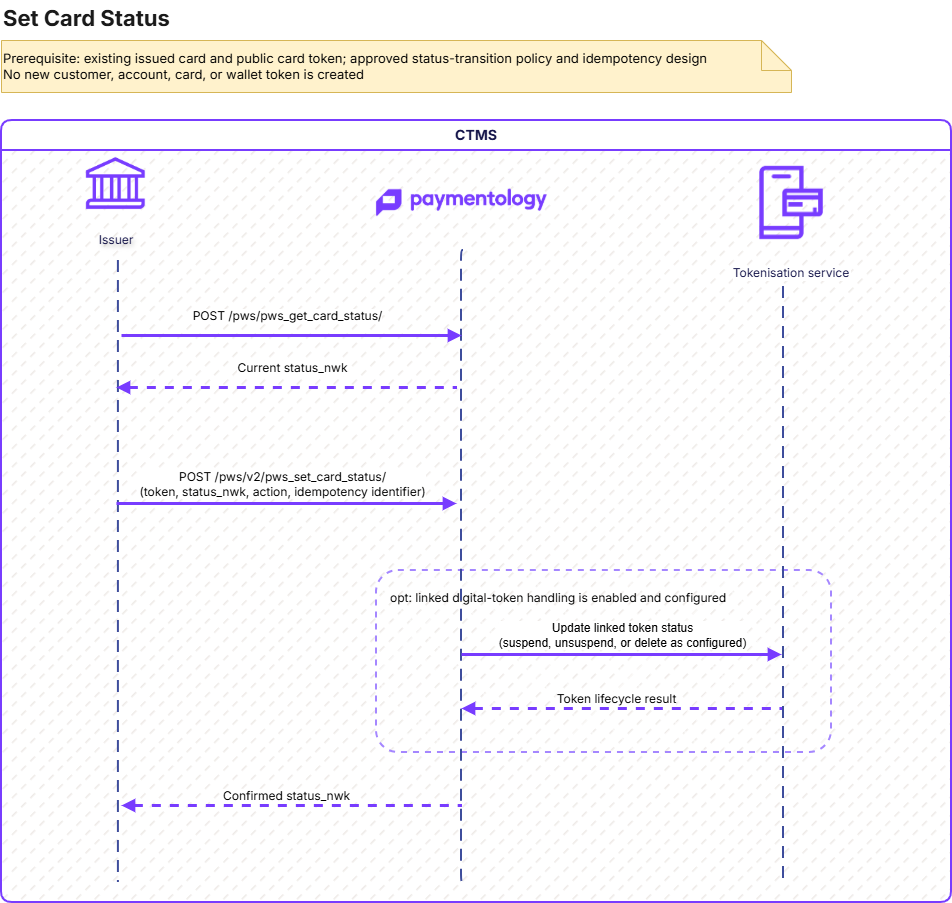
### Prerequisites
Before changing a card status, the following must be enabled in cooperation with Paymentology:
| Prerequisite | Description |
| ------------------------ | --------------------------------------------------------------------------------------------------------------------------------------------------------------------------------------------------- |
| Client and API access | A valid `client_id`, API credentials, and permission to call card-status endpoints.
The configuration is done during the onboarding in cooperation the Paymentology Implementation team. |
| Issued card | An existing Paymentology card. |
| Public card token | The existing card’s public `token`, used to identify the card in the request. |
| Status-management policy | An agreed policy defining authorised users, valid transitions, customer communications, and operational controls. |
| Idempotency design | A unique `api_call_unique_identifier` generated and persisted for each logical status-change request. |
| Wallet-token policy | Required if the card has linked digital-wallet tokens and the client uses Paymentology tokenisation services. |
A new customer, account, card product, card, PAN, or wallet token is not required or created by this journey.
### Recommended status-change flow
#### Retrieve the current card status
Before making a material status change, retrieve the current status and confirm that the requested transition is permitted by the client’s policy.
**API Reference:** Get Card Status
Use the existing public card `token` to retrieve the current `status_nwk`.
This step is especially important before activation, lost/stolen reporting, voiding, renewal, replacement, or retrying a timed-out request.
***
#### Select the target `status_nwk`
Use the approved network status that matches the operational event. A complete list could be found at: Card status.
Do not treat all non-1000 statuses as interchangeable. Lost, stolen, restricted, compliance, expired, and void cases have different operational and scheme consequences.
***
#### Set the card status
**API Reference:** Set Card Status V2
Required inputs:
| **Field** | **Value / purpose** |
| ---------------------------- | -------------------------------------------------------------------------------------------------------------------------------------------------------------------------------------- |
| `client_id` | Your Paymentology client ID. |
| `api_call_unique_identifier` | Unique identifier for this logical request. Reuse it only when retrying the same request with the same payload. |
| `token` | Existing public token for the card. |
| `status_nwk` | Target network-facing card status.
More information about the card statuses is available at [Card status](https://developer.paymentology.com/bankinglive/docs/card-status). |
Optional inputs:
| **Field** | **Purpose** |
| ---------------------- | ----------------------------------------------------------------------------------------------------------------- |
| `action` | `1` for a normal status change. `2` only for status handling related to a renewed card. |
| `note` | Short operational note, maximum 200 characters. |
| `update_digital_token` | V2 field intended to control linked digital-token handling. Validate its deployed behaviour before relying on it. |
***
#### Confirm and reconcile the result
On success, store:
* The public card `token`
* Previous and target `status_nwk`
* `api_call_unique_identifier`
* Business reason and `note`
* Operator or source system
* Timestamp
* Whether wallet-token handling was requested
* The response from Paymentology
Retrieve the card status again when the action is operationally significant or when the original request timed out.
***
### Renewal-related status handling
Use action: `1` for normal status changes.
Use action: `2` only when the status update is associated with a renewed card.
| `action` | Behaviour |
| -------- | --------------------------------------------------------------------------------------------------------------------------------------------------------------------------------------- |
| `1` | Normal status change. This is the default when `action` is omitted. |
| `2` | Renewal-related status handling. The status retained during renewal can override the incoming `status_nwk`. If no renewed card is found, the request behaves as a normal status change. |
Do not use action: `2` to renew or replace a card. Use the Card Renewal V2 endpoint for renewal or replacement.
### What is changed by Set Card Status
| Record | Changed by Set Card Status? |
| ---------------------------- | ---------------------------------------------------------------------------------------------- |
| Existing card | Yes; the network-facing `status_nwk` changes. |
| Linked digital-wallet tokens | May be affected, subject to the deployed tokenisation configuration and status-sync behaviour. |
| Customer | No. |
| Account | No. |
| Card product | No. |
| PAN | No. |
| Public card token | No; the existing value identifies the card. |
| New wallet token | No. |
### Important considerations
* Card status is different from `tok_flags`. Use public token flags to control transaction behaviour, not to represent lost, stolen, blocked, or void lifecycle events.
* V2 supports idempotency. Persist `api_call_unique_identifier` before calling the API and reuse it only for an unchanged retry.
* A timeout is not evidence that the status did not change. Retrieve the current card status before retrying.
### Linked digital-wallet tokens
Validate the wallet-token behaviour in UAT before publishing it as a firm operational contract.
The linked digital tokens are:
* Unsuspended when `status_nwk `is set to `1000`
* Deleted when `status_nwk `is set to `1199`
* Suspended for other status values
Do not assume that `update_digital_token` produces a deterministic wallet-token outcome until this has been tested against the deployed database procedures and tokenisation configuration.
### Testing
| Test case | Expected result |
| ---------------------------- | ----------------------------------------------------------------------------------------------------------------- |
| Activate card | `status_nwk` changes to `1000` and the card follows the agreed activation policy. |
| Temporary block | `status_nwk` changes to `1005` and card transactions are declined according to the configured behaviour. |
| Lost-card report | `status_nwk` changes to `1041` and the expected lost-card processing occurs. |
| Stolen-card report | `status_nwk` changes to `1043` and the expected stolen-card processing occurs. |
| Compliance hold | `status_nwk` changes to `1011` and the card follows the compliance restriction policy. |
| Void card | `status_nwk` changes to `1009` or `1199` according to the agreed retirement policy. |
| Invalid status | The request fails validation and the existing card status remains unchanged. |
| Invalid public token | The request fails and no card status changes. |
| Duplicate submission | Repeating the same request with the same idempotency identifier does not produce an unintended additional update. |
| Timeout and reconciliation | The client can determine the final card status before deciding whether to retry. |
| Renewal-related action | `action: 2` follows the expected renewal-specific behaviour only when a renewed card exists. |
| Linked wallet-token handling | Wallet-token outcomes match the agreed and UAT-validated status-sync policy. |
| Audit trail | The client stores the request, response, reason, operator, and resulting status. |
### Errors, retries, and request correction
Use `header.error_id` and `header.error_desc` as the primary outcome signal. Do not decide whether to retry from the HTTP status alone.
A retry must always reuse the same `api_call_unique_identifier` and identical payload. A changed target status, token, action, note, or wallet-update setting is a new business request and requires a new identifier.
#### Retry automatically
| Error ID | Error description | Automatic retry? | Required retry behaviour |
| ----------- | -------------------------------------------------------------------------- | ------------------ | ---------------------------------------------------------------------------------------- |
| No response | No PayAPI response received | Yes | Retry the same payload and identifier after backoff. |
| `1066` | `Original request still processing. Please try again later.` | Yes, after waiting | Do not run in parallel; retry the same request when processing has had time to complete. |
| `987` | `We are temporarily unable to handle the request. Please try again later.` | Yes | Bounded retry with the same payload and identifier. |
| `988` | `Error executing Request. Contact Paymentology for support` | Yes | Bounded retry with the same payload and identifier. |
| `989` | `Error executing Request. Contact Paymentology for support` | Yes | Controlled retry with the same payload and identifier. |
#### Do not retry automatically
| Error ID | Error description | Automatic retry? | Required action |
| -------- | ----------------------------------------------------------------------------------------------- | ------------------ | ------------------------------------------------------------------------------------------------------ |
| `995` | `model Validation Failed` | No | Correct the invalid field or request format, then submit a new business request with a new identifier. |
| `990` | `The client_id is invalid! Please provide a valid client id` | No | Correct the client ID or target-environment configuration. |
| `993` | `api_call_unique_identifier already been used!` | No | Reconcile the original operation. Use a new identifier only for a genuinely new status-change request. |
| `994` | `The token is invalid !` | No | Validate the public card token and its client ownership. |
| `996` | `Permission denied ! The client does not have access to this web service. Contact Paymentology` | No | Correct client entitlement or API access in the target environment. |
| `997` | Description varies; for example, `Provided card and account are not linked` | No | Correct the missing card, account, mapping, or configuration defect indicated by `error_desc`. |
| `1060` | `Failed to set card status at the moment please try again` | No automatic retry | Retrieve the current card status, reconcile the outcome, and escalate repeated failures. |
### Related APIs and documentation
* Get card status: Get Card Status
* Set card status: Set Card Status V2
* Card status guide: Card status
* Card renewal and replacement: Card renewal and replacement
* Card status notifications: Card Status Updates
* Tokenisation lifecycle: Overview
# Sibling pages
* [Issue a Virtual Card](https://developer.paymentology.com/lume/docs/issue-a-virtual-card.md)
* [Issue a Physical Card](https://developer.paymentology.com/lume/docs/issue-a-physical-card.md)
* [Convert a Virtual Card to a Physical Card](https://developer.paymentology.com/lume/docs/convert-a-virtual-card-to-a-physical-card.md)
* [Renew a Card](https://developer.paymentology.com/lume/docs/renew-a-card.md)
* [Replace a Card](https://developer.paymentology.com/lume/docs/replace-a-card.md)
* [Create and Link an Account Group](https://developer.paymentology.com/lume/docs/create-and-link-an-account-group.md)