
Remote messaging API allows Paymentology to call you to send administrative advice messages for Card API. These advice messages are sent using webhook-like schema. If you are integrating the service, you must create an endpoint accessible from the Paymentology network, which would be able to process the requests outlined below.
How it works
- All messages are sent as HTTP POST requests.
- Message content is always a JSON document.
- Methods structure is defined below, and it corresponds to the schema of the JSON document sent.
- The message type (e.g.
3DSecure.OTP,digitization.event, etc.) is to be included in the JSON message asmessageType. The message will be sent using the client-supplied URL, e.g.http://www.example.com/api/endpoint. - In the code samples provided, cURL is used to send requests.
- In the code samples provided, a mock endpoint is used for testing:
https://api.voucherengine.com/remoteMessaging/v1_0/jsonMock.cfm
Expectations
Total round-trip time, including network overload, should be less than 4 seconds. Failing to meet this, the transaction is considered failed.
Security
For detailed security measures, please see the end of the method summary – Payload Integrity Verification.
Client specific headers can be used, if previously agreed, in accordance with measures used for all methods simultaneously.
Response
HTTP response code 200 (OK) is expected to confirm that the message was accepted.
Methods
- 3DSecure.OTP
- 3DSecure Cardholder’s Contact Detail Collection
- digitization.activation
- digitization.event
- digitization.activationmethods
- 3DSecure.AppAuthentication
- 3DSecure.AppFinalisation
- Response Reference
3DSecure.OTP
Process 3DS OTP token for an end customer to be able to complete the challenge of a live transaction.
IMPORTANT: the refCode field is only applicable if the campaign option is enabled.
Request Path Parameters
| Parameter | type | Limits | required | Description |
|---|---|---|---|---|
| challenge | String | ✓ | OTP challenge code | |
| customerReference | String | ✓ | Customer reference this card is linked to | |
| messageType | String | ✓ | method name: 3DSecure.OTP | |
| trackingNumber | String | ✓ | Tracking number of the card, for which OTP token is being sent | |
| merchantDescription | String | ✓ | name of or information related to the merchant | |
| transactionAmount | Integer | ✓ | The monetary amount related the transaction | |
| refCode | String | Dynamic generated 4 letters code to be used along with OTP messages; if Campaign is configured to. | ||
| currencyCode | Integer | ✓ | The local currency code of the acquirer or source location of the transaction |
Request
curl --location --request POST 'https://api.voucherengine.com/remoteMessaging/v1_0/jsonMock.cfm' \
  --header 'Authorization: CS-HMAC-SHA-256 Terminal=0123456789,Checksum=1A11111B2222222C33D44E5555C3F666F1111722228B168892D544050B9B4D3A' \
  --header 'Content-Type: application/json' \
  --data-raw '{
    "challenge": "123456",
    "customerReference": "12b6405c-1120-123b-b55b-12b8f5a46ac1",
    "messageType": "3DSecure.OTP",
    "trackingNumber": "765432100000123",
    "merchantDescription": "SellerDesc4",
    "transactionAmount": "5105",
    "refCode": "QUJA",
    "currencyCode": "840"
  }'
Response Parameters
| Field | type | Description |
|---|---|---|
| challenge | String | Echo |
| resultCode | String | As described in response reference |
| customerReference | String | Echo |
| messageType | String | method name: 3DSecure.OTP |
| merchantDescription | String | Echo |
| transactionAmount | Integer | Echo |
| trackingNumber | String | Echo |
| currencyCode | Integer | Echo |
{
    "challenge": "123456",
    "resultCode": "0000",
    "customerReference": "12b6405c-1120-123b-b55b-12b8f5a46ac1",
    "messageType": "3DSecure.OTP",
    "merchantDescription": "SellerDesc4",
    "transactionAmount": "5105",
    "trackingNumber": "765432100000123",
    "currencyCode": "840"
}
Administrative Message – 3D Secure Cardholder Contact Detail Collection
Collects the cardholder’s masked contact details to be used upon 3DS checkout.
Request Path Parameters
| Parameter | type | Limits | required | Description |
|---|---|---|---|---|
| messageType | String | ✓ | cardholder.maskedContactDetails | |
| trackingNumber | String | ✓ | Tracking number of the card, for which OTP token is being sent | |
| customerReference | String | ✓ | Customer reference this card is linked to |
Request
curl --location --request POST 'https://api.voucherengine.com/remoteMessaging/v1_0/jsonMock.cfm' \
--header 'Authorization: CS-HMAC-SHA-256 Terminal=0123456789,Checksum=1A11111B2222222C33D44E5555C3F666F1111722228B168892D544050B9B4D3A' \
--header 'Content-Type: application/json' \
--data-raw ‘{
"messageType":"cardholder.maskedContactDetails",
"trackingNumber":"212345678900321",
"customerReference":"7353500987654321",}'
Response Parameters
| Field | type | Description |
|---|---|---|
| resultCode | String | Status code indicating transaction result |
| maskedContactDetails | Array | Masked contact details (phone number and email address) linked with the card |
STATUS 200 OK
{
"resultCode":"1",
"maskedContactDetails" : [ { "phoneNumber" : "(###) ### 4321", "emailAddress" : "t****a@g****.com" } ] ",
}
digitization.activation
Process MDES OTP token for an end customer to be able to complete the challenge and activate the wallet.
Request Path Parameters
| Parameter | type | Limits | required | Description |
|---|---|---|---|---|
| messageType | String | ✓ | method name: digitization.activation | |
| trackingNumber | String | ✓ | Tracking number of the card, for which tokenization is being performed | |
| customerReference | String | ✓ | Customer reference this card is linked to | |
| walletIdentifier | String | ✓ | 3-digit wallet identifier: 103 – Apple Pay216 – Google Pay217 – Samsung Pay327 – Merchant tokenization program | |
| challenge | String | ✓ | OTP activation code | |
| tokenRequestorId | String | ✓ | The id assigned by the Token Service Provider to the Token Requestor |
Request
curl --location --request POST 'https://api.voucherengine.com/remoteMessaging/v1_0/jsonMock.cfm' \
--header 'Authorization: CS-HMAC-SHA-256 Terminal=0061218987,Checksum=a6d5abb4a4c0e5a6f45287b040ed6cccc82900454959cbf65bbe8cbbf3c24794' \
--header 'Content-Type: application/json' \
--data-raw '{"challenge":"123456","customerReference":"500110022","messageType":"digitization.activation","walletIdentifier":"217","trackingNumber":"544911100000042","tokenRequestorId":"54139059333"}'
Response Parameters
| Field | type | Description |
|---|---|---|
| challenge | String | Echo |
| resultCode | Integer | As described in response reference |
| customerReference | String | Echo |
| messageType | String | Echo |
| walletIdentifier | String | Echo |
| trackingNumber | String | Echo |
| tokenRequesterId | String | Echo |
{
    "challenge": "123456",
    "resultCode": "0000",
    "customerReference": "500110022",
    "messageType": "digitization.activation",
    "walletIdentifier": "217",
    "trackingNumber": "544911100000042",
    "tokenRequestorId": "54139059333"
}
digitization.event
Used to communicate tokenization events in MDES.
Request Path Parameters
| Parameter | type | Limits | required | Description |
|---|---|---|---|---|
| messageType | String | ✓ | method name: digitization.event | |
| eventType | String | ✓ | MDES digitalization status:DigitizedStoppedDeletedDigitization_exceptionDeleted_from_DeviceReplacementcomplete | |
| trackingNumber | String | ✓ | Tracking number of the card, for which tokenization is being performed | |
| customerReference | String | ✓ | Customer reference the card is linked to | |
| walletIdentifier | String | ✓ | 3-digit wallet identifier: 103 – Apple Pay 216 – Google Pay 217 – Samsung Pay 327 – Merchant tokenization program | |
| digitizedDeviceIdentifier | String | ✓ | Single digit device type identifier: 1 – Mobile phone| 2 – Tablet 3 – Watch | |
| digitizedPan | String | ✓ | The DPAN (Token) | |
| digitizedPanExpiry | String | ✓ | Expiry date of the DPAN | |
| digitizedFpanMasked | String | ✓ | Masked Funding Account PAN | |
| digitizedTokenReference | String | ✓ | Token reference | |
| tokenRequestorId | String | ✓ | The id assigned by the Token Service Provider to the Token Requestor |
Request
curl --location --request POST 'https://api.voucherengine.com/remoteMessaging/v1_0/jsonMock.cfm' \
--header 'Authorization: CS-HMAC-SHA-256 Terminal=0061218987,Checksum=1282C9FFD2586A2DAD5A74B003A34531310007521E65DA17F55D1B744A28B409' \
--header 'Content-Type: application/json' \
--data-raw ‘{"eventType":"complete","digitizedDeviceIdentifier":"21","digitizedPan":"5412345678908888","digitizedTokenReference":"DSACBA000012290985be8cd35f7e46f38b569829de110852","customerReference":"15e6405d-9220-453b-b66b-02d8f9a46ac7","messageType":"digitization.event","walletIdentifier":"217","digitizedFpanMasked":"5473XXXXXXXX1234","digitizedPanExpiry":"2402","trackingNumber":"533223100000004","tokenRequestorId":"54239059112"}'
Response Parameters
| Field | type | Description |
|---|---|---|
| resultCode | String | As described in response reference |
{
  "digitizedTokenReference": "DSACBA000012290985be8cd35f7e46f38b569829de110852",
  "customerReference": "15e6405d-9220-453b-b66b-02d8f9a46ac7",
  "walletIdentifier": "217",
  "resultCode": "0000",
  "eventType": "complete",
  "digitizedDeviceIdentifier": "21",
  "digitizedPan": "5412345678908888",
  "messageType": "digitization.event",
  "digitizedFpanMasked": "5473XXXXXXXX1234",
  "digitizedPanExpiry": "2402",
  "trackingNumber": "533223100000004",
  "tokenRequestorId": "54239059112"
}
digitization.activationmethods
This message signals that a token provision has been made and requires a verification method in order to push the OTP validation. The type of method will need to be returned as well as the data for the method. At the moment only activation types 1 (mobile phone number) and 2 (cardholder’s email address) are supported.
The response will follow the same conventions described in response reference but in this case it will contain additional information (the activation methods). For simplicity the input parameters are omitted although they are expected in the response.
Request Path Parameters
| Parameter | type | Limits | required | Description |
|---|---|---|---|---|
| messageType | String | ✓ | method name: digitization.activationmethods | |
| trackingNumber | String | ✓ | Tracking number of the card, for which tokenization is being performed | |
| customerReference | String | ✓ | Customer reference the card is linked to | |
| walletIdentifier | String | ✓ | 3-digit wallet identifier: 103 – Apple Pay216 – Google Pay217 – Samsung Pay327 – Merchant tokenization program | |
| tokenRequestorId | String | ✓ | The id assigned by the Token Service Provider to the Token Requestor | |
| digitizationPath | String | ✓ | Specifies which path was chosen based on our logic and rules: green, yellow, orange or red | |
| digitizedDeviceType | String | ✓ | Indicates the type of device used at the terminal. | |
| walletRecommendation | String | ✓ | Tokenization decision suggested by the wallet provider. One of the following values: decline, approve or require_additional_authentication | |
| tokenizationPanSource | String | ✓ | Identifies the method which the cardholder is attempting to tokenize a primary account number. One of the following values: card_on_file, card_added_manually, card_added_via_application, existing_token_credential or card_added_via_browser |
Request
curl --location --request POST 'https://api.voucherengine.com/remoteMessaging/v1_0/jsonMock.cfm' \
--header 'Authorization: CS-HMAC-SHA-256 Terminal=0061218987,Checksum=9AE9FC1FCA7602C7000B708CA10B396C0E44FF324976AF70D406C22DC0D89A9B' \
--header 'Content-Type: application/json' \
--data-raw ‘{“messageType":"digitization.activationmethods","customerReference":"15e6405d-9220-453b-b66b-02d8f9a46ac7","trackingNumber":"162961400000233","walletIdentifier":"217","tokenRequestorId":"50139059239","digitizationPath":"GREEN","digitizedDeviceType":"00","walletRecommendation":"approve",
"tokenizationPanSource":"card_on_file"}'
Response Parameters
| Field | type | Description |
|---|---|---|
| resultCode | String | As described in response reference |
| activationMethods | Array | JSON array of methods where each element has: type: 1 (phone number) or 2 (email).value: Cardholder’s phone number (type 1) or email (type 2). |
{"resultCode":"0000","customerReference":"15e6405d-9220-453b-b66b-02d8f9a46ac7","messageType":"digitization.activationmethods","walletIdentifier":"217","activationMethods":[{"value":"555123451","type":1}],"trackingNumber":"162961400000233","tokenRequestorId":"50139059239"}3DSecure.AppAuthentication
This message is used to trigger the process of cardholder authentication. You only need to respond to this message to indicate you have received the message and will initiate the cardholder authentication. Once you have completed cardholder authentication you will send a message to the ThreeDSAuthenticationOutcome API.
Messages should be as following:
Request Path Parameters
| Parameter | type | Limits | required | Description |
|---|---|---|---|---|
| messageType | String | ✓ | method name: 3DSecure.AppAuthentication | |
| trackingNumber | String | ✓ | Tracking number of the card, for which authorisation is being performed | |
| customerReference | String | ✓ | Customer reference this card is linked to | |
| transactionID | String | ✓ | Transaction id to link all messages. The same transaction id should be used for the following message sent to Paymentology. | |
| purchaseAmount | String | ✓ | Amount of the transaction, formatted with currency included | |
| merchant | String | ✓ | name of the merchant transaction is being done at | |
| amount | Integer | ✓ | Numeric value of the amount, unformatted, in minor units | |
| currency | Integer | ✓ | ISO code of the currency of the transaction |
Request example```bash
curl --location --request POST 'https://api.voucherengine.com/remoteMessaging/v1_0/jsonMock.cfm' \--header 'Authorization: CS-HMAC-SHA-256 Terminal=0061218987,Checksum=1282C9FFD2586A2DAD5A74B003A34531310007521E65DA17F55D1B744A28B409' \--header 'Content-Type: application/json' \--data-raw ‘{"messageType":"3DSecure.AppAuthentication","customerReference":"12e1234d-1234-123b-b12b-12d8f9a12ac7","trackingNumber":"123456700000004","transactionID":"123456-123456","purchaseAmount":"R100.00","amount":"10000", "merchant": "Itunes", "currency": "840"}'Response Parameters
| Field | type | Description |
|---|---|---|
| resultCode | String | As described in response reference |
{"resultCode":"0000"}3DSecure.AppFinalisation
This administrative message is used to inform the client of the final status of the 3DSecure authentication.
Messages include the following:
Request Path Parameters
| Parameter | type | Limits | required | Description |
|---|---|---|---|---|
| messageType | String | ✓ | method name: 3DSecure.AppFinalisation | |
| trackingNumber | String | ✓ | Tracking number of the card, for which authorisation is being performed | |
| customerReference | String | ✓ | Customer reference this card is linked to | |
| transactionID | String | ✓ | Unique id provided by the ACS | |
| status | String | ✓ | Value indicating the status. Values include: 0 – Successfully received final status; 1 – Timer on browser expired before response was received; 2 – General error; 3 – Transaction cancelled before response was received |
Response Reference
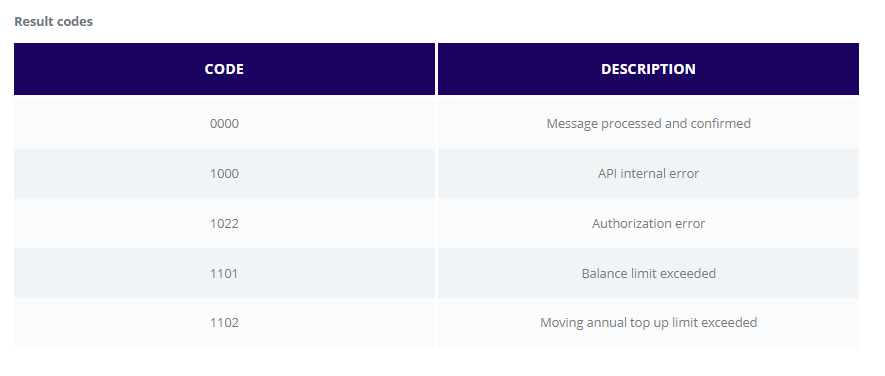
Response should contain all the same fields as the original request. In addition, a resultCode will always be added and specific response information when that is required by the method. The resultCode will be a string field with values from the table below:
Note
- The range of response codes may be expanded in the future. Other response codes, not in the table above, should not be used without explicit written confirmation. The behavior of the system is undefined when using codes not in the listing.
- Response codes should always be four-digit codes. For example, using
0instead of0000(approval) can, and will, yield different than expected results.
Optional Payload Integrity Verification
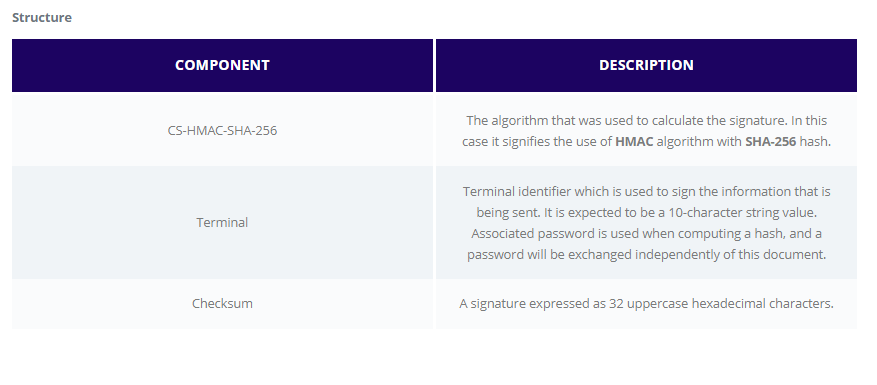
In order to ensure the integrity of data, all messages can optionally (enabled per client) have a HTTP header named Authorization with a key and a hash of the entire payload.
NOTE: Unless otherwise declared – this is applicable to all the methods of the API.
Example:Authorization: CS-HMAC-SHA-256 Terminal="0061218987,Checksum=9AE9FC1FCA7602C7000B708CA10B396C0E44FF324976AF70D406C22DC0D89A9B
Method
To calculate the checksum, the payload is treated as a single UTF-8 byte stream, excluding surrounding space characters, if any. The resulting value is passed into HMAC function: HMAC(secret, payload), which signifies the HMAC-keyed hash algorithm using octet string represented by “secret” as the key and the octet string “payload” as the input string. The size of the result is the hash result size for the hash function in use. In this case, it is 32 octets for SHA-256 as mandated. The “secret” is associated with the Terminal value and shared in a separate communication medium prior to enactment of the API.
All the examples supplied in the documentation calculate the authorization header using the non existing terminal 0061218987 with the password: 1234567890
Example
const crypto = require('crypto-js')
const authorizationTerminal = '0061218987'
const terminalPassword = '1234567890'
const payload = `{"challenge":"123456","customerReference":"500110022","messageType":"digitization.activation","walletIdentifier":"217","trackingNumber":"544911100000042","tokenRequestorId":"54139059333"}`
const hashing = crypto.HmacSHA256(payload,terminalPassword).toString(crypto.enc.Hex)
const httpHeader = 'Authorization: CS-HMAC-SHA-256 Terminal=' + authorizationTerminal + ',Checksum=' + hashing
console.log(httpHeader)
Will produce the following output:
Authorization: CS-HMAC-SHA-256 Terminal=0061218987,Checksum=a6d5abb4a4c0e5a6f45287b040ed6cccc82900454959cbf65bbe8cbbf3c24794