
Apple Pay quarterly fee billing report
For clients using Paymentology’s tokenization, Paymentology can issue a quarterly report to clients to utilize the report data to compile their Apple report through the Apple Partner Connect platform.
The report includes the following details:
-
Total Debit Spend - this is the total settled transaction value of Apple Pay transactions for the given quarter. This includes contactless and eCommerce transactions that have been made using Apple Pay.
-
POS debit spend share - this is the percentage of Total Debit Spend that was made at Point of Sale (POS) using Apple Pay. This includes the following Capture Mode's:
- EMV - chip cards
- NFC - Near Field Communication devices
- MAG - Magnetic stripe
- MAN - Manual entry
-
E-commerce debit spend share - this is the percentage of Total Debit Spend that was eCommerce using Apple Pay. This includes the following Capture Mode's:
- ECOM - eCommerce
- ECOF - eCommerce Card on File
-
Active Debit DPANS - this is the total number of cards that made at least one successful spend.
DPAN (Device Primary Account Number) - A token that acts as a surrogate for the customer’s card number and is used to make contactless and e-commerce transactions using an Apple device.
All amounts reported are in the cardholder billing currency.
Report format
| Format | File name | Frequency | Accessibility |
|---|---|---|---|
| XLS | [CampaignName]_ApplePay Quarterly Fee Billing Report [Month] YYYY.xls | Quarterly | Via email |
Report time frame
| UTC +2 | UTC +7 | Remarks |
|---|---|---|
| 02:00, day 2 of month produced | 07:00, day 2 of month produced | Quarterly reports are produced as follows: • Q1 — January, February, March; produced in April • Q2 — April, May, June; produced in July • Q3 — July, August, September; produced in October • Q4 — October, November, December; produced in January |
Report sample
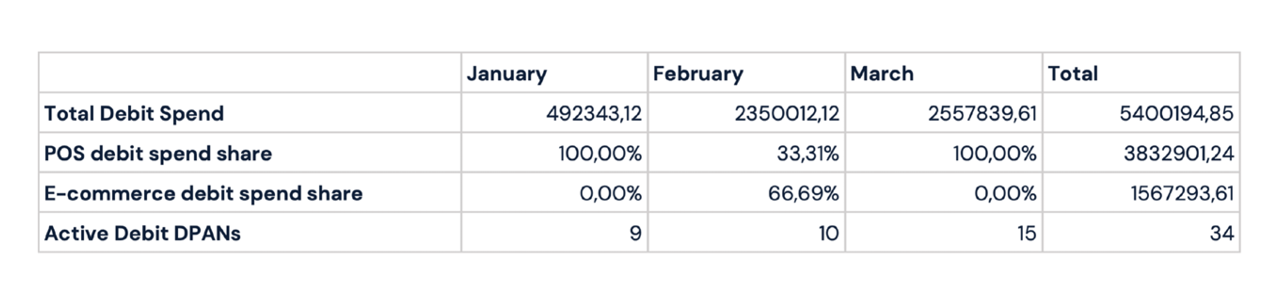
Note: file will automatically download upon clicking link
CampaignName_ApplePay Quarterly Fee Billing Report Month YYYY.xls
Updated 3 months ago