
eCommerce report
A report that shows successful and failed Ecommerce transactions along with associated eCommerce fees.
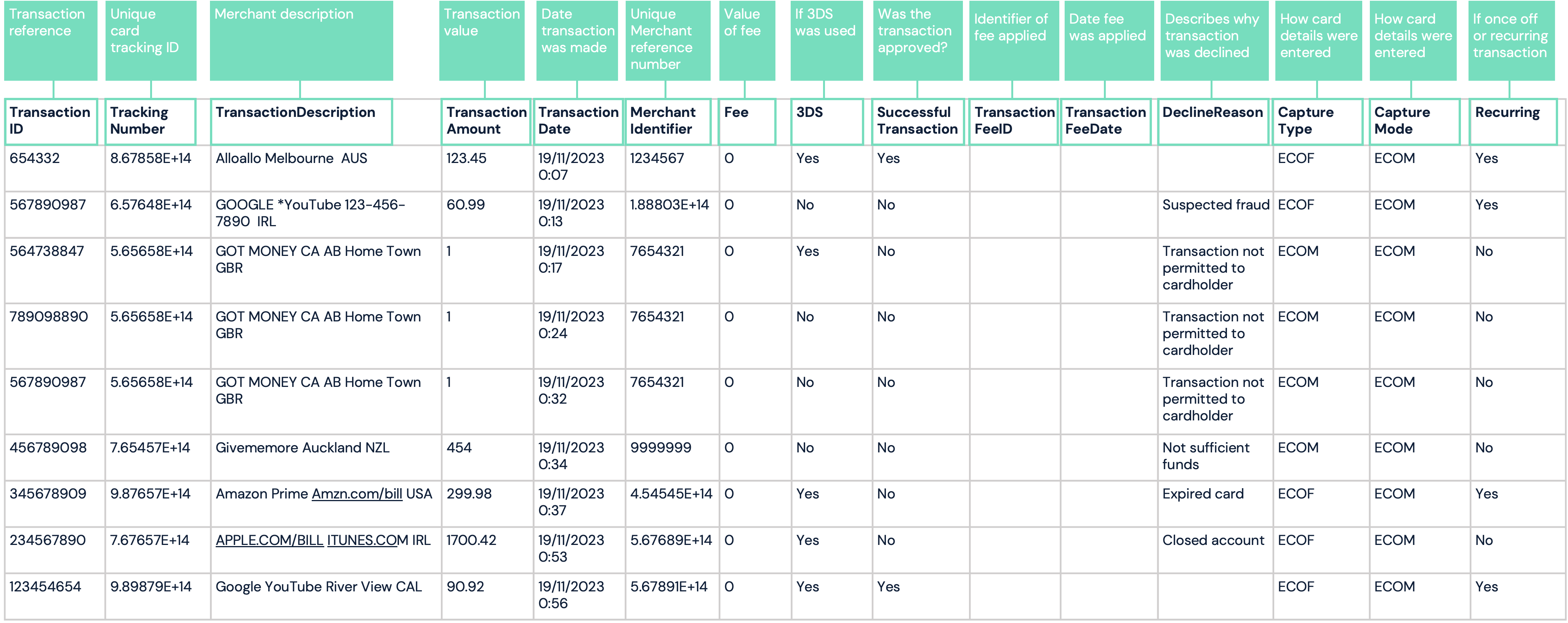
The report includes the following details:
-
TransactionID - it’s a reference for the transaction
-
TrackingNumber - this is a unique 15-digit tracking identifier for the card.
-
TransactionDescription- this is a description of the merchant.
-
TransactionAmount - the value of the transaction
-
TransactionDate- This is the authorization date of the transaction
-
MerchantIdentitifer - this is numeric identifier of the merchant. Usually 15 digits.
-
Fee - this is the value of a fee the card has incurred for the transaction. Fee type must be one of the below:
- 51 - Ecommerce Fee
- 52 - Online Fee
- 6 - POS Purchase Fee
-
3DS- specifies whether 3DS authentication occurred prior to the authorisation.
-
SuccessfulTransaction - specifies whether the transaction was approved or declined.
-
TransactionFeeID - the identifier of the transaction fee incurred.
-
TransactionFeeDescription - describes the transaction fee.
-
TransactionFeeDate - the date in which the transaction fee was applied.
-
DeclineReason - describes why the transaction was declined. If the transaction was successful then this filed is left blank.
-
CaptureType - Capture type must be one of the below:
- ECOM - Transaction captured online
- MAG - Magnetic Stripe captured transaction
- MAN - Manually captured transaction
- ECOF - Online Card On File transaction
-
CaptureMode - this is the respective capture mode of the card’s transaction. Capture Mode must be one of the below:
- MAG - Magnetic Stripe captured transaction
- EMV - Electronic chip captured transaction
- ECOM - Transaction captured online (with no 3DS authentication)
- 3DS - Transaction captured online using 3DS authentication
- MAN - Manually captured transaction
- NFC - Transaction captured via a Near Field Communication device
-
Recurring - specifies whether the transactions is a once off or recurring through COF method.
Report format
| Format | File name | Frequency | Accessibility |
|---|---|---|---|
| CSV | EcommerceTransactions_[CampaignName]_[YYYYMMDD].csv | Daily | HTTP GET request |
Report time frame
| UTC +2 | UTC +7 | Remarks |
|---|---|---|
| 09:00 | 14:00 | When the report is generated, the timeframe of all captured data in this report is from 00:00:00 to 11:59:59 of the previous day: • System time zone UTC+2 • Asia client time zone UTC+7 |
Report sample
Note: file will automatically download upon clicking link
Updated 3 months ago