
Mark-off file
This file contains a record of all successful transactions that Paymentology processes on behalf of a store of value like a wallet or a bank account. It includes the financial transactions between a store of value and Paymentology. Paymentology generates the Mark-off file daily at midnight in your local time zone. The file matches a report from a store of value for all successfully processed transactions.
Ideally, the Mark-off file report and the store of value report should be in sync each day as the systems mirror one another. In case of any discrepancy, you should log a ticket via your Zendesk Portal. Select the Report a Service Incident form, and then choose Reporting and Discrepancy under the Request Type, indicate the file’s date and the transaction in question. We’ll promptly address the issue.
The Mark-off file has the following fields:
-
Campaign Name- the name of the client's campaign
-
Paymentology System Date - Paymentology's system date in UTC+7 time zone
-
Time Date Stamp - t he merchant’s timestamp, in their time zone
-
Customer Reference- unique customer reference information
-
Pocket ID - the UUID information for the client campaign
-
Transaction Description- this described the transaction, such as:
- DeductFund - shows deductions/debits
- LoadFunds - shows loads/credits
-
Transaction Type - the possible values for TransactionTypes are:
- 0 - POS transaction
- 1 - ATM transaction
- 2 - Adjustment
-
Transaction ID - the Transaction ID of the transaction, as created by the card network
-
Sequence Number - Paymentology's unique sequence identifier for the specific card used
-
Tracking Number - Paymentology's unique tracking identifier for the specific card used
-
Amount - the transaction amount in cents
Report format
| FORMAT | FILE NAME | FREQUENCY | ACCESSIBILITY |
|---|---|---|---|
| CSV | [CampaignUUID]/[CampaignName]CardAPIMarkOffFile[YYYYMMDD].csv | Daily | HTTP get request or client SFTP folder |
Report time frame
| UTC +2 | UTC +7 | REMARKS |
|---|---|---|
| 19:00 | 00:00 | When the report is generated at 19:00 UTC+2 2020-09-10 / 00:00: UTC+7 2020-09-11, the timeframe of all the authorized transactions captured in this report is from: • 2020-09-09 00:00:00 UTC+2(system time) to 2020-09-09 11:59:59 UTC+2 (system time) • 2020-09-10 00:00:00 UTC+7(Asia client time) to 2020-09-10 11:59:59 UTC+7 (Asia client time) |
Report sample
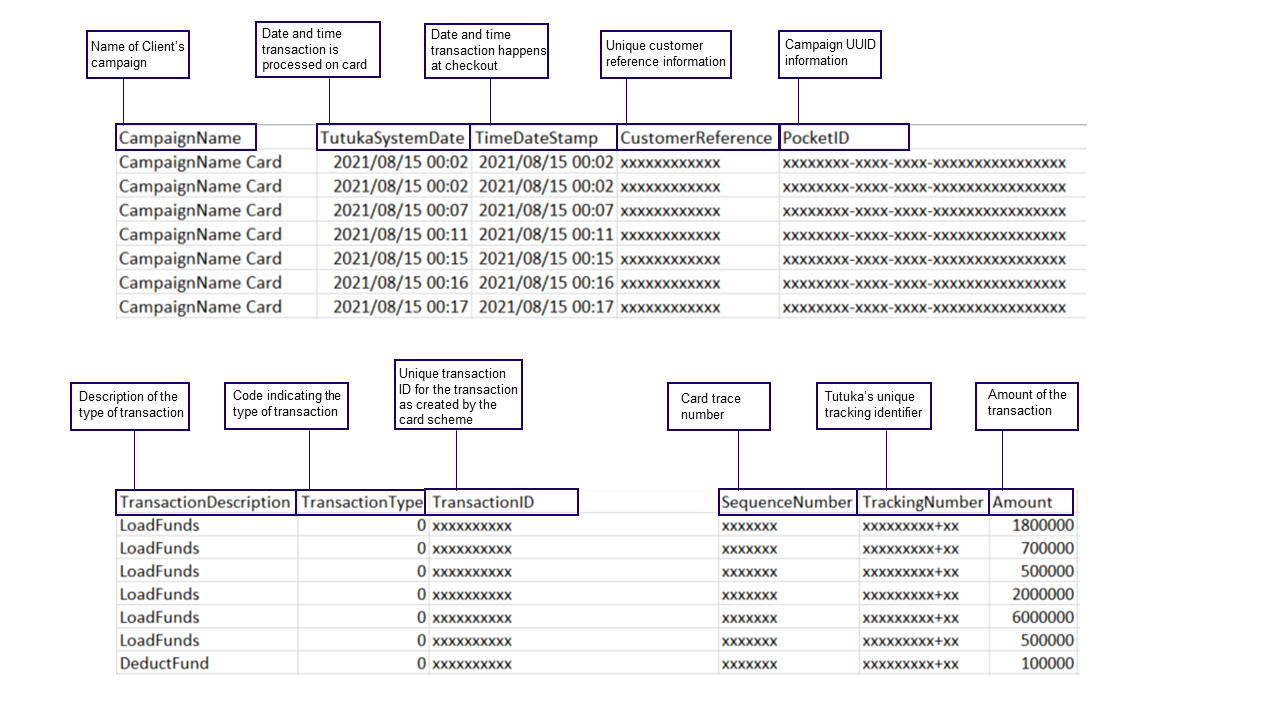
Note: file will automatically download upon clicking link
Updated 3 months ago