
Google Pay monthly report
A report which provides detailed information about cards that were tokenised to a Google Pay wallet within a given month. Client's can use the data from this report to fulfil their Google Pay reporting requirements.
The report includes the following details:
-
FirstLastName- Customer's first and last name
-
BillingPostalCode- Customer's postal code
-
BillingStreetAddress- Customer's postal street address
-
BillingCountryCode - Customer's postal country
-
BillingCity - Customer's postal city
-
BillingAdministrativeArea - Customer's postal region or state
-
FullPhoneNumber- Customer's contact number
-
OpaquePaymentCard - Google Pay tokenised card number
-
FundingPrimaryAccountNumber- Voucher number/Customer's card number
-
ExpirationDate- Expiry date of OpaquePaymentCard
Report format
| FORMAT | FILE NAME | FREQUENCY | ACCESSIBILITY |
|---|---|---|---|
| CSV | [CampaignName]googlepaymonthlyreport[MMM YYYY].csv | Monthly | HTTP get request and email. |
Report time frame
| UTC +2 | UTC +7 | REMARKS |
|---|---|---|
| 12:00 | 17:00 | The report is generated on day 1 of every month, the timeframe of all the captured data in this report is from 00:00:00 day 1 of previous month to 11:59:59 of last day of previous month in: • System time zone UTC+2 • Asia client time zone UTC+7. |
Report sample
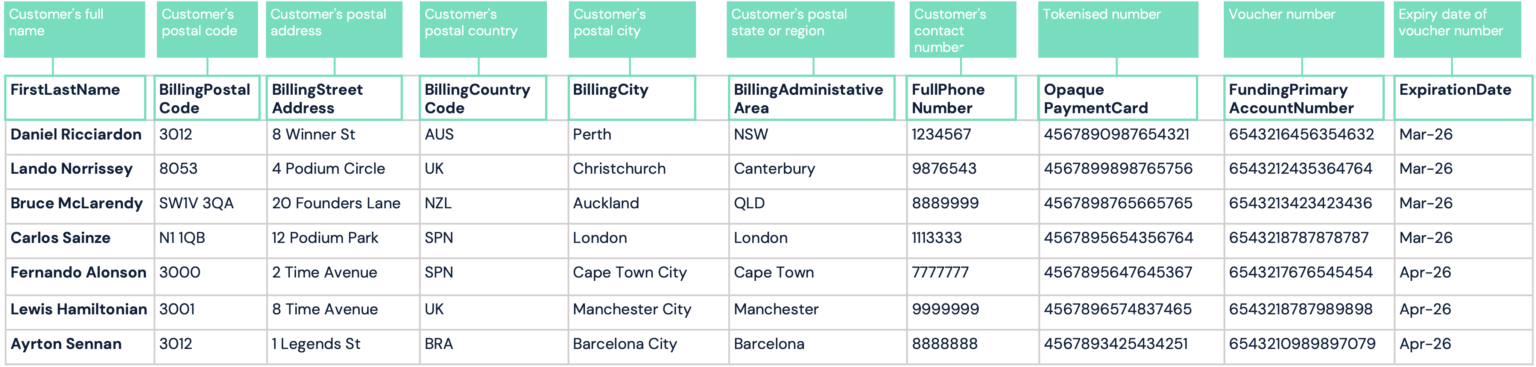
Note: file will automatically download upon clicking link
Updated 3 months ago