
Summary settlement report
This gives a daily summary of all the transactions settled by the card association. Paymentology gathers the information from the card association file and packages it into a summary report. It is a report where you can find a summary of transaction types, the number of transactions that have been settled for the day, fees and interchanges earned.
The Summary Settlement Report includes a separate tab for each currency you decide to settle in.
Note: If the client chooses to settle in one currency, then both domestic and international settlements will fall under one tab.
The report includes a combination of debits and credits that the network processes daily.
-
Credits - include refunds, chargebacks and interchanges.
-
Debits - include POS and ATM settlements, fees and unique transactions.
The network NETTs off the credits from the debits. So, only a single transfer will need to be made when settling with the network daily.
Here is a description of the transactions you can find in the report:
-
Unique Transactions - consist of transactions from merchants, such as casinos, gambling sites and pharmacies.
-
ATM Interchange - it’s a debit fee that the card issuer sends to a card network to pay the bank agent where the ATM transaction took place.
-
Card Association Fee - this can be either a debit or a credit transaction. As a debit transaction, there is a fee paid to a card network for a specific service rendered. As a credit transaction, there can be some discounts applied to the paid services. There is a difference between Card Association Fee Credit and Card Association Fee Reversal. The latter refers to a reversal provided back to the issuer via an incorrect charge, whereas the former is a discount given off the fees.
Report format
| FORMAT | FILE NAME | FREQUENCY | ACCESSIBILITY |
|---|---|---|---|
| CSV or XLS | [CampaignUUID]/[CampaignName]Daily_SettlementReport[ICA][YYYY_MM_DD].csv or [CampaignUUID]/[CampaignName]Daily_Settlement_Report[ICA]_[YYYY_MM_DD].xls | Daily | HTTP get request or client SFTP folder |
Report time frame
| UTC +2 | UTC +7 | REMARKS |
|---|---|---|
| 08:00 | 13:00 | When the report is generated at 08:00 UTC+2 / 13:00 UTC+7 2020-09-10, the timeframe of all settled transactions captured in this report is from 2020-09-09 00:00:00 to 2020-09-09 11:59:59 in: • System time zone UTC+2 • Asia client time zone UTC+7 • Merchant time zone |
Report sample
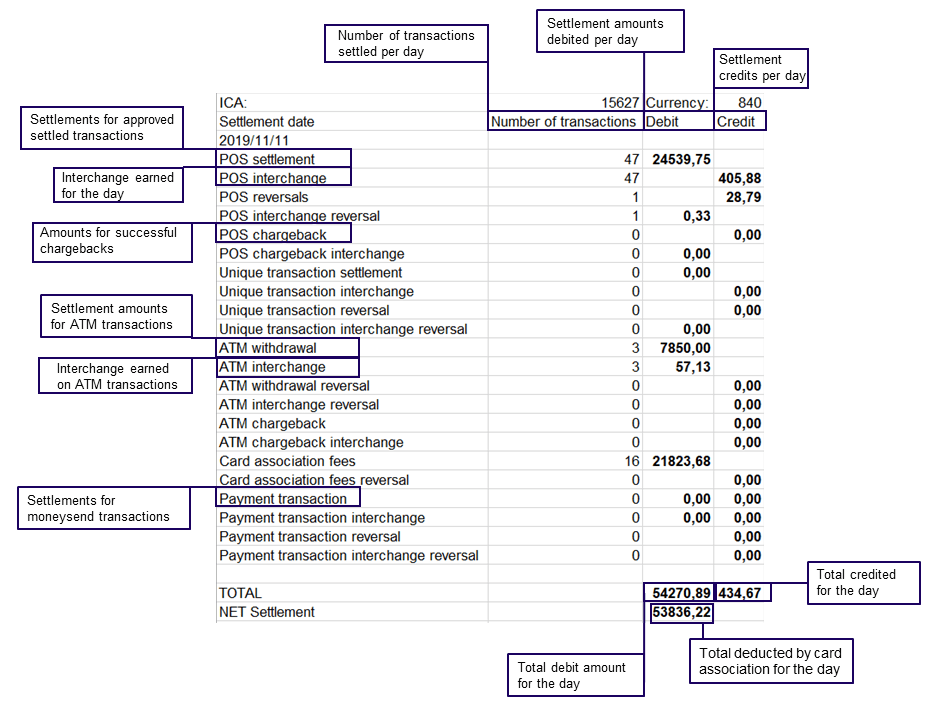
Note: file will automatically download upon clicking link
Updated 3 months ago