
Account Group Fee action
What the Account Group Fee action is
The Account Group Fee action is a Decision Engine action that lets you evaluate a rule once at a higher level and then apply different fee configurations for different account groups.
Instead of creating the same fee rule separately for each card program or account group, you create one shared rule and attach one Account Group Fee action to it. Inside that action, you define which fee should apply to each account group.
In practical terms, this means you can centralize the rule logic while still charging different fee configurations per account group.
Why it is useful
Without the Account Group Fee action, teams usually have to duplicate the same rule logic across multiple account groups.
Example:
- Blue Card Program: charge
$1for an ATM withdrawal - Red Card Program: charge
$2for an ATM withdrawal
Before this action, that usually meant building the same ATM-withdrawal rule more than once, then attaching a different fee action at each account-group level.
With the Account Group Fee action:
- the ATM-withdrawal rule is defined once at a parent scope
- each account group can still have its own fee amount
- the fee logic stays aligned without duplicating the predicate
Value it brings
- Less duplication: you do not need to recreate the same rule for every account group that shares the same decision logic.
- Lower maintenance effort: when the rule condition changes, you update it once instead of updating several copies.
- Reduced configuration drift: shared logic is less likely to diverge across programs over time.
- Faster rollout: new account groups can be added by extending the action configuration instead of cloning and maintaining another rule.
- Cleaner governance: the separation between rule evaluation and fee amount definition is clearer.
When to use it
Use the Account Group Fee action when:
- the rule condition is the same across multiple account groups
- the fee amount or fee configuration needs to differ by account group
- you want to manage the rule centrally at a higher scope instead of repeating it at account-group level
Do not use it when each account group needs different rule logic. In that case, separate rules are still the better fit.
How it works
The action stores a list of account group fee mappings. Each mapping contains:
- an account group
- a fee configuration for that account group
Each fee configuration uses the same fee model as a normal fee action, including:
- fee description
- charge logic
- fixed amount and currency, percentage, or a combined charge logic depending on the selected option
- fee basis
In PayControl, the supported charge logic options are:
FIXEDPCTMAXSUMMIN
The supported fee basis options are:
- charge only if the transaction is approved
- charge only if the transaction is declined
- always charge
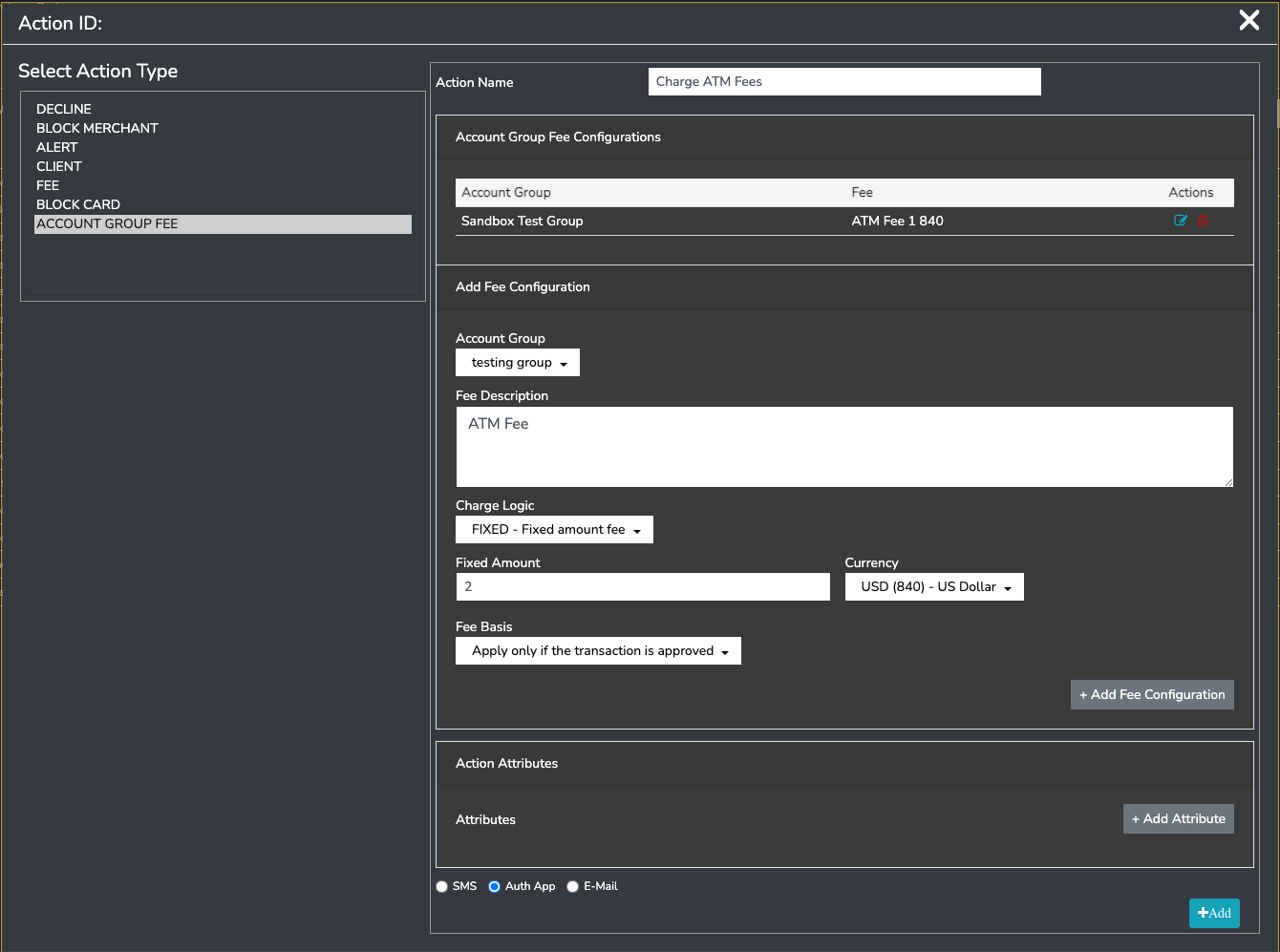
How to set it up in PayControl
1. Create the action
In PayControl, go to the Decision Engine actions area for the relevant client and create a new action.
Select the action type:
ACCOUNT GROUP FEE
Enter an action name that makes the shared purpose clear, for example:
ATM withdrawal fee by account group
2. Add account group fee mappings
For each account group that should use the action:
- Select the account group.
- Enter the fee configuration for that group.
- Add the fee configuration to the list.
PayControl requires at least one account group fee pair before the action can be saved.
3. Define the fee configuration for each account group
For each account group entry, configure the fee details you want applied for that group, including:
- Fee Description
- Charge Logic
- Fixed Amount and Currency, where applicable
- Percentage, where applicable
- Fee Basis
Example:
- Blue Card Program account group: fixed fee of
$1 - Red Card Program account group: fixed fee of
$2
4. Save the action
After all required account group fee pairs have been added, save the action.
Optional action attributes can also be added if required by your wider rule-action design.
5. Link the action to the rule outcome
Creating the action does not make it run on its own. The action must still be linked to the appropriate Decision Engine rule outcome.
Typical pattern:
- Create or edit the shared rule at the higher scope.
- Open the rule outcome section.
- Link the Account Group Fee action to the outcome that should charge the fee.
For example, if the rule is "transaction is an ATM withdrawal", link the action to the outcome that should apply the fee when that condition is met.
Example scenario
You have two account groups:
- Blue Card Program
- Red Card Program
You want both to use the same rule:
- if the transaction is an ATM withdrawal
But you want different fees:
- Blue Card Program:
$1 - Red Card Program:
$2
Without Account Group Fee:
- you create the same rule more than once at account-group level
- you maintain each copy separately
With Account Group Fee:
- you create the rule once at a parent scope
- you create one Account Group Fee action
- inside that action, you map Blue to
$1and Red to$2 - you link that one action to the rule outcome
Summary
The Account Group Fee action is useful because it removes the need to duplicate identical rule evaluation across multiple account groups just to vary the fee amount. It lets you centralize the decision logic and localize only the fee values, which makes configuration cleaner, safer, and easier to maintain.
Updated 5 months ago