
Access and role management
PayControl environment URLOnce you have been added as a user, you will receive the PayControl environment URL via email.
For PayControl sandbox and UAT environments this is https://uat.banking.live/paycontrol/.
This guide specifies how an user with Administrator access rights can:
Adding a new user
- Log in with your credentials to the PayControl environment you are adding the new user to.
- Proceed to Client Control > Client Setup

- Right-click on your Organization's Name found under the Clients panel and select View Users.
- Click Add User
- Provide the required information in the Add User for Client pop-up window.
- After providing and verifying all the necessary information, click Save.
- Verify if the user has been added or not by checking in View Users (step 3).
Disabling a user
- Log in with your credentials to the PayControl environment you are adding the new user to.
- Proceed to Client Control > Client Setup
- Right-click on your Organization's Name found under the Clients panel and select View Users.
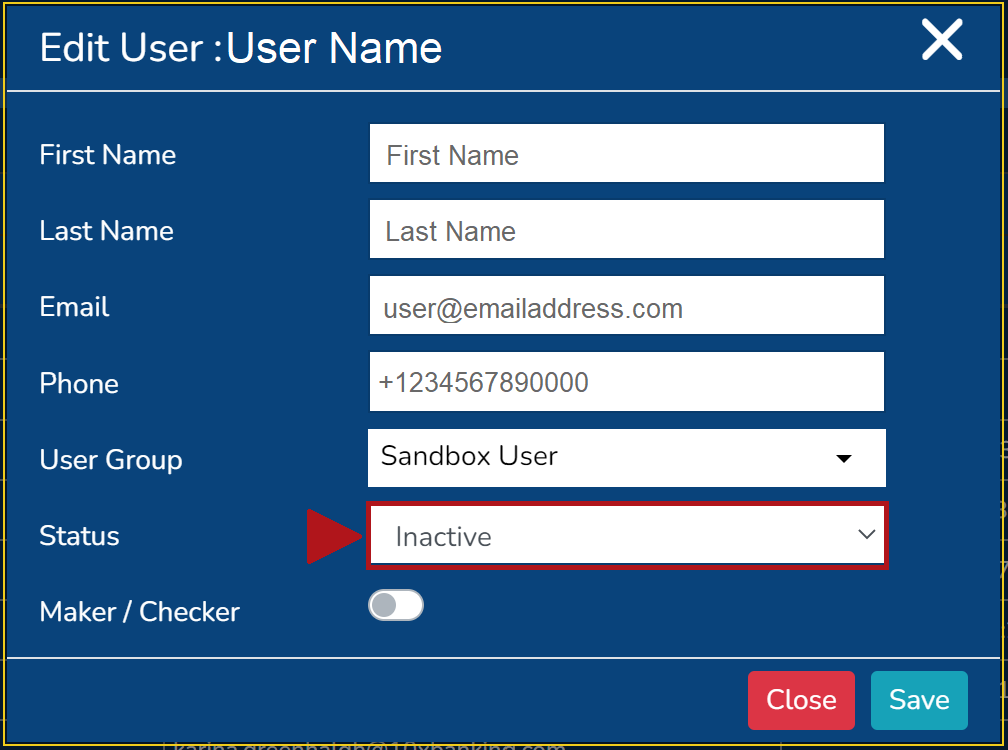
- Search for the user by First Name or Email, then right-click on user and select Edit User
- Change user Status to Inactive and click Save
Managing user roles and permissions
Each user is assigned to a User Group. User Group's define the role and available permissions for the user within PayControl.
Editing or adding a new user group
If you are needing to edit permissions or add a new User Group, you need to request this through our Customer Support Platform or consult your Client Executive.
Viewing users and their user group
- Log in with your credentials to the PayControl environment you are adding the new user to.
- Proceed to Client Control > Client Setup
- Right-click on your Organization's Name found under the Clients panel and select View Users.
This screen will provide you with the following User information:
- User ID
- First Name
- Family Name
- Last Login Time
- Phone
- Status
- User Group
Updated 11 months ago
Did this page help you?