
Actions
The end goal of your rule evaluation
Linking actions to a rule enable post authorisation processes to be triggered.
Some actions are handled by us:
- Fees are automatically calculated and included in FAST.
- Notifications (like SMS or email) are sent directly by Paymentology to the configured recipient.
- Declines
- STIP Availability
Others are designed for your systems to handle - for example:
- Client FAST Event actions which can be used for:
-
Triggering internal alerts
-
Updating dashboards or reports
-
Performing custom business logic
When creating Client FAST Actions, attributes may associated with each action, enabling the consumer to link the action to any downstream process of their choosing via the setting of custom key-value attributes. -
Rule to Action Linking
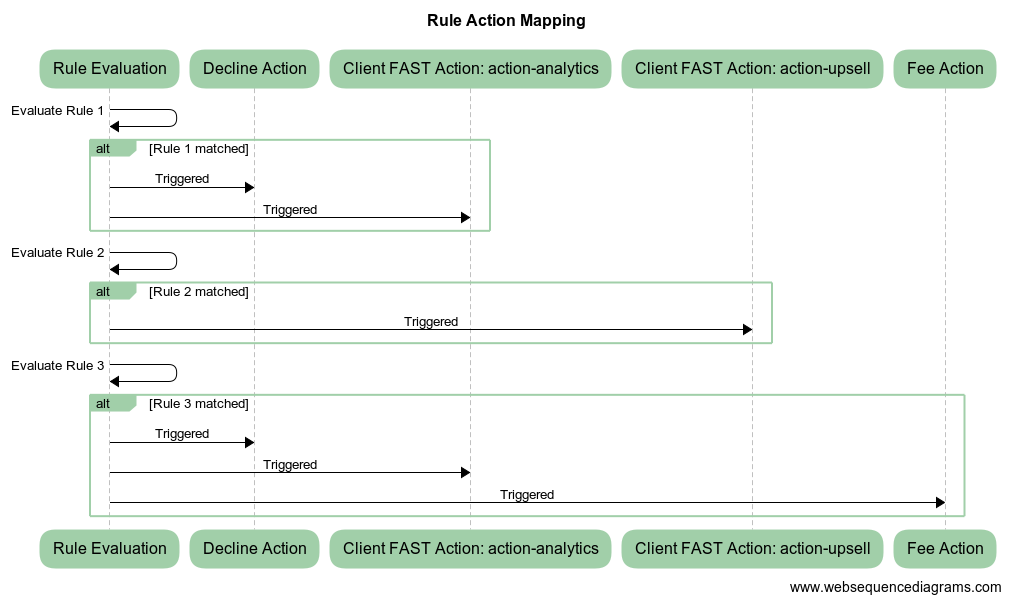
Actions may be shared across rules. In the example below we have 3 rules with actions (some shared) assigned to each of them:
- Rule 1
- Decline Action
- Client FAST Action (with an attribute of: action-analytics)
- Rule 2
- Client FAST Action (with a attribute of: action-upsell)
- Rule 3
- Decline Action
- Client FAST Action (with a attribute of: action-analytics)
- Fee Action
If all 3 of the rules were to be triggered, this is what it would look like:
This is what the consumer of the FAST message would receive:
{
  "DECISION_ENGINE": {
    "Actions": [
      {
        "id": 5,
        "typeName": "DECLINE",
        "details": {
          "attributes": []
        }
      },
      {
        "id": 11,
        "typeName": "CLIENT",
        "details": {
          "attributes": [
            {
              "action": "analytics",
            }
          ]
        }
      },{
        "id": 65,
        "typeName": "CLIENT",
        "details": {
          "attributes": [
            {
              "action": "upsell",
            }
          ]
        }
      },
      {
        "id": 1,
        "typeName": "FEE",
        "details": {
          "amount": 0,
          "basis": "ALWAYS_CHARGE",
          "currencyCode": "980",
          "attributes": []
        }
      }
    ],
    "DryRunActions": []
  }
}
A Little Bit More on Attributes
You will notice from the example above - the existence of an attributes element. This allows you to add your own custom attributes to an action, like {"reason": "velocity-limit", "fraud-level": "0"} - which will be passed along in the FAST message whenever that action is triggered. This makes it easy to drive detailed downstream logic, reporting, or messaging.
{
      "id": 12,
      "typeName": "CLIENT",
      "details": {
        "attributes" : [
          {
            "velocity-limit": "0"
          }
        ]
      }
    }
Dynamic Attributes
Dynamic attributes can be used when you need to identify which rule triggered an action.
When an action with dynamic attributes is triggered by more than one rule, it may appear multiple times in the FAST message. Each entry will reflect the specific dynamic values for the rule that triggered it, such as the Tree ID or Rule ID.
This means that:
- actions with only static attributes will normally appear once, even if triggered by multiple rules
- actions with dynamic attributes may appear multiple times if the attribute values differ between triggering rules
- this allows clients to trace an action back to the specific rule evaluation that produced it
For example, if the same action is triggered by two different rules and each rule supplies a different Tree ID or Rule ID, both instances will be shown in the FAST message.
{
  "DECISION_ENGINE": {
    "Actions": [
      {
        "id": 1002,
        "typeName": "DECLINE",
        "details": {
          "attributes": [
            {
              "tree-id": "1003"
            }
          ]
        }
      },
      {
        "id": 1002,
        "typeName": "DECLINE",
        "details": {
          "attributes": [
            {
              "tree-id": "1004"
            }
          ]
        }
      }
    ],
    "DryRunActions": []
  }
}
Updated 4 months ago