
Fee Action
A Fee Action calculates and applies a fee when a rule is triggered.
When to use a Fee Action
Use a standard Fee Action when the same fee calculation applies to every transaction that matches the rule.
For example:
- A transaction occurs in Mexico.
- Every matching card is charged a fixed fee of
$1.
If different account groups require different fees for the same condition, use an Account Group Fee Action instead.
Configuration
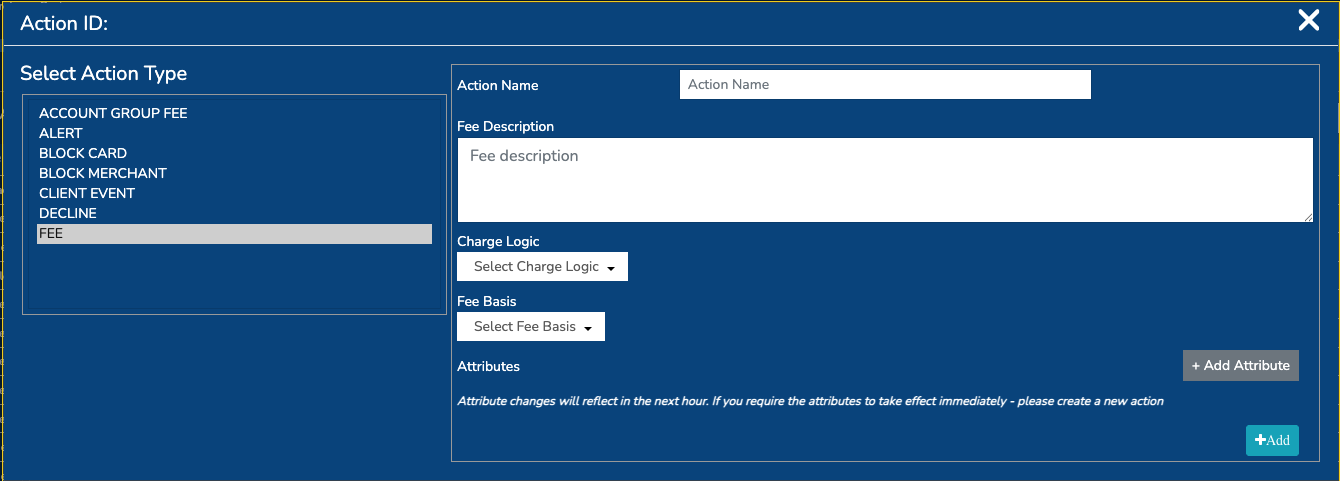
Configure the following fields:
| Field | Description |
|---|---|
| Action name | A unique, descriptive name for the action. |
| Fee description | An optional description of the fee. |
| Fee basis | Defines when the fee is charged based on the transaction outcome. |
| Charge logic | Defines how the fee amount is calculated. |
| Fixed amount | The fixed fee amount, required for fixed-fee calculations. |
| Fixed amount currency | Three-digit ISO 4217 currency code for the fixed amount. |
| Percentage | The percentage used for percentage-based calculations. |
Charge logic
The charge logic determines how the fee is calculated from the transaction amount.
| Charge logic | Description | Required values |
|---|---|---|
FIXED | Charges a fixed amount, converted into the transaction currency where required. | Fixed amount and fixed amount currency |
PCT | Charges a percentage of the transaction amount. | Percentage |
MAX | Charges the greater of the percentage calculation and the fixed amount calculation. | Percentage, fixed amount, and fixed amount currency |
MIN | Charges the lesser of the percentage calculation and the fixed amount calculation. | Percentage, fixed amount, and fixed amount currency |
SUM | Adds the percentage calculation and the fixed amount calculation together. | Percentage, fixed amount, and fixed amount currency |
Calculation examples
Assume the transaction amount is $100:
| Charge logic | Configuration | Result |
|---|---|---|
FIXED | Fixed amount: $1 | $1 |
PCT | Percentage: 2% | $2 |
MAX | Fixed amount: $1, percentage: 2% | $2 |
MIN | Fixed amount: $1, percentage: 2% | $1 |
SUM | Fixed amount: $1, percentage: 2% | $3 |
Fee basis
The fee basis controls when the fee is charged:
| Fee basis | Description |
|---|---|
CHARGE_IF_APPROVED | Charge the fee only when the transaction is approved. |
CHARGE_IF_DECLINED | Charge the fee when the transaction is declined. |
ALWAYS_CHARGE | Charge the fee regardless of the transaction outcome. |
Linking the action to a rule
After creating the Fee Action:
- Create or select the rule containing the transaction condition.
- Add the Fee Action to the rule.
- Save the rule.
- Test the rule with representative approved and declined transactions, depending on the configured fee basis.
When the rule is triggered, the fee is calculated from the transaction amount and added to the Decision Engine fee output.
Example: fixed fee for transactions in Mexico
To charge every matching card a fixed $1 fee when a transaction occurs in Mexico:
| Field | Value |
|---|---|
| Action name | Mexico transaction fee |
| Fee basis | CHARGE_IF_APPROVED |
| Charge logic | FIXED |
| Fixed amount | 1.00 |
| Fixed amount currency | 484 for MXN, or the required fee currency |
Create a rule with the condition:
IF transaction country is Mexico THEN apply the Mexico transaction fee action
This configuration applies the same fee to every transaction that triggers the rule.
Standard Fee Action versus Account Group Fee Action
Use a standard Fee Action when one fee configuration is sufficient:
| Requirement | Recommended action |
|---|---|
| Every matching transaction uses the same fee | Fee Action |
| The fee varies by account group | Account Group Fee Action |
The rule condition is the same, but Account Group A pays $1 and Account Group B pays $2 | Account Group Fee Action |
With a standard Fee Action, different fees for different account groups generally require separate rules with separate fee actions. The Account Group Fee Action allows the rule to be created once and associates a different fee configuration with each account group.
Updated about 1 month ago