
Retrieve Contact Data
This API allows Paymentology to retrieve cardholder contact data in masked formatted.
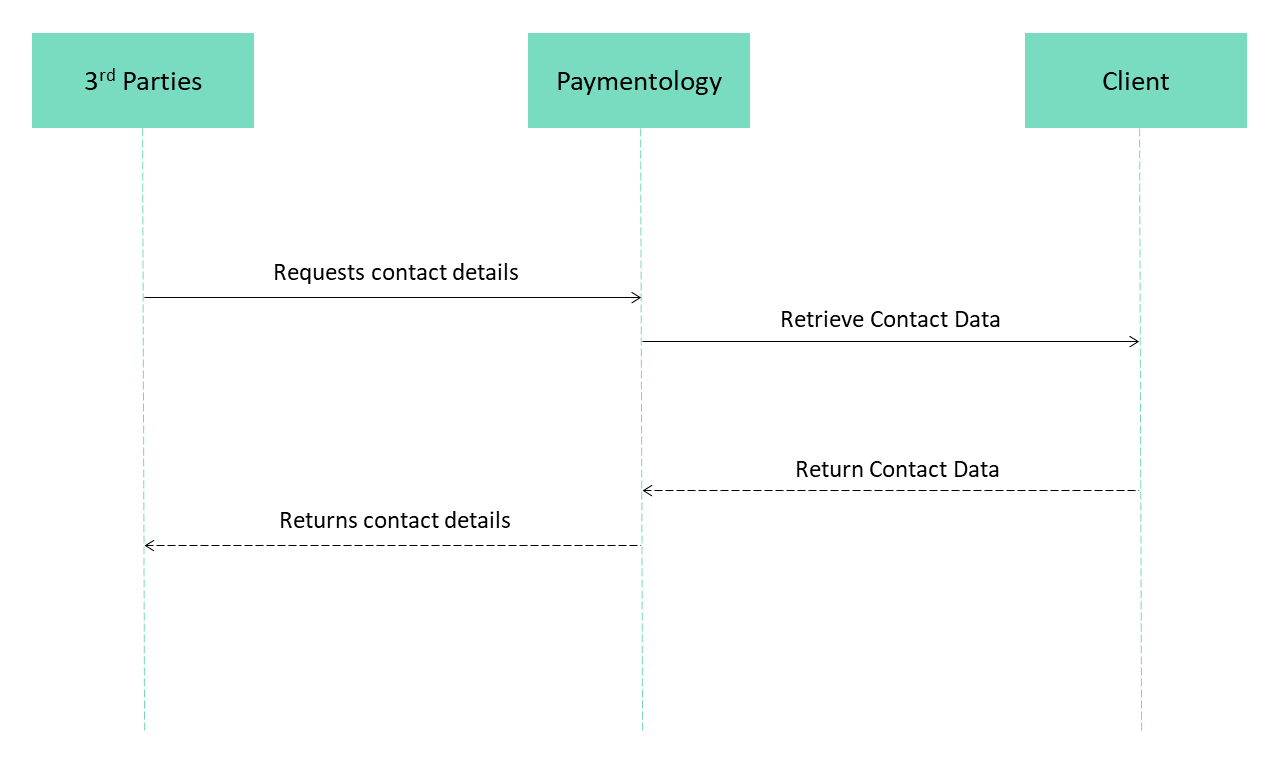
Request flow to retrieve Contact Data from Client
The following explains the sent request and response parameters, what they represent, how Paymentology expects to receive or send a value, and whether they are required.
Request
| Field name | Description | Format | Example |
|---|---|---|---|
clientId (REQUIRED) | Represents Paymentology's client ID. | Int64 | 123456 |
rid (REQUIRED) | Request identifier generated by Paymentology | String | a962778c-c33d-11ed-afa1-0242ac120002 |
token (REQUIRED) | This is the Paymentology public card token value. The value is numeric. | String | 100023980 |
correlationId | This is the ‘original’ request identifier sent by 3rd parties to Paymentology. This value is forwarded to keep track of the processing flow. It's not required but will always be sent. | String | 12345678098765432104 |
reasonCode | This is the reason code to retrieve the contact data. Use this for logging purposes, not for any validations and not for any filtering. It’s not required but will always be sent. Some reason examples include but not limited to PROVISIONING and DEVICE_BINDING. | String | PROVISIONING |
tokenUniqueReference | This is the token unique reference we receive from 3rd parties, Paymentology forwards this value. | String | DWSPMC000000000132d72d4fcb2f4136a0532d3093ff1a45 |
{
    "clientId": 123456,
    "rid": "82a1ba49-7807-428e-ad00-a749c74a0562",
    "token": "100023980",
    "correlationId": "5588997744123456789",
    "reasonCode": "PROVISIONING",
    "tokenUniqueReference": "DWSPMC000000000132d72d4fcb2f4136a0532d3093ff1a45"
}
Response
Success response: 200 OK
| Field name | Description | Format | Example |
|---|---|---|---|
rid (REQUIRED) | Transaction identifier generated by Paymentology. Echo this value with the received one. | String | a962778c-c33d-11ed-afa1- 0242ac120002 |
token (REQUIRED) | This is the Paymentology public card token value. Echo this value with the received one. | String | 100024 |
maskedPhoneNumber (REQUIRED) | Masked mobile phone number for SMS with passcode or outbound call. Mask all digits with asterisk character ( * ), except the last 4. Leave hyphens if applicable. | String |
|
firstName | This is the card holder’s first name. | String | Jhon |
maskedEmailAddress | Masked email address. First two characters remains of identifier remains as is, rest is replaced with asterisk character ( * ). Email domain remains unchanged. | String | ag*****@gmail.com |
{
    "rid": "82a1ba49-7807-428e-ad00-a749c74a0562",
    "token": "100023980",
    "maskedPhoneNumber": "**-***-****-1234",
    "firstName": "",
    "lastName": "",
    "maskedEmailAddress": "ag*****@gmail.com"
}
Error response: 404 NOT FOUND
Server should respond with 404 if the card is not found or the endpoint does not exists.
Paymentology result is also a failure result when this error is received.
Error response: 500 INTERNAL SERVER ERROR
Server should respond with any 5xx family error if something wrong happen during the processing.
Paymentology result is also a failure result when this error is received.
Masking information guide
Masking phone number with Regex
Phone number must be masked using asterisks. Left the last 4 digits untouched and replace other numbers with asterisk. Left the hyphens if applicable. See below examples
- A phone number like, 99-9999-9999 is masked to **-****-9999.
- A phone number like, 9988887777 is masked to ******7777.
Regex example
This regex can be used to mask the phone number - see on Regex101
\d(?!\d{0,3}$)Java example
public static void main(String[] args) {
    String phoneNumber = "11999997777";
    String phoneNumberWithHypens = "11-99999-7777";

    String maskedPhoneNumber = phoneNumber.replaceAll("[^0-9-]", "")
            .replaceAll("\\d(?!\\d{0,3}$)", "*");
    String maskedPhoneNumberWithHypens = phoneNumberWithHypens.replaceAll("[^0-9-]", "")
            .replaceAll("\\d(?!\\d{0,3}$)", "*");

    System.out.printf("A phone number as %s is masked to: %s %n", phoneNumberWithHypens, maskedPhoneNumberWithHypens );
    System.out.printf("A phone number as %s is masked to: %s %n", phoneNumber, maskedPhoneNumber);
}
Output
11-99999-7777
**-*****-7777
Masking email address with Regex
Email address must be masked with asterisks. Left the first 2 characters and the domain unmodified and replace all other characters with asterisk. For example:
- An email address like [email protected] is masked to fo**********@gmail.com
- An email address like [email protected] is masked to jh******@paymentology.com
Regex example
This regex can be used to mask the email address - see on Regex101
(?<=.{2}).(?=[^@]*?@)Java example
public static void main(String[] args) {
    String emailAddress = "[email protected]";
    String maskedEmailAddress = emailAddress.replaceAll("(?<=.{2}).(?=[^@]*?@)", "*");

    System.out.printf("An email address '%s' is masked to: %s %n", emailAddress, maskedEmailAddress );
}
Output
An email address '[email protected]' is masked to: jh******@paymentology.com Updated 11 months ago