
Multi-currency
DisclaimerThe physical settlement of funds with the scheme is managed by the client - Paymentology does not partake in this. Therefore, it is the responsibility of the client to manage any risk associated with exchange rate movement.
Banking.Live's unique Card to account mapping, enables Paymentology clients to have multi-currency card products available for cardholders.
This structure allows for transactions of a specific currency to be routed to the linked account of that same currency.
If multiple accounts capability is enabled at the product level a client is able to utilise multiple accounts to card capability for their cardholders.
* Multi-currency is available with specific prepaid and debit card products.* A token should not be linked to two accounts with the same currency when the card program is multi-currency.* Product set up and configuration is managed by Paymentology in production. Sandbox/UAT/client portal users may be provided with access for testing purposes.
Multi-currency object creation
When creating a card with multiple currency accounts the following takes place:
- Parent account is passed in create card.
- Billing currency child account is created under the parent account.
- The billing currency child account is marked as the default account.
- Additional currency accounts are created with create account.
- These accounts are created as child accounts of the billing currency child account created above i.e. the default account.
- The additional currency accounts created above then need to be linked to the card created above with Link card and account.
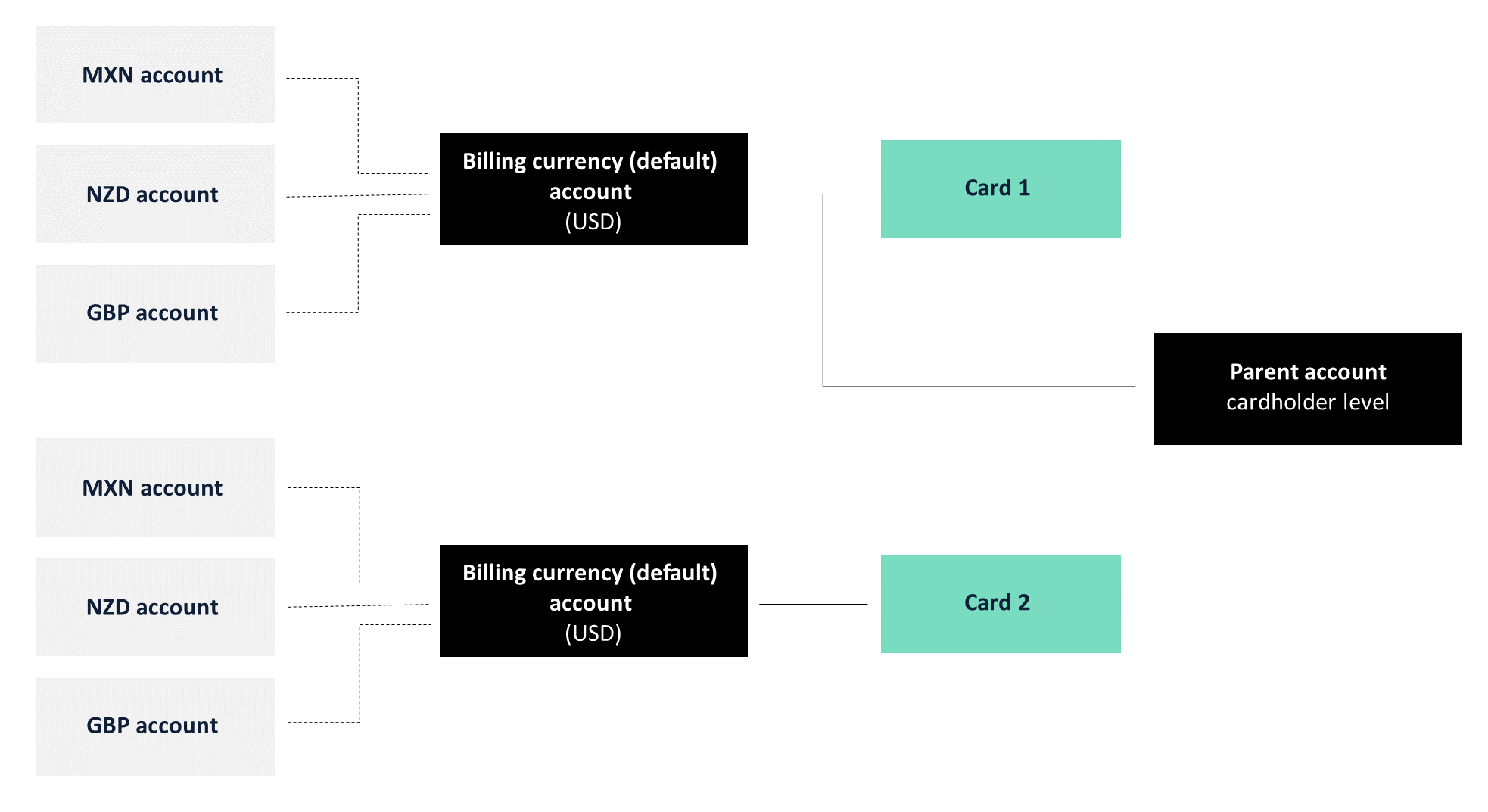
Multi-currency account hierarchy
Account selection
In every authorization message we receive the local/transaction currency amount (DE4) and the billing currency amount (DE6). If they differ, we also receive the exchange rate.
The corresponding currency codes are stipulated in the authorization message under local/transaction currency (DE49) and billing currency (DE51).
So when an authorization message is received for a multi-currency card product, the following applies:
- If the transaction currency (DE49) = the currency of a linked account, then deduct the transaction amount (DE4) from the corresponding linked currency account.
- If not, then use the billing currency (DE51) and deduct the billing amount (DE6) from the default account.
As the default account is the original billing currency of the card (configured at initial product creation, then inherited by the card during creation.), then a transaction of a currency that does not match any of the currency accounts linked to the card will then be converted to the billing currency using the scheme conversion rate.
The Account selection hierarchy diagram showcases account selection during spend.
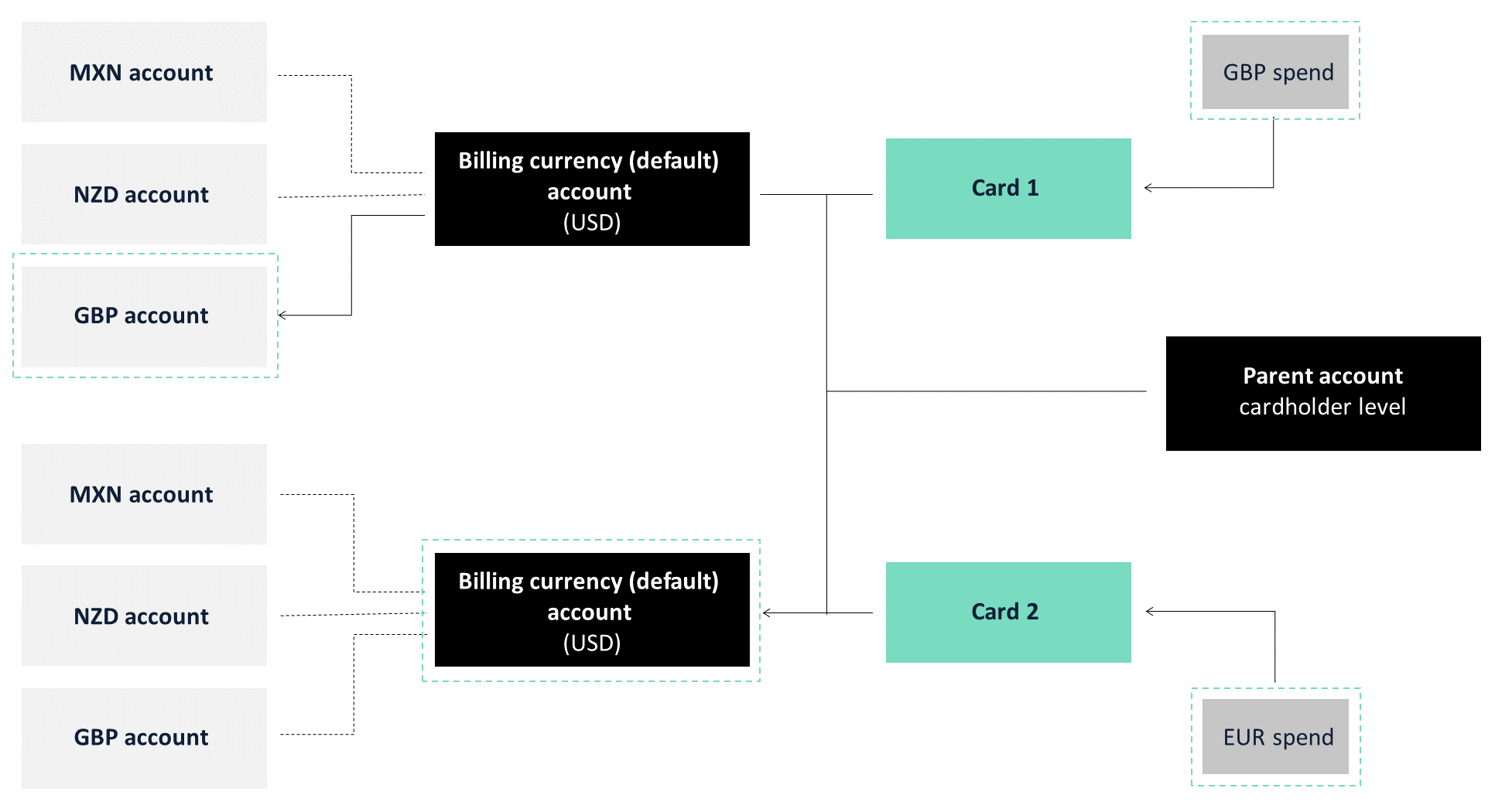
Account selection hierarchy
The following authorization flow showcases how an authorization message is handled when associated to a multi-currency card product:
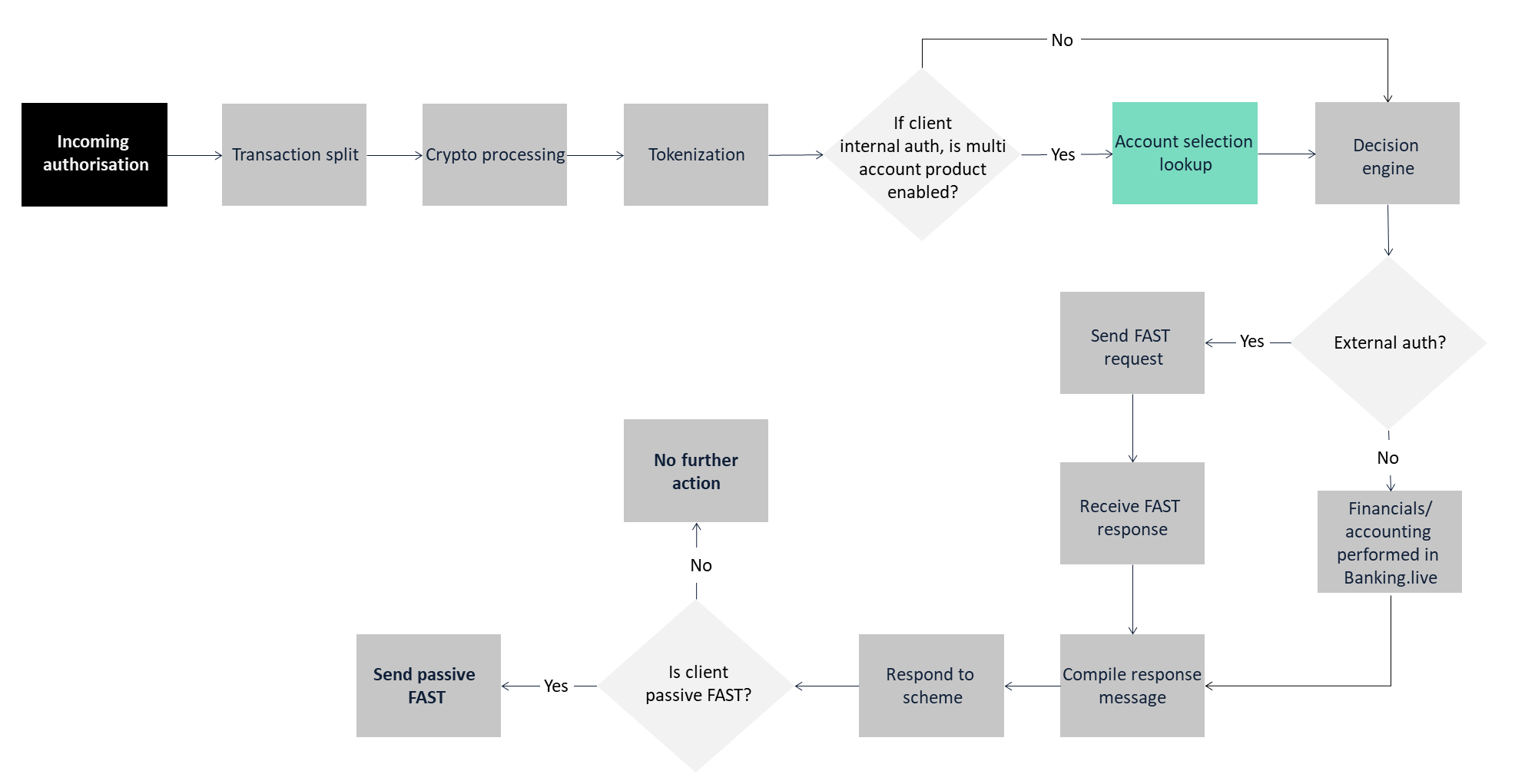
Account selection transaction flow
- Authorization 0100 message received
- The message is split into components
- Crypto processing is performed
- Tokenization occurs
- Account selection occurs and the message is passed to the Decision Engine
- Decision Engine passes the token and account back with the inherited rule(s) results
- Financials of the selected account are logged in the ledger
- The response message is compiled
- The transaction response 0110 message is sent to the scheme
- If the client uses passive FAST, then a FAST message is sent to them
Account-based limit and rules
- Limits are checked based on the card account hierarchy, type of transaction and currency.
- Rules are checked based on the token and account selected and passed to Decision Engine as shown above.
For example, currency limit rules are able to be inherited by a card with multiple accounts so that restrictive limits are placed on the spending made with a specific currency.
This means that a card with multiple currency accounts can have different spend limits per currency, which can be defined further based on data components such as eCommerce, POS, location etc. and based on different time windows such as hourly, daily, weekly, monthly, or a mixture. Further rules information are available here.
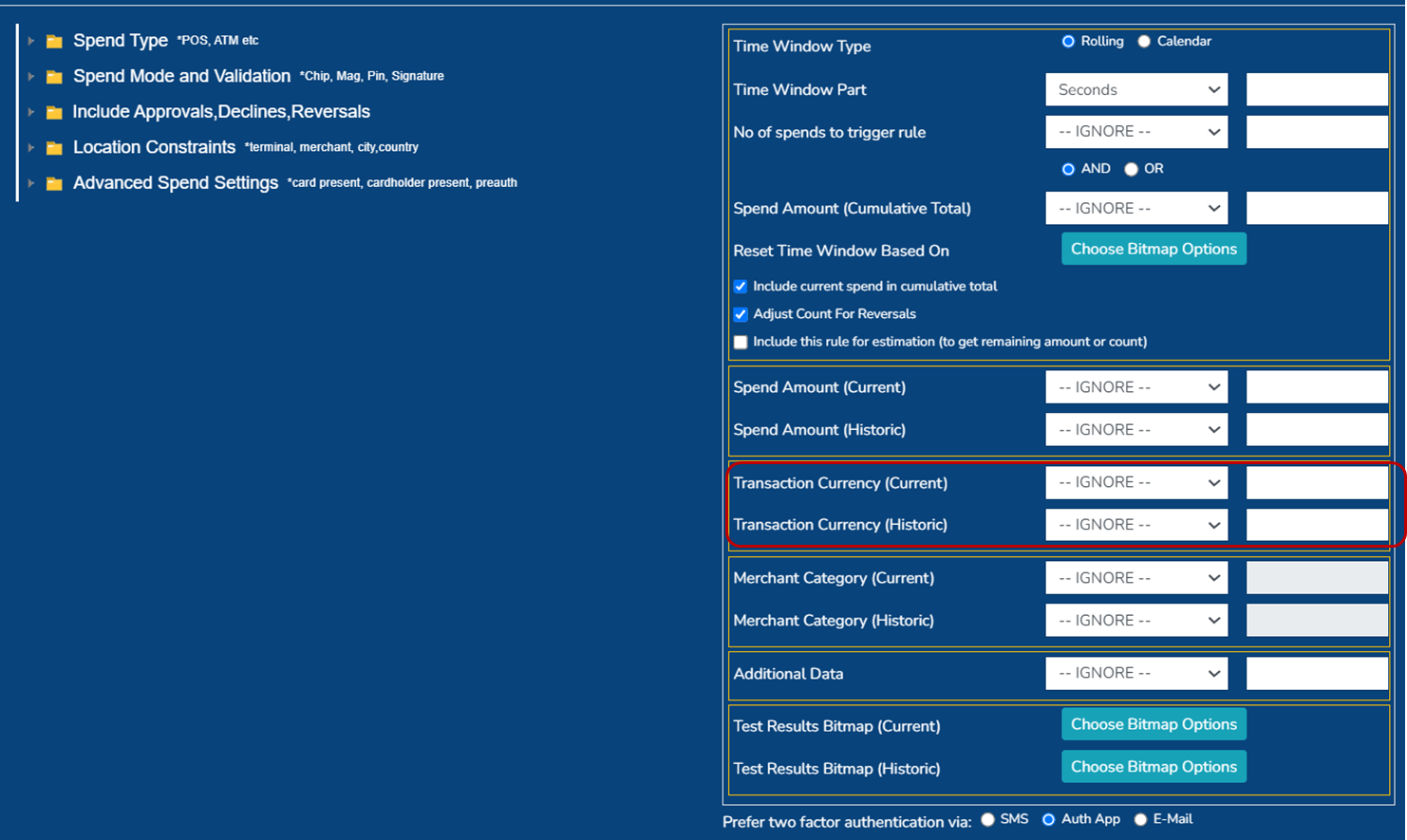
Examples
The below screenshots illustrate the account selection during authorization as seen in PayControl.

Multi-currency accounts linked to one card
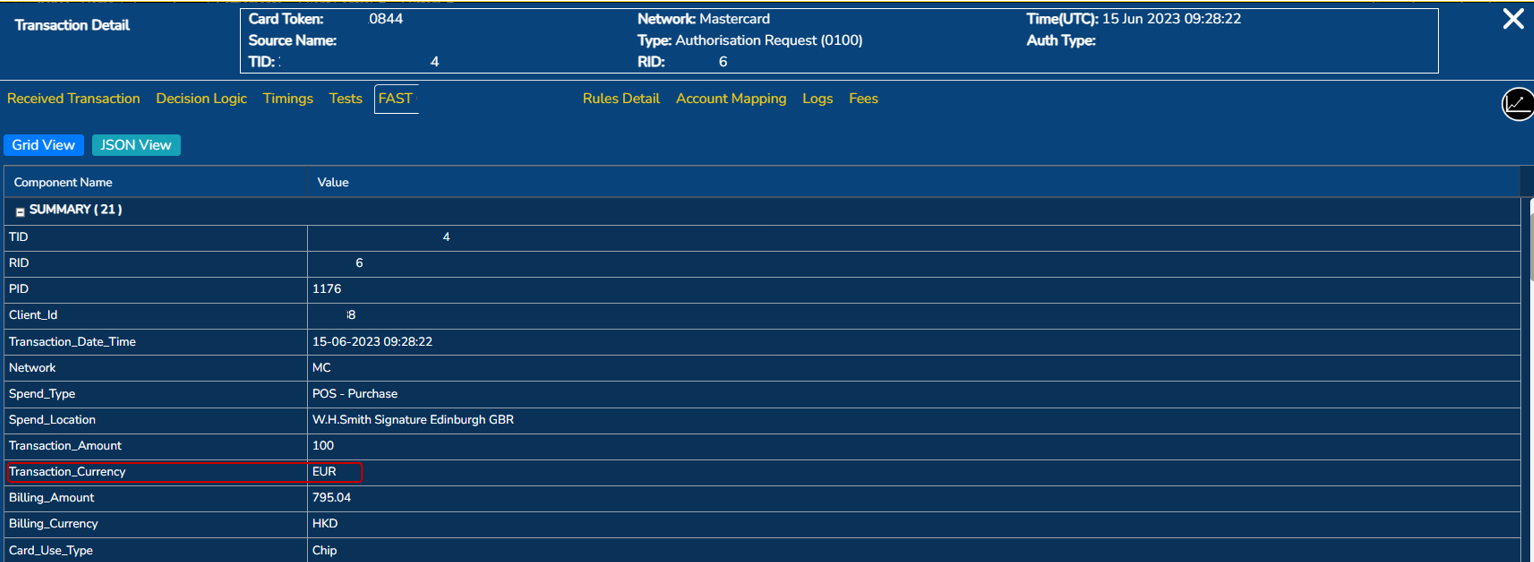
Other currency transaction mapping to default account: Part 1

Other currency transaction mapping to default account: Part 2
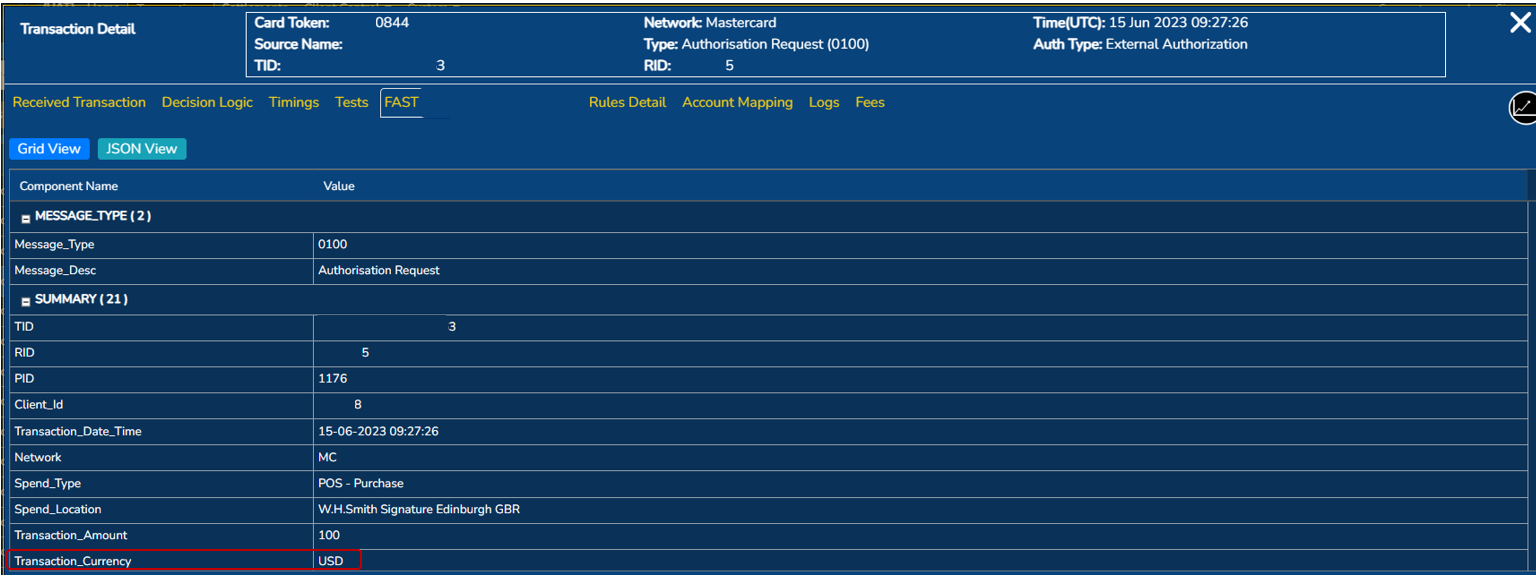
Non-default supported currency transaction mapping: Part 1
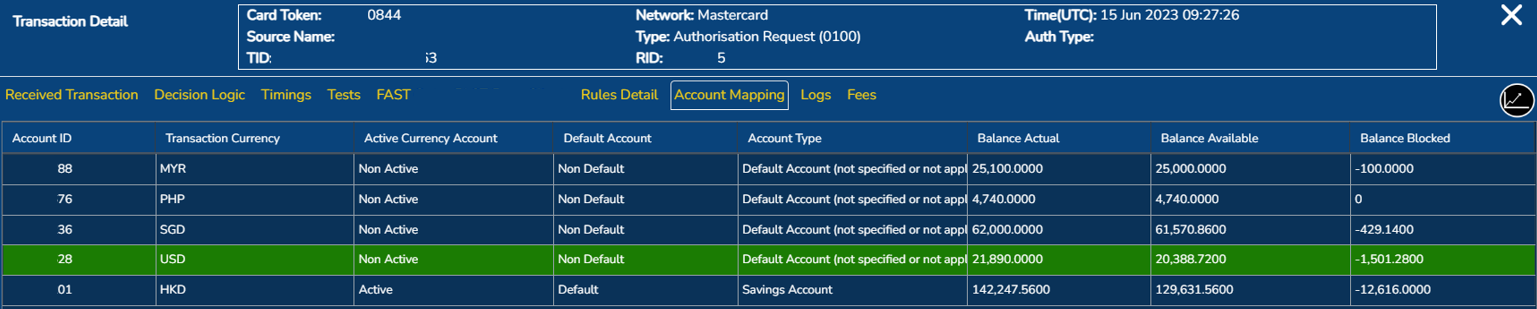
Non-default supported currency transaction mapping: Part 2
Fees
The Decision Engine checks the transaction currency (DE4) and billing currency (DE6) values of the authorization message and calculates the transaction currency fee and/or the billing currency fee. Once it has done so, the fee is applied to the supported currency's account or the default account.
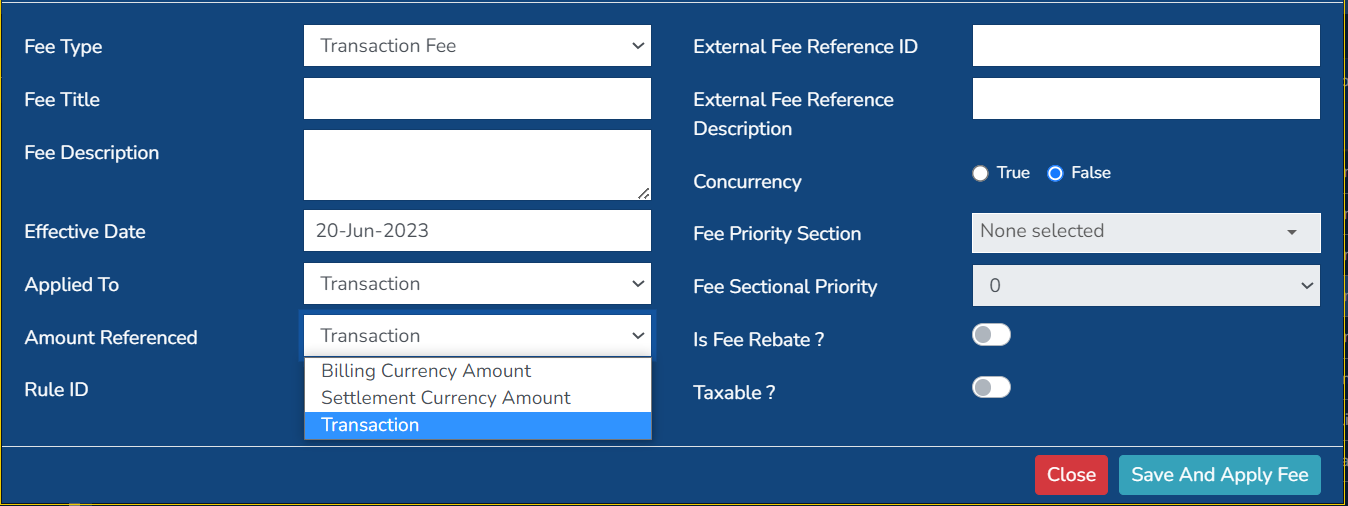
Fee template - Amount referenced
Fees can be defined as a fixed amount or a minimum, maximum, average or sum of a percentage of the transaction or billed amount.
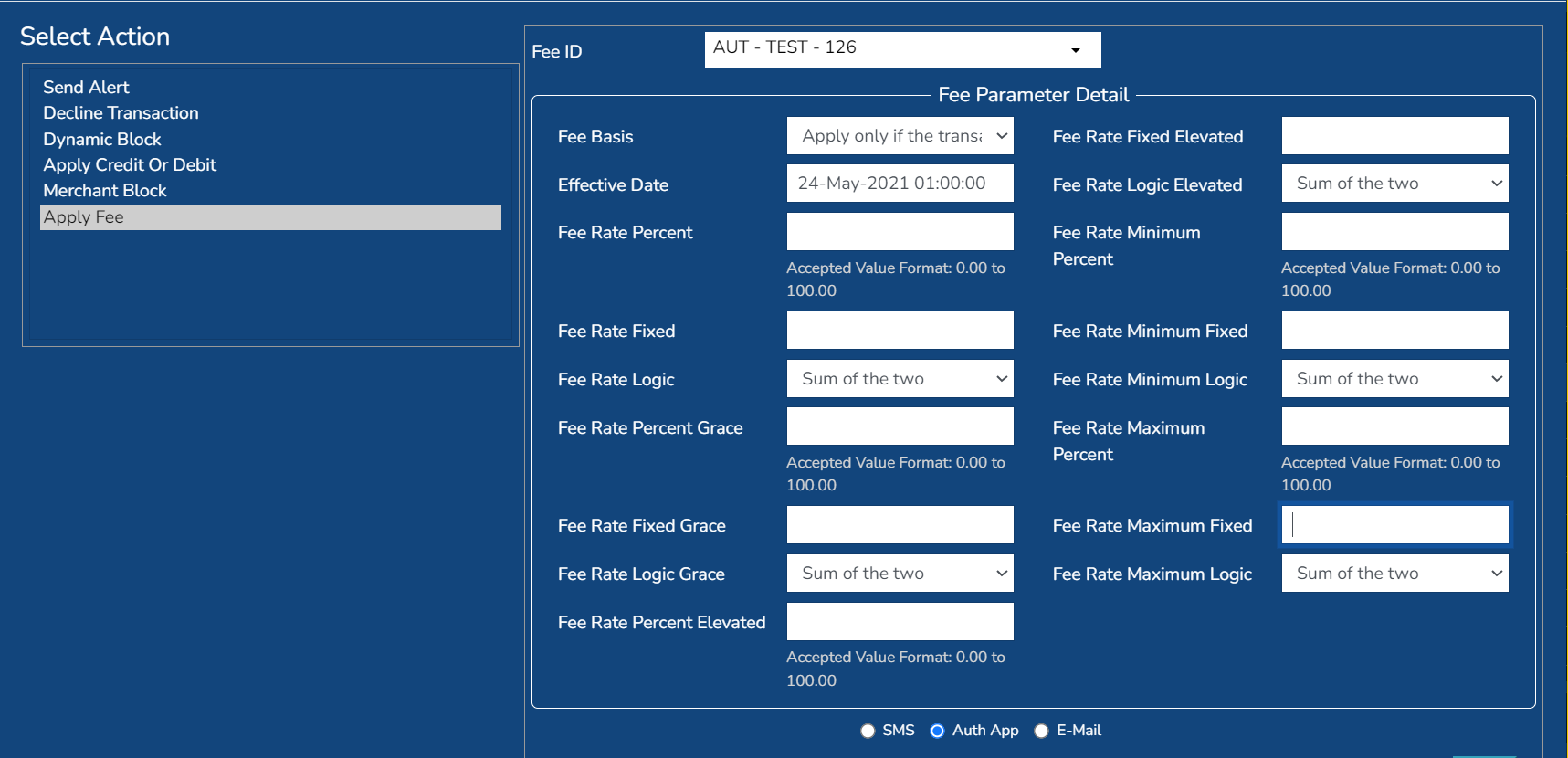
Fee template - Calculation logic
If the fee group associated with the authorization has both transaction currency and billing currency fees, and there is no linked account of the same currency as the transaction, then the fee(s) are applied to the default account.
Once the product is live, multi-currency fee information is available in real-time through the use of PayControl or via API and can be found in the daily Program fees report.
Default account currency
Fixed fee - transaction
Calculated on the billing amount (DE6) and debited from the default account.
Fixed fee - billing
Calculated on the billing amount (DE6) and debited from the default account.
Percentage fee - transaction
Calculated on the transaction amount (DE4) and debited from the default account.
Percentage fee - billing
Calculated on the billing amount (DE6) and debited from the default account.
Example
Default account = USD
| 10USD spend | Transaction amount | Billing amount | Fee amount | Fee amount calculation | Total debited amount | Account debited |
|---|---|---|---|---|---|---|
| Fixed fee - transaction | 10USD | 10USD | 5 | 5USD | 10 + 5 = 15USD | Default account |
| Fixed fee - billing | 10USD | 10USD | 5 | 5USD | 10 + 5 = 15USD | Default account |
| Percentage fee - transaction | 10USD | 10USD | 10% | 1USD | 10 + 1 = 11USD | Default account |
| Percentage fee - billing | 10USD | 10USD | 10% | 1USD | 10 + 1 = 11USD | Default account |
Non-default supported currency
Fixed fee - transaction
Calculated on the billing amount (DE6), converted to supported currency and debited from supported currency account.
Fixed fee - billing
Calculated on the billing amount (DE6), converted to supported currency and debited from supported currency account.
Percentage fee - transaction
Calculated on the transaction amount (DE4) and debited from the non-default supported currency account.
Percentage fee - billing
Calculated on the billing amount (DE6), converted to supported currency and debited from supported currency account.
Example
Default account = USD
Non-default supported currency = MXN
| 100MXN = 5.84USD | Transaction amount (DE4) | Billing amount (DE6) | Fee amount | Fee amount calculation | Total debited amount | Account debited |
|---|---|---|---|---|---|---|
| Fixed fee - transaction | 100MXN | 5.84USD | 5 | 5USD converted to MXN = 85.68 | 100 + 85.68 = 185.68MXN | MXN account |
| Fixed fee - billing | 100MXN | 5.84USD | 5 | 5USD converted to MXN = 85.68 | 100 + 85.68 = 185.68MXN | MXN account |
| Percentage fee - transaction | 100MXN | 5.84USD | 10% | 10MXN | 100 + 10 = 110MXN | MXN account |
| Percentage fee - billing | 100MXN | 5.84USD | 10% | 0.58USD converted to MXN = 10 | 100 + 10 = 110MXN | MXN account |
Non-default other currency
Fixed fee - transaction
Calculated on the billing amount (DE6) and debited from the default account.
Fixed fee - billing
Calculated on the billing amount (DE6) and debited from the default account.
Percentage fee - transaction
Calculated on the transaction amount (DE4), converted to the billing currency and debited from the default account.
Percentage fee - billing
Calculated on the billing amount (DE6) and debited from the default account.
Example
Default account = USD
Other currency = NZD
| 100NZD = 61.84USD | Transaction amount (DE4) | Billing amount (DE6) | Fee amount | Fee amount calculation | Total debited amount | Account debited |
|---|---|---|---|---|---|---|
| Fixed fee - transaction | 100NZD | 61.84USD | 5 | 5USD | 61.84 + 5 = 66.84USD | Default account |
| Fixed fee - billing | 100NZD | 61.84USD | 5 | 5USD | 61.84 + 5 = 66.84USD | Default account |
| Percentage fee - transaction | 100NZD | 61.84USD | 10% | 10NZD converted to 6.18USD | 61.84 + 6.18 = 68.02USD | Default account |
| Percentage fee - billing | 100NZD | 61.84USD | 10% | 6.18USD | 61.84 + 6.18 = USD | Default account |
Exchange rate variation
Exchange rate variations only affect the billing amount (DE6) in normal transaction conditions.
The exception to this is a transaction involving a pre-authorisation and partial reversal (i.e. a partial reversal is received before the clearing process). In this case, the transaction amount (DE4) may be affected.
Therefore, based on the logic of multi-currency account selection, only transactions of a currency that does not have an account of the same currency are affected (non-default other currency). This is due to the DE6 amount being applied instead of the DE4 amount.
To support your understanding, refer to the diagram and X, Y, Z example amounts.
- X = a default account currency transaction
- Y = a non-default supported currency transaction
- Z = a non-default other currency transaction

Exchange rate variation
Updated 11 months ago