
Provisioning
In the context of payments, tokenization refers to the process of using non-sensitive data (tokens) as an alternative to sensitive card information (i.e. PAN) during a transaction.
Reasons for tokenization:
- Security: tokens are less sensitive than PANs. A token links to a particular PAN. It can be easily destroyed and replaced.
- Convenience: for mobile digital wallets (X-pays), for example, Google Pay or Apple Pay, it is convenient to use tokens to process transactions.
The tokenization lifecycle can be summarized into two areas:
- Tokenization provisioning: Token provisioning is the process of making a card's PAN into a token and making the token available for use in transactions.
- Tokenization lifecycle management: Management of the token once it has been provisioned.
In this guide we coverTokenization Provisioning and its relationship with Banking.live.
Integration requirements
The provisioning process starts when the cardholder requests a token through their digital device. Paymentology notifies clients on each step of the provisioning stages via Tokenization Notifications. Tokenization Notification Specifications are found here.
As part of the provisioning process, clients will integrate to Paymentology's Tokenization Notification Specification.
| Notification type | Function | Action |
|---|---|---|
| TER | Notifies client on check eligibility process. | Client may use this to send notifications to cardholder. |
| RCD | Notifies clients on retrieve contact data process. | Client may use this to send notifications to cardholder. |
| TACR | Notifies client with OTP details to be sent to cardholder. | Client to send OTP to cardholder. |
| TNR | Notifies clients on a token status change. | Client may use this to send notifications to cardholder. |
In addition to this, Paymentology supports clients that hold cardholder information, in the case where Paymentology does not have this information (i.e. the source of truth is client side). In this use case, Paymentology require the Retrieve Contact Data endpoint found here to be implemented by the client.
This endpoint will be called during the Retrieve Contact Data (RCD) stage of the provisioning process, to retrieve cardholder’s information.
Provisioning flows
The provisioning process starts when the cardholder requests a token through their digital device. Paymentology notifies clients on each step of the provisioning stages via Tokenization Notifications. Tokenization Notification Specifications are found here.
We summarise provisioning into six provisioning flows:
- Green flow
The green provisioning flow is summarized as an approval flow without the need of additional identification and verification of the cardholder.
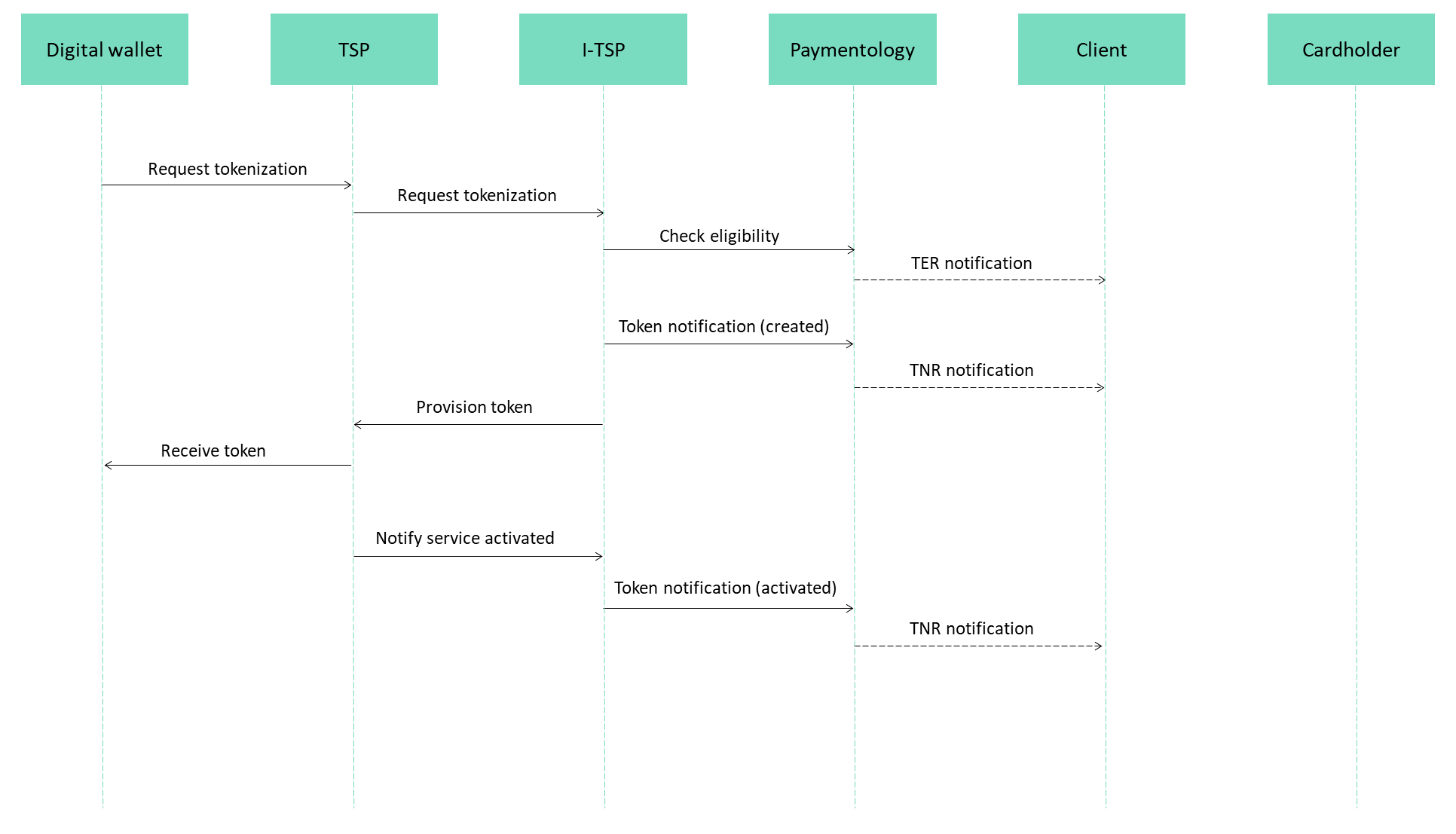
Green flow
- Yellow flow
The yellow provisioning flow is summarized as an approval flow where additional identification and verification of the cardholder is required.
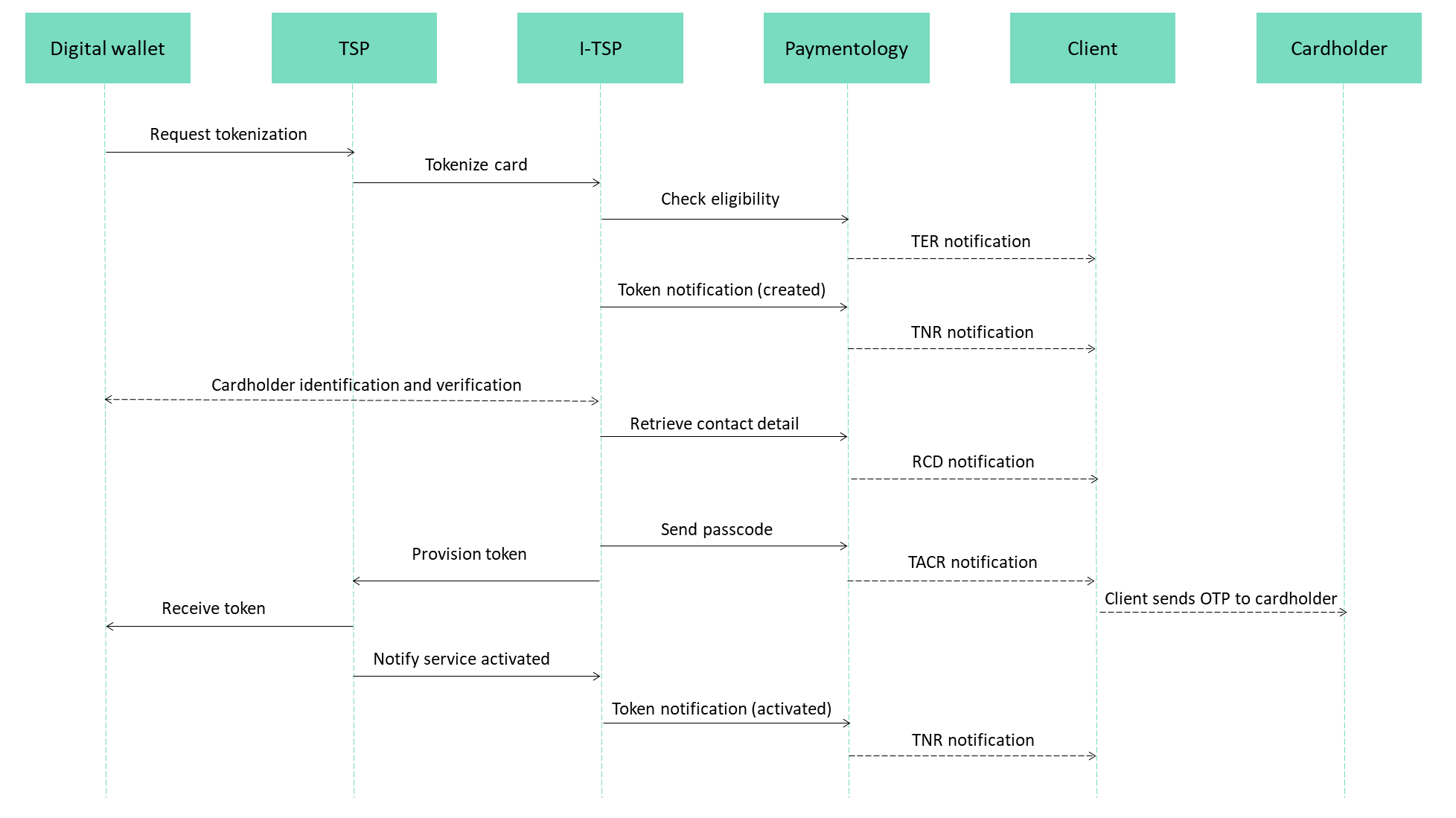
Yellow flow
- Orange flow (ApplePay)
The orange provisioning flow is summarized as an approval flow where ApplePay's account or device history infer an elevated statistical probability of fraud and authentication via app or ringfenced call center is required.
Clients can chose for orange flow whether they are implementing call center verification or In-App-Verification. If you don't have a call center (or don't want to use this service) then you are implementing In-App-Verification by default.
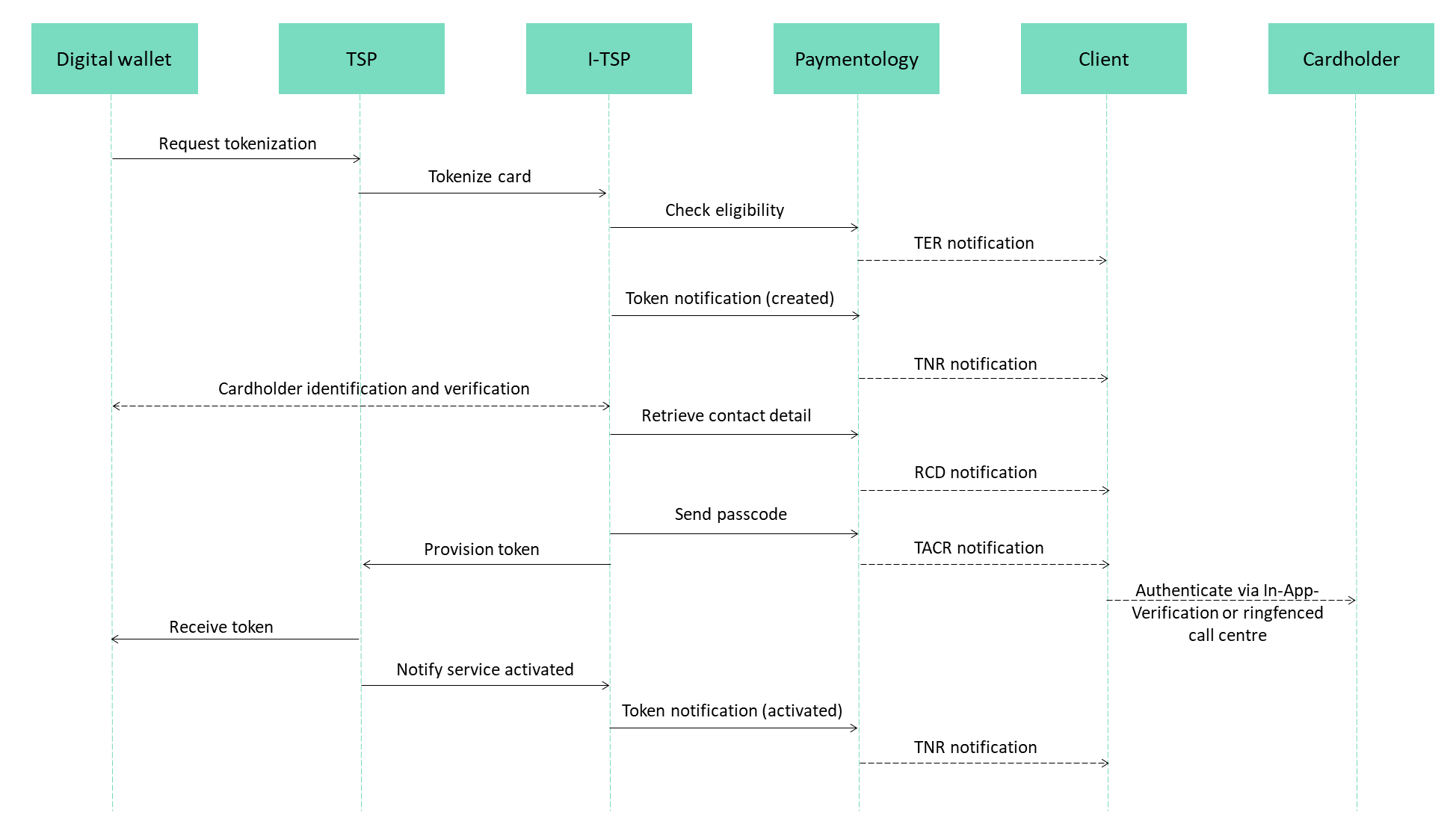
Orange flow
- Red
The red provisioning flow is summarized as a decline flow.
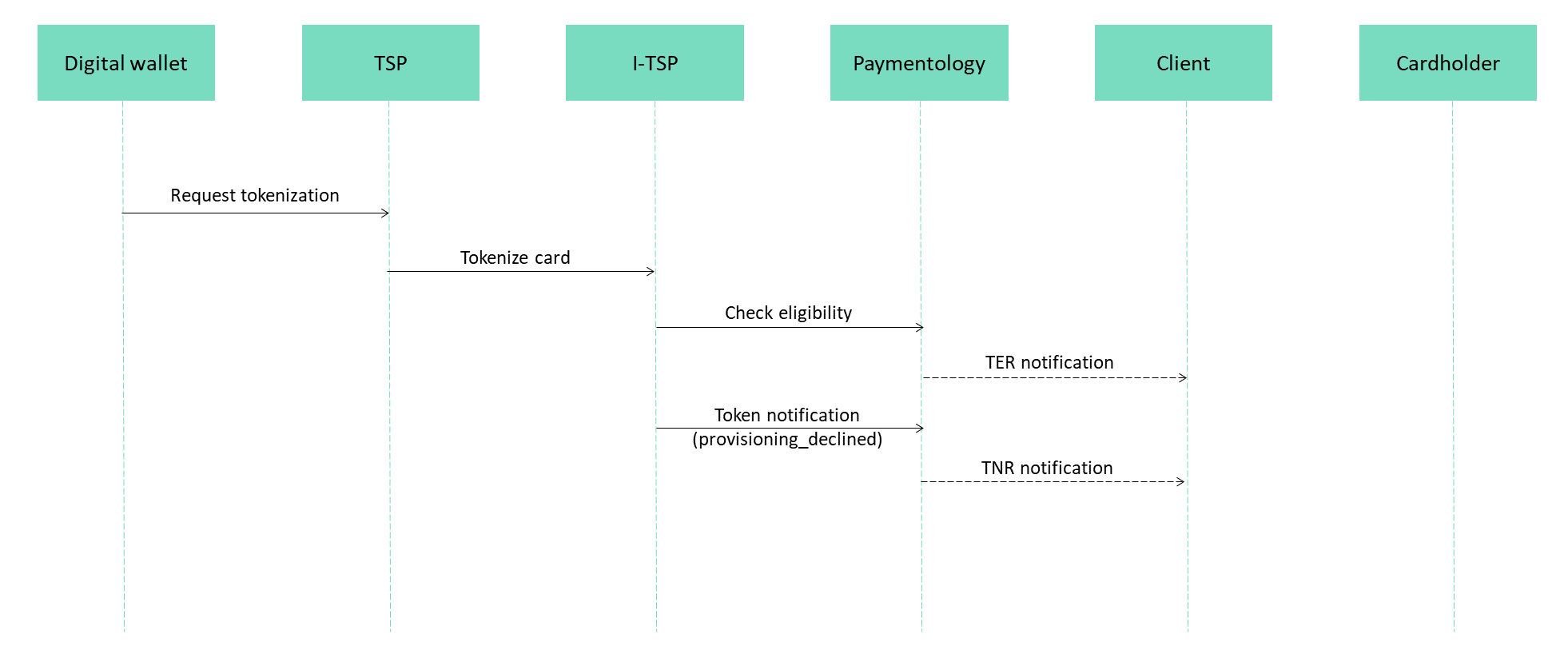
Red flow
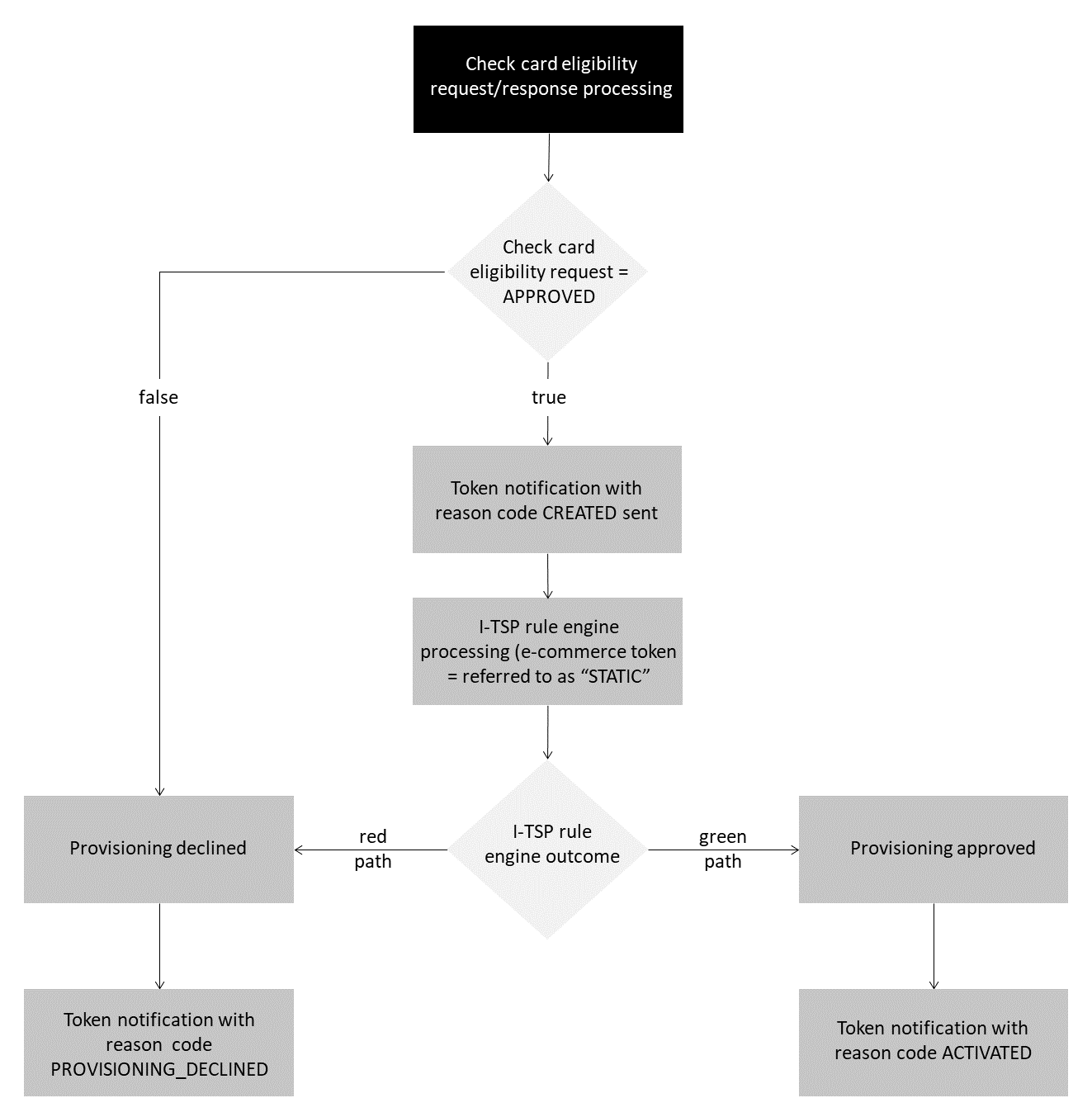
- M4M
M4M is MDES for Merchants (eCommerce specifically). It alleviates security risks by way of tokenization. Sensitive payment credentials are replaced with tokens. When a cardholder enters their card details at checkout Mastercard immediately replaces this with a Mastercard token. The token is both unique to the cardholder and the merchant. When a payment is made, the token is transmitted as opposed to the card details.
In most instances of M4M, cardholders are unaware that a merchant has initiated the tokenization of their card.
- Mada
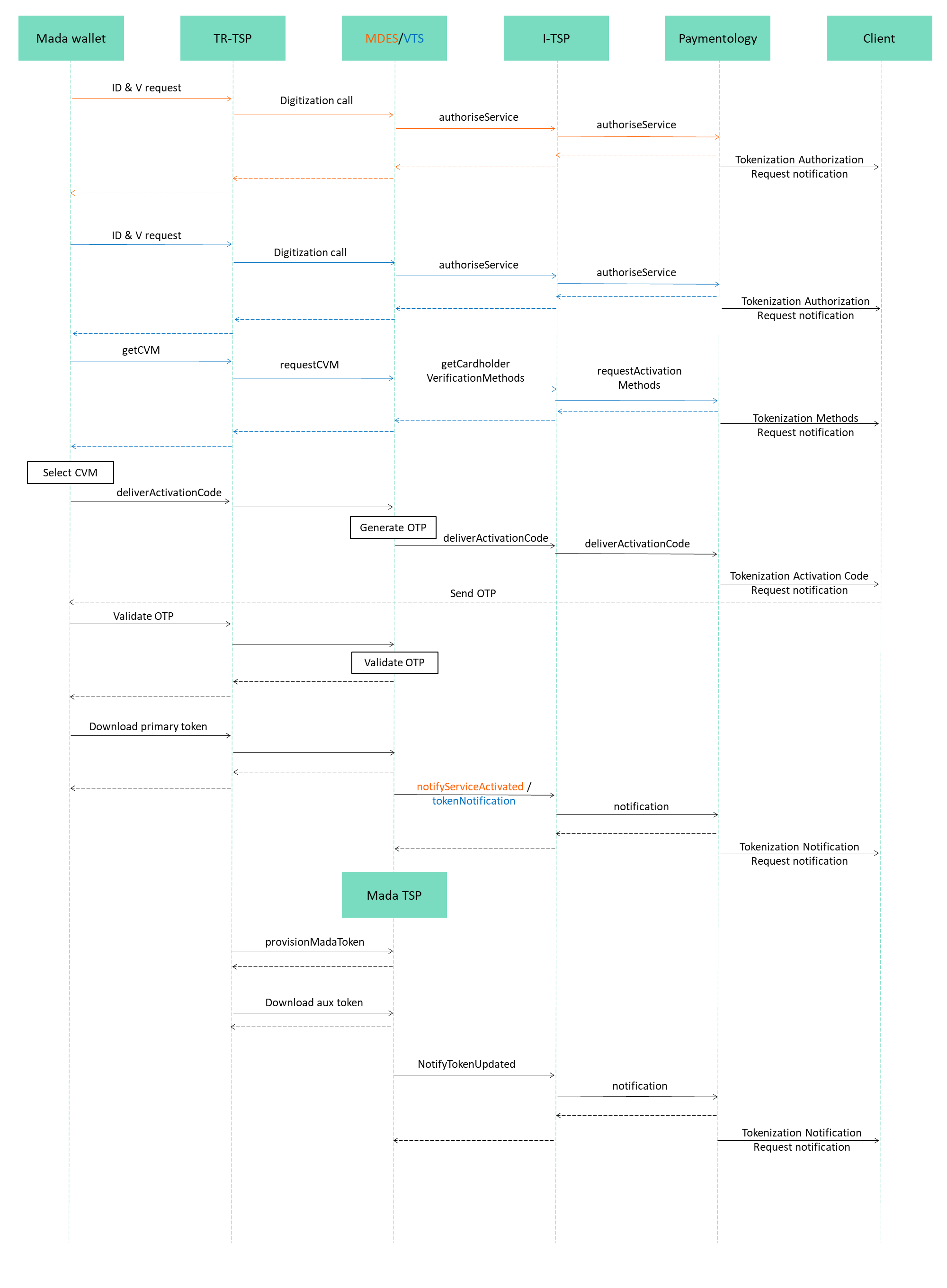
Mada Pay tokenization provisioning flow is documented below. There are six specific notification messages Mada Pay clients need to integrate with:
- Tokenization Eligibility Request (available in VTS)
- Tokenization Authorization Request
- Tokenization Activation Code Request
- Activation Methods Request
- Tokenization Notification Request
- Device Token Binding Request (VTS specific)
The flow differs dependent on the international card network used; VTS - Visa, MDES - Mastercard.
Abandoned provisioning
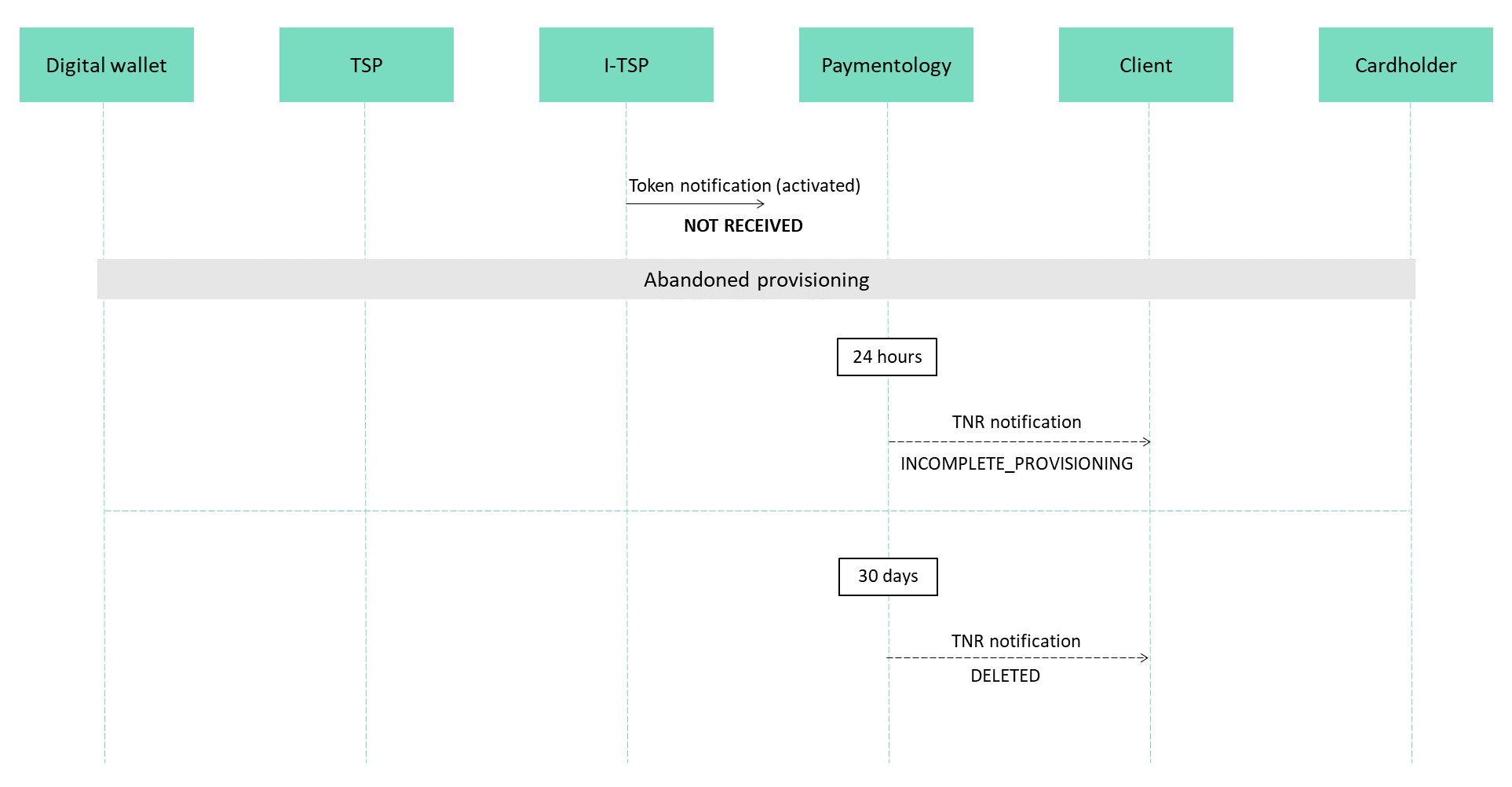
We define abandoned provisioning as a token that has been created but not yet activated. This can occur when a cardholder abandons the authentication process, or simply does not complete the full provisioning process.
In the event abandoned provisioning occurs Paymentology will perform the following:
- 24 hours after token created but not yet activated: Paymentology will notify client via TNR of incomplete provisioning with message reason:
Token Notification: INCOMPLETE_PROVISIONING. - 30 days later: If the cardholder has still not completed the provisioning process, Paymentology will delete the token on behalf of the client and notify client via TNR with message reason:
Token Notification: DELETED.
Abandoned flow
API integration
Generate time based secret
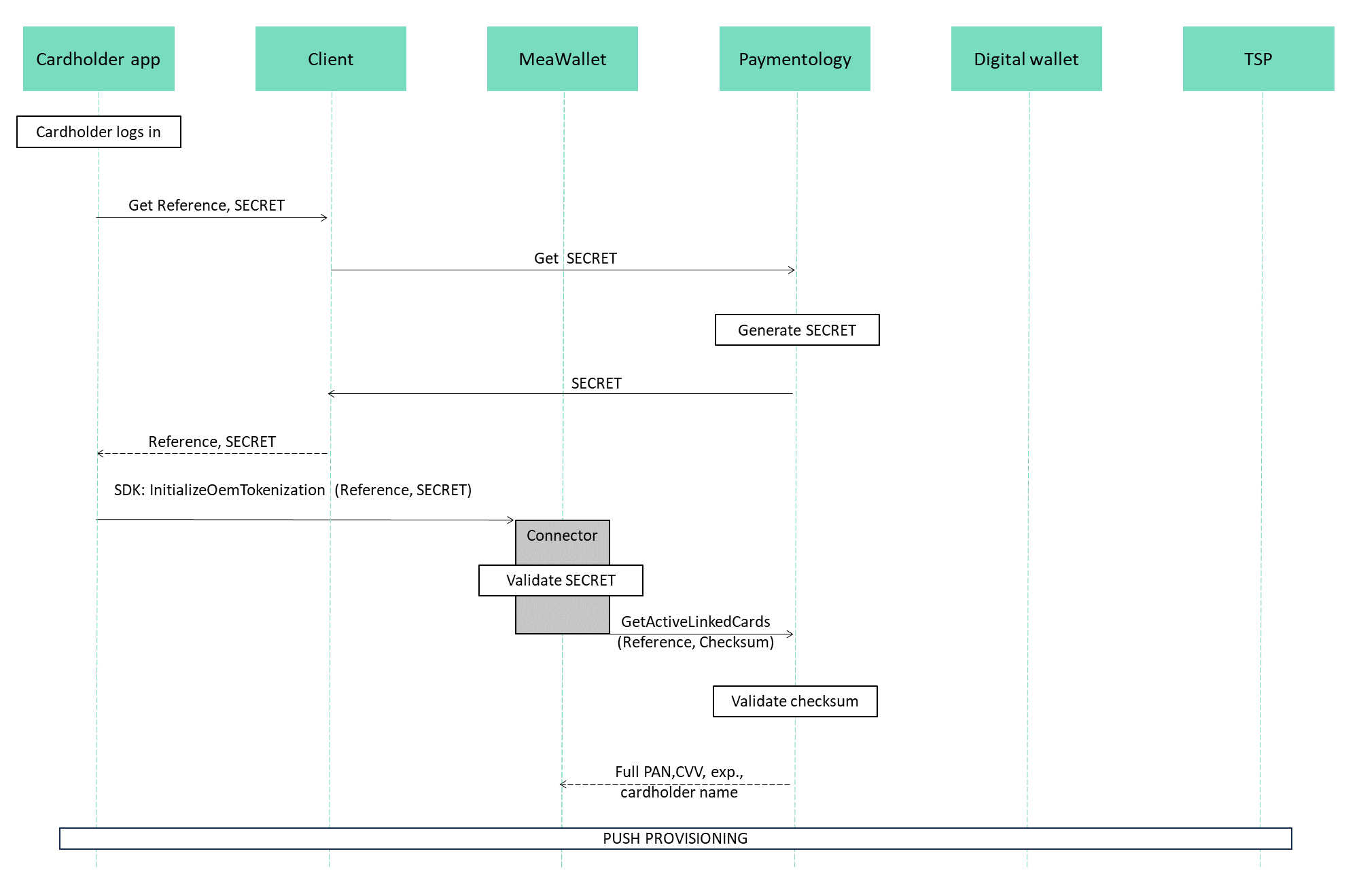
Client's that utilize MeaWallet's Push Provisioning (MPP) SDK are required to integrate with the Generate Time Based Secret API endpoint.
This endpoint is used by clients as an extra step of authentication when MeaWallet needs to call Paymentology's API's on behalf of the client in order to collect cardholder data from Paymentology.
The client will call this endpoint and forward the Time Based Secret to MeaWallet.
Sample request and response messages below. The API schema is available here.
{
  "api_call_unique_identifier": "438574123456789985",
  "client_id": 123456,
  "user_id": "string",
  "remarks": "string",
  "token": 123456789,
  "timeStep": 60,
  "cardSecretLength": 8,
  "algorithm": "HmacSHA512"
}
{
"header": {
"error_id": 0,
"error_desc": "success"
},
"body": {
"secret": "12345678"
}
}Generate apple digitization data
This API endpoint gets the digitization data from the provided token to be used in Apple Pay in-app provisioning verification.
The endpoint is part of PaySecure API, for required session id generation please refer here.
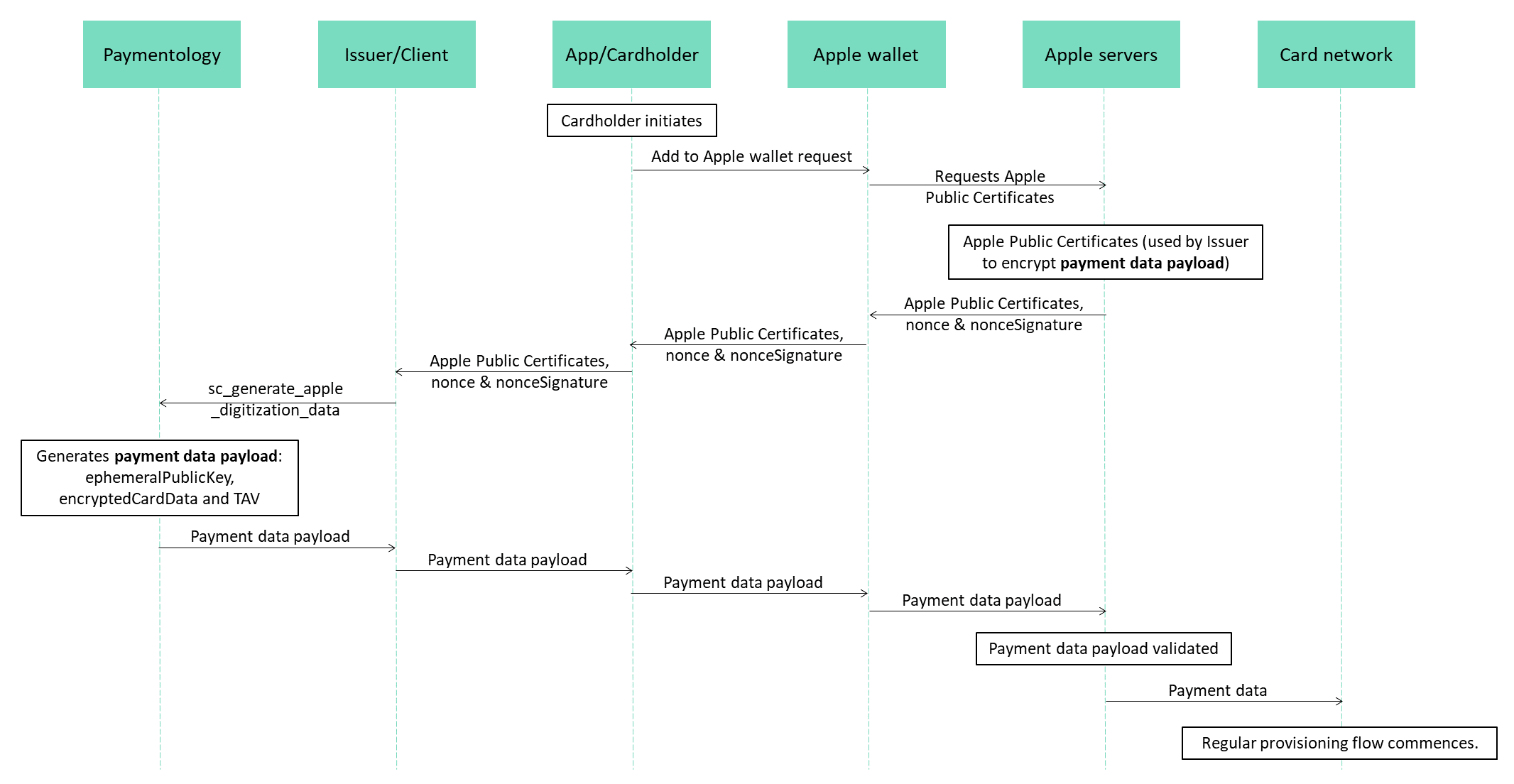
Sample request and response messages below. The API schema is available here.
{
  "client_id": 123456,
  "token": 311123451,
  "tavSigned": true,
  "tavFormat": 3,
  "tavSigningAlgorithm": 1,
  "tavDataFields": "dataValidUntilTimestamp|accountNumber|accountExpiry",
  "appleLeafCertificate": "MIIAAjCCA7igAwIGA...IgTI94NSaIn7DLd47QTK760WILDOr0Ed1HiExJMZwYp7c=",
  "appleNonce": "somenonce",
  "appleNonceSignature": "somenoncesignature"
}
{
"header": {
"error_id": 0,
"error_desc": "success"
},
"body": {
"clientId": 123456,
"token": 311123451,
"tav": "ewogICJ2ZXJzaW9uIiA6AAAzIiwKICAic2lnbmG0dXJlQWxnb3JpdGhtIiA6ICJSU0EtU0hBMjU2IiwKICAiZGF0YVZhbGlkVW50aWxUaW1lc3RhbXAiIDogIjIwMjMtMDEtMThUMDc6MDg6MTRaIiwKICAiaW5jbHVkZWRGaWVsZHNJbk9yZGVyIiA6ICJkYXRhVmFsaWRVbnRpbFRpbWVzdGFtcHxhY2NvdW50TnVtYmVyfGFjY291bnRFeHBpcnkiLAogICJzaWduYXR1cmUiIDogImFmZ2pGZnZCZWdCc21qV25rVnI0b0FTcVhhbDF4M0ZDeXdOOGVLZlJIWitxQnRQVGpZMVpob244WXpOYWlPNkFwWnBBTmh3RDJvN29KcDAzQUQ3cVh3OWl6Zm43SGdwWTBXTFE3ZDFPYUlCM3NoenNVaHhKa3hjVVM5MCtZUlJqTG1hekxodXg5UVhxZjl3R0M1MFNhSmg5MStXcXNkdjQyZFlCbVRaWlBMY25hckNTN0x5NnZNelVEVGxnc1VEcDFXZlFEK1l4UmV4TUxvcmxuNjdOeTRZWkhWOU4wZmhlQTVBTmttSmtVN21lc0VGWTd3S00xNUV4TnZkN1NvNFp1TnVKR3ZiOWl1MjZTUkVyQldydXdFZ0VFZXdCaGdDUEFqOVBsb3B0SzgxNk9tdTU0YWU5WElsaVUxTEk4c1U5VVNKU050UkFGenQ4Rk1xT3d4Q2J1QT09Igp9",
"encryptedCardData": "eyJlhhNyeXB0ZWREYX...2hpbmdBbGdvcm34aG0iOiJTSEE1MTIifQ",
"ephemeralPublicKey": "ewogICJ2ZXJzaW9u...IiA6ICIzIiwKADFic2lnbmF0d"
}
}Generate MDES digitization data
This API endpoint generates TAV and retrieves the encrypted card data to be used during in-app card digitization with MDES.
The endpoint is part of PaySecure API, for required session id generation please refer here.
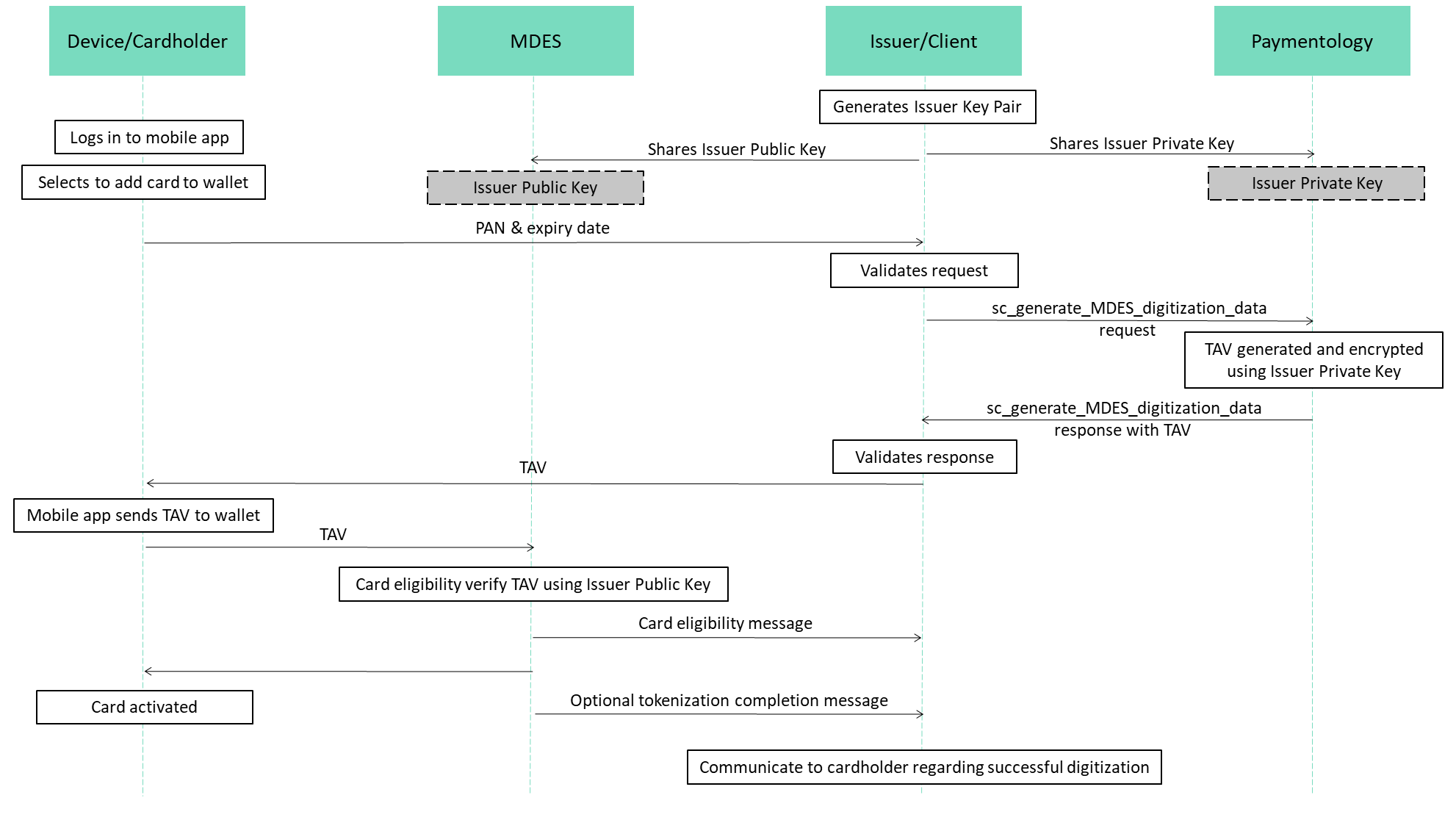
Sample request and response messages below. The API schema is available here.
{
  "client_id": 123456,
  "token": 311123451,
  "tavSigned": true,
  "tavFormat": 3,
  "tavSigningAlgorithm": 1,
  "tavDataFields": "dataValidUntilTimestamp|accountNumber|accountExpiry"
}
{
"header": {
"error_id": 0,
"error_desc": "success"
},
"body": {
"clientId": 123456,
"token": 311123451,
"tav": "ewogICJ2ZXJzaW9uIiA6ICIzIiwKICAic2lnbmF0dXJlQWxnb3JpdGhtIiA6ICJSU0EtU0hBMjU2IiwKICAiZGF0YVZhbGlkVW50aWxUaW1lc3RhbXAiIDogIjIwMjMtMDEtMThUMDc6MDg6MTRaIiwKICAiaW5jbHVkZWRGaWVsZHNJbk9yZGVyIiA6ICJkYXRhVmFsaWRVbnRpbFRpbWVzdGFtcHxhY2NvdW50TnVtYmVyfGFjY291bnRFeHBpcnkiLAogICJzaWduYXR1cmUiIDogImFmZ2pGZnZCZWdCc21qV25rVnI0b0FTcVhhbDF4M0ZDeXdOOGVLZlJIWitxQnRQVGpZMVpob244WXpOYWlPNkFwWnBBTmh3RDJvN29KcDAzQUQ3cVh3OWl6Zm43SGdwWTBXTFE3ZDFPYUlCM3NoenNVaHhKa3hjVVM5MCtZUlJqTG1hekxodXg5UVhxZjl3R0M1MFNhSmg5MStXcXNkdjQyZFlCbVRaWlBMY25hckNTN0x5NnZNelVEVGxnc1VEcDFXZlFEK1l4UmV4TUxvcmxuNjdOeTRZWkhWOU4wZmhlQTVBTmttSmtVN21lc0VGWTd3S00xNUV4TnZkN1NvNFp1TnVKR3ZiOWl1MjZTUkVyQldydXdFZ0VFZXdCaGdDUEFqOVBsb3B0SzgxNk9tdTU0YWU5WElsaVUxTEk4c1U5VVNKU050UkFGenQ4Rk1xT3d4Q2J1QT09Igp9",
"cardData": "eyJlbmNyeXB0ZWREYXRhIjoiYWYxY2Q1MWNlODVhYTZmM2YyNDQ2MzMxOGNhM2E4YzA2NTEyMWRiODI3OGMxOTc2NGYzMzg5NTc2ZTRiYTczZmI1ZDI3OGNmMDkyN2U5MzIzMmI4OTVhNDM0ZjQwMjQwNDgxYzY0NDk4NGM0MmYxNzU4OTAyYTE4YWVhMGE5YzI3YWVjNDc4ZDJhMTFhNGYxYjYwYjJmZTNjM2EzY2RiMGY0MjQwMzE2NTZiYTNkN2FkMWUzMmNhMmY1ZjJmNjU1ZDRmYzRiNWUxMDAzY2Q0Y2YxYjE4YTJmY2QwOWNhMTE4MzZiOTJmNTFjMzI4Mjg0YTA4MmMzMjJhYjdmZmJhNWM4MWZhM2Y2YjhjY2MxYmQyMDM4MTlmMzc0ZmEyZmQwIiwiaXYiOiI2YzAwZDgwNzgwMjM4MTFiMTA3MzVmN2QwMDI4NjFhMCIsImVuY3J5cHRlZEtleSI6IjJmZmE1ZTE3MzhmOWVlZWQxYWViZmVkMGU5NmRmMzU3MGRiNDlkNzJjMjQ5ZjYxMGI0N2NmZTczNTRlZDcyNjk1Y2JkNjgxMWZlZTY0YTYwODAyMDcyMWFhODQzZjU4ZDVmMDViN2ZmMTdiODk4MTdmZWQxNDI0NjMwMzQ2YzRmM2M5ZDU0M2VkYWM0YzkwN2MzNDUxMTcxOWY5OWMzMzY4NmE0ZWFhMzNiMzUyMTczOWZkYTQzMzcxMWI2OTk1YWM5YzE5YzQ3NWY5YjliMWM4OTg3ZTcxYmNiNWFiZTA0ODRlYmRhNjljMmYwNTA3ZTkwYTYyMmI4OTYzNzk4M2Q4MGUyYTdhZTY0ZjM4YTk0NDg0ZTYwNjVhNDc0YTZkODljODU3NzY4ZjBkZWU3YmVmOGZmYTNlMjFkNjlkZTlkNDhjNjEyZDQ2MWE2ZTNmYzQ2MWFkZmU0NTNmYTgxMmUxZWQxOTdlNDhhYjFkZmU1YzgwZGM5YTk4NWYwMmY3YjI4OGZiNzdiZDY5M2Y3OGExYTA4YjUyMWYxZDI0NmI3ZGRmOGY4MzViZjRlMDQ4YTQ1MDU4MjI4YmZkMTZjMDRkNTUyNmFiOTgxNzMxZjIwMDcwN2M2OGIyYjZlNDNjZGUzZjA0MWZmNmJmNzIyOTkwMTFmNzRjOTMyNmRjOTcxIiwicHVibGljS2V5RmluZ2VycHJpbnQiOiJmMDZiYzI4OGQ2OTcyOGU1MzIxNDhmMGU1NDkwZmVkY2U5ZGJjMTAxMmUyMWMzOGI3Mzc3NDAwZDgxOThiYjU3Iiwib2FlcEhhc2hpbmdBbGdvcml0aG0iOiJTSEE1MTIifQ"
}
}Updated 11 months ago