
Account Group Fee Action
Account Group Fee Action
The Account Group Fee Action allows a single rule to apply different fee configurations based on the account group associated with the cardholder's account.
This is useful when the same transaction condition should apply to multiple account groups, but each group should be charged a different fee.
Why use an Account Group Fee Action?
With a standard Fee Action, the fee configuration is attached directly to the rule. If different account groups require different fee amounts, you would need to duplicate the rule and attach a different Fee Action to each copy.
This can make the rule set harder to maintain and creates a risk that one copy of the rule is updated while another is not.
The Account Group Fee Action separates the rule condition from the fee configuration:
- Create the transaction rule once at the product or client level.
- Create one account-group fee action.
- Add a fee configuration for each relevant account group.
- Link the account-group fee action to the rule.
Example: Mexico transaction fee
Assume the requirement is:
- When a transaction occurs in Mexico, charge cards in Account Group A a fee of
$1. - When a transaction occurs in Mexico, charge cards in Account Group B a fee of
$2.
Standard Fee Action approach
Using standard Fee Actions, the configuration would need two separate rules:
| Rule | Scope | Condition | Action |
|---|---|---|---|
| Mexico transaction - Group A | Account Group A | Transaction occurs in Mexico | Fee Action: $1 |
| Mexico transaction - Group B | Account Group B | Transaction occurs in Mexico | Fee Action: $2 |
The transaction condition is duplicated. Any change to the condition must be made in both rules.
Account Group Fee Action approach
Using an Account Group Fee Action, create one rule at the product or client level:
IF transaction country is Mexico THEN apply the Account Group Fee Action
Configure the action as follows:
| Account group | Fee amount |
|---|---|
| Account Group A | $1 |
| Account Group B | $2 |
The rule is evaluated once. The fee configuration is then selected using the account group or groups associated with the cardholder's account.
This keeps the transaction condition in one place while allowing the fee amount to vary by account group.
Configuration
Configure the following fields for each account-group fee entry:
| Field | Description |
|---|---|
| Fee title | A descriptive name for the fee. |
| Fee description | Optional description of the fee. |
| Account group ID | Select the ID of the account group to which the fee configuration below applies. |
| Charge logic | Defines how the fee is calculated, such as FIXED, Percentage, Minimum, Maximum, or Sum. |
| Fixed amount | The fixed fee amount when using fixed-fee logic. |
| Fixed amount currency | Three-digit ISO currency code for the fixed amount. |
| Percentage | Percentage used when using percentage-based fee logic. |
| Fee basis | Defines whether the fee is charged when the transaction is approved, declined, or always. |
Add one account-group fee entry for every account group that requires a different fee configuration.
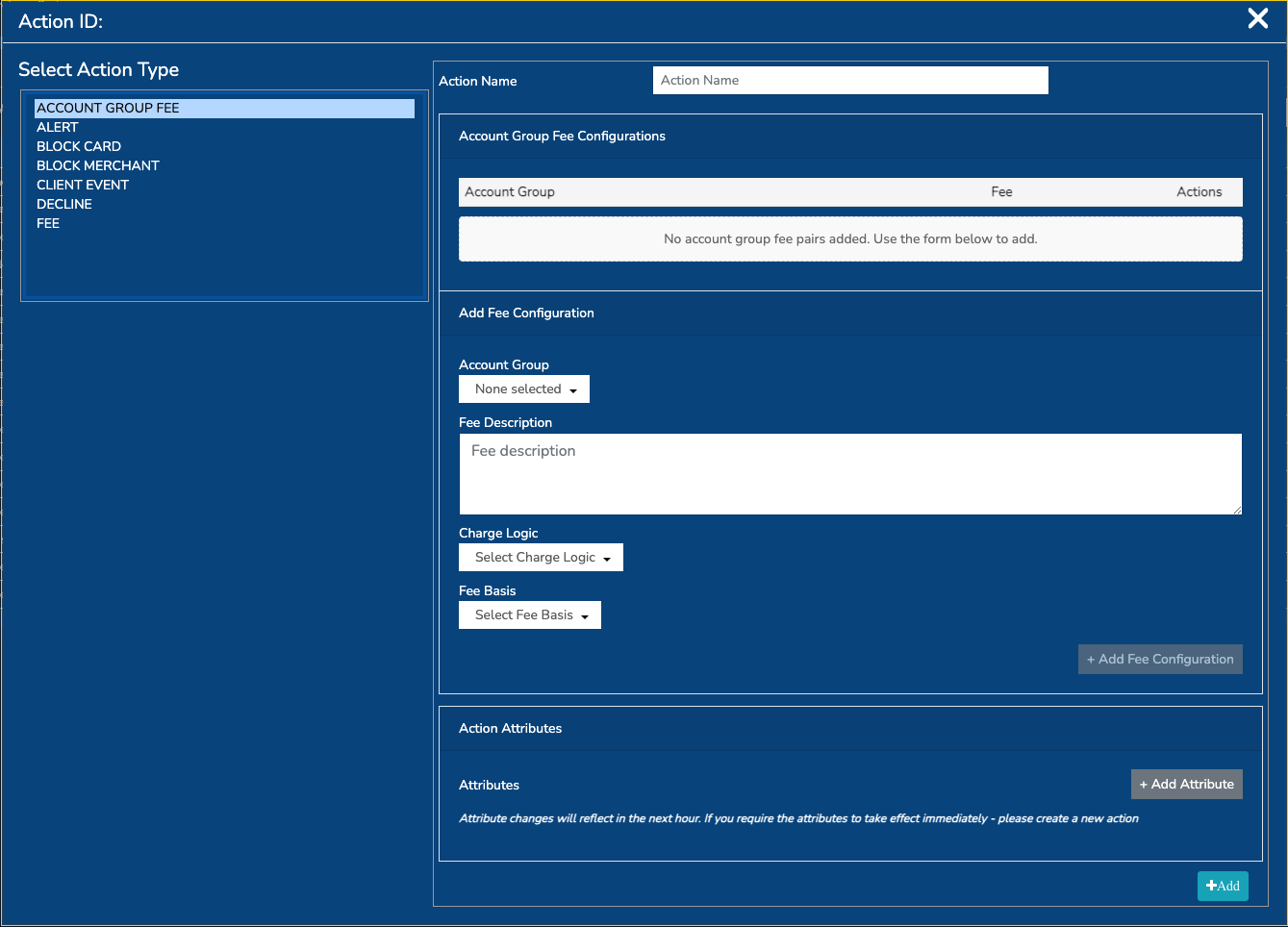
How matching works
When the action is evaluated:
- Decision Engine returns the account group IDs associated with the transaction's account.
- The action finds all configured fee entries whose account group ID matches one of those account group IDs.
- Each matching fee configuration is planned and added to the transaction's Decision Engine fee output.
- The fee amounts are converted into the required transaction, billing, and USD currencies where exchange rates are available.
Important: multiple matching account groups
The action supports accounts associated with more than one account group. If more than one configured account group matches the transaction, each matching fee entry is included.
For example, if an account belongs to both Account Group A and Account Group B, the configuration above produces both fees: $1 and $2.
If the intention is to charge only one fee, make sure the account-group assignments and action configuration do not produce multiple matches.
Fee basis
The fee basis controls when the fee is charged:
| Fee basis | Description |
|---|---|
CHARGE_IF_APPROVED | Charge the fee only when the transaction is approved. |
CHARGE_IF_DECLINED | Charge the fee when the transaction is declined. |
ALWAYS_CHARGE | Charge the fee regardless of the transaction outcome. |
Summary
Use an Account Group Fee Action when:
- The transaction condition is the same for multiple account groups.
- The fee amount or calculation differs by account group.
- You want to define the rule once at product or client level.
- You want to reduce duplicated rules and simplify future maintenance.
The action centralises the rule condition while keeping fee configuration specific to each account group.
Updated about 2 months ago