

Create and Link an Account Group
Outcome
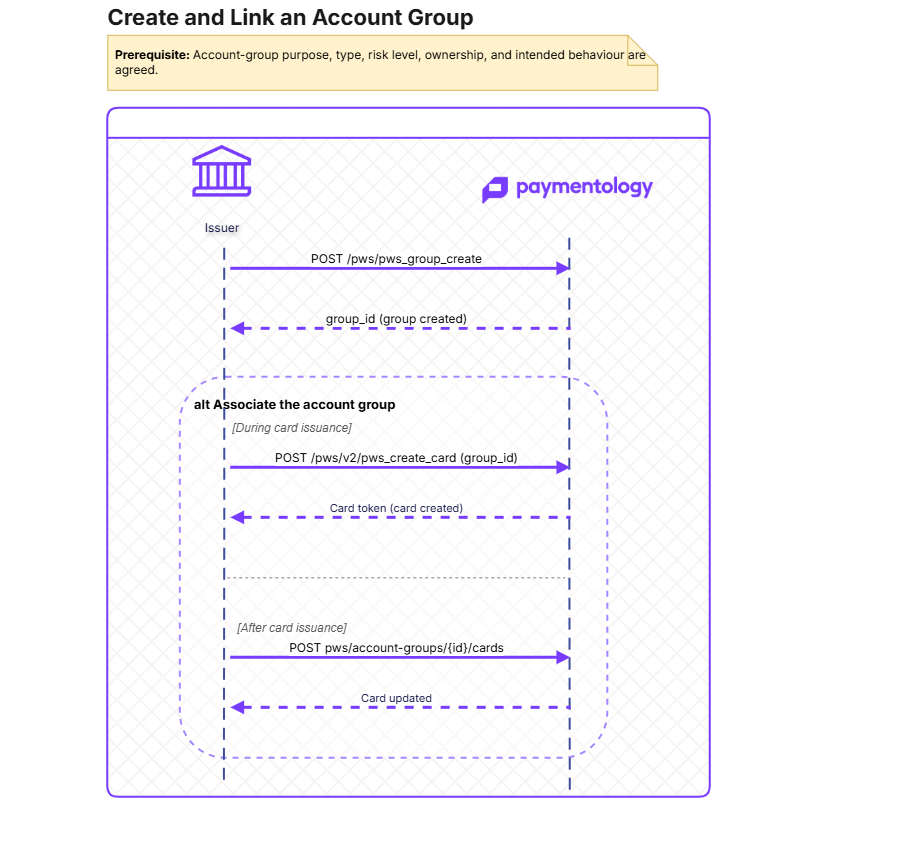
Use this guide to create an account group and associate it with an account through card issuance or after a card already exists.
An account group is a reusable configuration container. Creating one does not create a customer, account, card product, account, or card. Linking a group through a card associates the card’s underlying account with that group.
Who this is for
| Audience | Responsibility |
|---|---|
| Backend Engineer | Creates groups, stores group IDs, links them to accounts, and implements retry handling. |
| Product Manager | Defines the business purpose, intended controls, and which accounts should be included. |
| Operations or Risk Team | Configures and validates the policies, rules, or fees associated with the group. |
Overview
Prerequisites
| Prerequisite | Description |
|---|---|
| Client and API access | A valid client ID and entitlement to call the required PayAPI endpoints. The configuration is done during the onboarding in cooperation the Paymentology Implementation team. |
| Group design | An agreed purpose, group type, risk level, and ownership model. The configuration is done during the onboarding in cooperation the Paymentology Implementation team. |
| Existing card and account | Required only when associating a group after card issuance. |
| Card issuance prerequisites | Required only when associating a group during Create Card: configured card product, customer, and account or account-creation inputs. The configuration is done during the onboarding in cooperation the Paymentology Implementation team. It is created in PayControl>Clients List>Add Product/Add Customer. |
A customer, card product, account, and card are not prerequisites for creating the account group itself.
Recommedned flow
Define the group
Before calling the API, agree:
- The business purpose of the group.
- The accounts that should be governed together.
- The group type and risk level.
- The team responsible for its configuration and operational support.
Avoid using a group as an informal label. Its type and linked configuration can affect cardholder behaviour.
Create the account group
API Reference: Create Group
Required fields:
| Field | Value / purpose |
|---|---|
client_id | Your program client ID. |
api_call_unique_identifier | Unique identifier for this create request. |
group_name | A short, durable name for the group, up to 50 characters. Make it meaningful to operational users; for example, UK_PREMIUM_DEBIT rather than Group 1. |
group_desc | A business-readable description, up to 100 characters. State the group’s purpose and intended population; for example, Premium UK debit accounts with enhanced limits. |
group_type | Defines the functional classification of the group. Select the value that matches the capability being configured: 2 general container, 3 fees, 4 authorisation activities, 5 settlement activities, 6 scheduled tasks, 7 fraud assessment, 8 AI rules, or 9 wallet interactions. Choose the type during design; do not use it as a free-form label. |
risk_level | Your agreed risk classification for the group, up to 10 characters. The API requires a non-empty value, but the permitted vocabulary and its operational meaning should be defined by the program’s risk design. |
Store the returned group_id. This is the identifier used when associating the group with accounts.
Alternative: create the group in PayControl
The same account-group setup can be completed in the PayControl UI by an authorised operations or configuration user.
Use the UI where group creation is an operational configuration activity; use the API where your backend must create groups as part of a controlled automated workflow. These are alternative administration paths, not separate group types.
Whichever path is used:
- Store the resulting group ID in your system of record.
- Avoid creating the same business group through both the UI and API.
- Define ownership for future configuration changes and membership updates.
- Validate the group’s configured behaviour in UAT before associating production accounts.
Associate the group during card issuance
Where the account is being created or selected as part of card issuance, include group_id in:
API Reference: Create Card
| Field | Value / purpose |
|---|---|
group_id | One or more existing group IDs, supplied as a comma-separated string; for example, "55,56". |
ac_id | Existing account to associate with the group. |
Validate every group ID before issuing the card. An invalid ID in a comma-separated list can result in that individual association being skipped.
Associate a group with an existing card
Use the group ID in the path and provide one or more existing public card tokens.
API Reference: Add cards to account group
This operation resolves the account linked to each supplied card and associates that account with the account group. It is idempotent: repeating the same successful association should not create duplicate membership.
What is created or changed
| Record | Created or changed? |
|---|---|
| Account group | Created by pws_group_create. |
| Group ID | Created and returned by the API. |
| Customer | No. |
| Card product | No. |
| Account | No; an existing account is associated with the group. |
| Card | No; a card can be used to identify the account to associate. |
| Account-group membership | Created when the group is linked during card issuance or through the existing-card endpoint. |
Important considerations
- Account groups operate at account scope. If multiple cards share one account, associating that account can affect all cards that use it.
- Creating the group alone does not activate any business control. Configure and test the intended rules, actions, or fees separately.
- Treat
api_call_unique_identifieras a durable request-correlation value. If the outcome is uncertain, reconcile before submitting another create request. - Store the group ID with its business purpose, owner, and lifecycle status in your own system.
- Do not use a new group for every cardholder unless the intended policy genuinely requires account-level isolation.
- Changes to group membership should be auditable and owned by a clearly defined operational team.
Testing
| Test case | Expected result |
|---|---|
| Create group | A group is created and the response returns its ID. |
| Missing required field | The request fails and no group is created. |
| Duplicate or timed-out create request | The client reconciles the outcome before attempting another create operation. |
| Link during card issuance | The issued card’s account is associated with each valid requested group. |
| Link an existing card | The account behind the supplied public card token is associated with the target group. |
| Repeat association | No duplicate account-group membership is created. |
| Shared-account scenario | All cards using the same account behave according to the configured account-group policy. |
| Rule or fee validation | The configured business behaviour is observed in the target UAT scenario. |
Errors, retries, and request correction
Use header.error_id and header.error_desc as the primary outcome signal. Do not decide whether to retry from the HTTP status alone.
Persist the original api_call_unique_identifier, requested group name, client ID, and returned group ID before proceeding to configuration or account association.
Retry automatically
| Response or situation | Error description | Automatic retry? | Required retry behaviour |
|---|---|---|---|
| No response / network timeout | The caller did not receive a response. The create operation may still have completed. | Controlled | First reconcile whether the group was created using the original request details. Retry only if creation cannot be confirmed, using the same business request and original identifier where supported. |
| Temporary platform or gateway failure | A transient service, gateway, or infrastructure failure is explicitly indicated. | Controlled | Retry with bounded backoff. Limit attempts and alert the operations team when the limit is reached. Do not create a second group with a different name or identifier as a workaround. |
| Service unavailable after a previously successful request | The client received an uncertain transport failure, but the group is later found to exist. | No retry required | Treat the operation as successful. Store the returned group ID and continue with configuration or association. |
Do not retry automatically
| Response or situation | Error description | Automatic retry? | Required correction |
|---|---|---|---|
| Request validation failure | A required field is missing or invalid, for example group_name, group_desc, group_type, risk_level, client_id, or api_call_unique_identifier. | No | Correct the request according to the API contract. Validate field lengths, allowed group_type values, and approved risk_level values before resubmission. |
| Authentication or permission failure | The credentials are invalid, expired, or not entitled to create groups for the specified client. | No | Correct credentials, client access, or feature entitlement. Do not retry until access is confirmed. |
| Invalid client | The supplied client_id does not identify an authorised client. | No | Correct the client ID and confirm that the calling credentials are authorised for it. |
| Duplicate or conflicting create request | The request conflicts with an existing group or a previously used request identifier. | No | Reconcile the original request and use the existing group where appropriate. Do not submit another create request merely to bypass the conflict. |
| Unsupported group classification | The requested group_type or risk_level is not valid for the target environment or agreed design. | No | Select an approved classification and confirm its intended configuration before resubmitting. |
| Successful response with a group ID | The response includes body.id. | No | Treat the group as created. Store the ID and continue with separate configuration and account-association steps. |
| Unexpected application error | The API returns an error that is neither clearly transient nor explained by the request. | No | Stop automatic processing. Capture the request identifier, timestamp, client ID, request body excluding sensitive information, and full API response; then raise a support case. |
Related APIs
- Create a group: Create group
- List groups: Get linked account groups
- Create a card: Create card V2
Updated about 1 month ago