

Set Card Status
Outcome
Use this guide to change the network-facing status of an existing Paymentology card.
A card-status update can activate, block, restrict, mark as lost or stolen, expire, or void an existing card. It does not create a new customer, account, card product, card, public card token, or digital-wallet token.
Use the card’s existing Paymentology public card token to identify the card.
Who this is for
| Audience | Responsibility |
|---|---|
| Backend Engineer | Calls the status APIs, implements idempotency and reconciliation, and stores the status-change audit record. |
| Product Manager | Defines permitted status transitions, activation policy, lost/stolen handling, and wallet-token behaviour. |
| Fraud and Compliance Team | Defines the policy for restricted, lost, stolen, and compliance-hold statuses. |
Overview
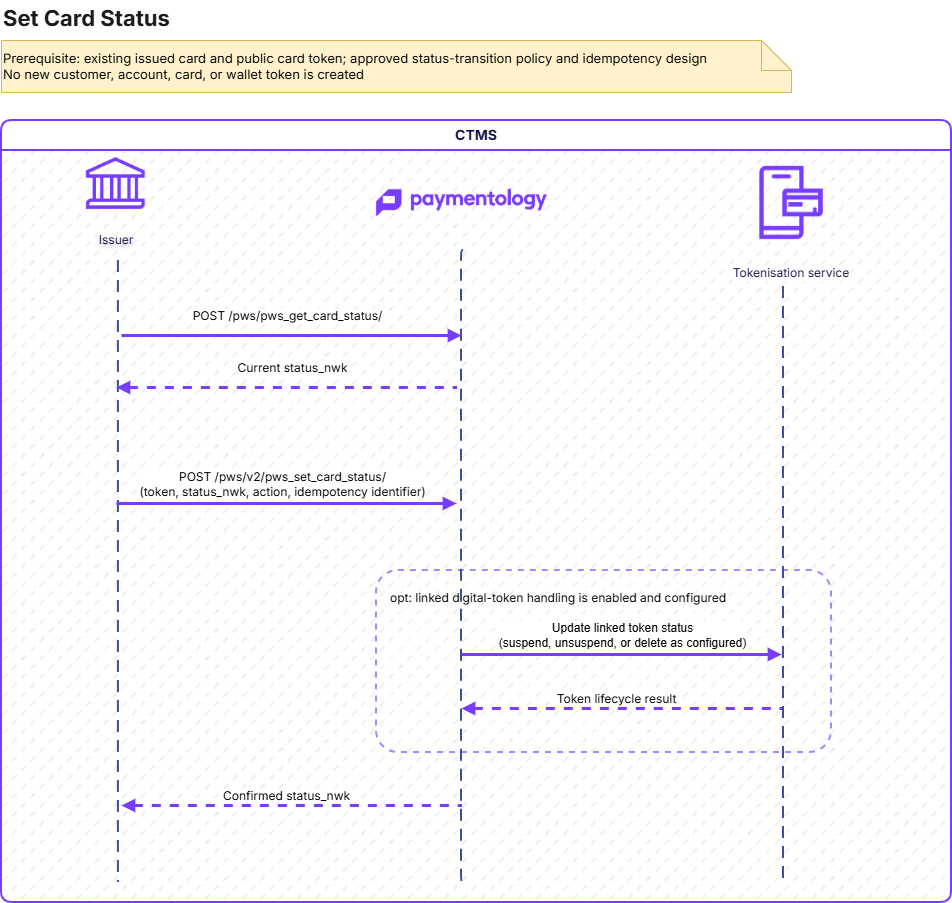
Prerequisites
Before changing a card status, the following must be enabled in cooperation with Paymentology:
| Prerequisite | Description |
|---|---|
| Client and API access | A valid client_id, API credentials, and permission to call card-status endpoints.The configuration is done during the onboarding in cooperation the Paymentology Implementation team. |
| Issued card | An existing Paymentology card. |
| Public card token | The existing card’s public token, used to identify the card in the request. |
| Status-management policy | An agreed policy defining authorised users, valid transitions, customer communications, and operational controls. |
| Idempotency design | A unique api_call_unique_identifier generated and persisted for each logical status-change request. |
| Wallet-token policy | Required if the card has linked digital-wallet tokens and the client uses Paymentology tokenisation services. |
A new customer, account, card product, card, PAN, or wallet token is not required or created by this journey.
Recommended status-change flow
Retrieve the current card status
Before making a material status change, retrieve the current status and confirm that the requested transition is permitted by the client’s policy.
API Reference: Get Card Status
Use the existing public card token to retrieve the current status_nwk.
This step is especially important before activation, lost/stolen reporting, voiding, renewal, replacement, or retrying a timed-out request.
Select the target status_nwk
status_nwkUse the approved network status that matches the operational event. A complete list could be found at: Card status.
Do not treat all non-1000 statuses as interchangeable. Lost, stolen, restricted, compliance, expired, and void cases have different operational and scheme consequences.
Set the card status
API Reference: Set Card Status V2
Required inputs:
| Field | Value / purpose |
|---|---|
client_id | Your Paymentology client ID. |
api_call_unique_identifier | Unique identifier for this logical request. Reuse it only when retrying the same request with the same payload. |
token | Existing public token for the card. |
status_nwk | Target network-facing card status. More information about the card statuses is available at Card status. |
Optional inputs:
| Field | Purpose |
|---|---|
action | 1 for a normal status change. 2 only for status handling related to a renewed card. |
note | Short operational note, maximum 200 characters. |
update_digital_token | V2 field intended to control linked digital-token handling. Validate its deployed behaviour before relying on it. |
Confirm and reconcile the result
On success, store:
- The public card
token - Previous and target
status_nwk api_call_unique_identifier- Business reason and
note - Operator or source system
- Timestamp
- Whether wallet-token handling was requested
- The response from Paymentology
Retrieve the card status again when the action is operationally significant or when the original request timed out.
Renewal-related status handling
Use action: 1 for normal status changes.
Use action: 2 only when the status update is associated with a renewed card.
action | Behaviour |
|---|---|
1 | Normal status change. This is the default when action is omitted. |
2 | Renewal-related status handling. The status retained during renewal can override the incoming status_nwk. If no renewed card is found, the request behaves as a normal status change. |
Do not use action: 2 to renew or replace a card. Use the Card Renewal V2 endpoint for renewal or replacement.
What is changed by Set Card Status
| Record | Changed by Set Card Status? |
|---|---|
| Existing card | Yes; the network-facing status_nwk changes. |
| Linked digital-wallet tokens | May be affected, subject to the deployed tokenisation configuration and status-sync behaviour. |
| Customer | No. |
| Account | No. |
| Card product | No. |
| PAN | No. |
| Public card token | No; the existing value identifies the card. |
| New wallet token | No. |
Important considerations
- Card status is different from
tok_flags. Use public token flags to control transaction behaviour, not to represent lost, stolen, blocked, or void lifecycle events. - V2 supports idempotency. Persist
api_call_unique_identifierbefore calling the API and reuse it only for an unchanged retry. - A timeout is not evidence that the status did not change. Retrieve the current card status before retrying.
Linked digital-wallet tokens
Validate the wallet-token behaviour in UAT before publishing it as a firm operational contract.
The linked digital tokens are:
- Unsuspended when
status_nwkis set to1000 - Deleted when
status_nwkis set to1199 - Suspended for other status values
Do not assume that update_digital_token produces a deterministic wallet-token outcome until this has been tested against the deployed database procedures and tokenisation configuration.
Testing
| Test case | Expected result |
|---|---|
| Activate card | status_nwk changes to 1000 and the card follows the agreed activation policy. |
| Temporary block | status_nwk changes to 1005 and card transactions are declined according to the configured behaviour. |
| Lost-card report | status_nwk changes to 1041 and the expected lost-card processing occurs. |
| Stolen-card report | status_nwk changes to 1043 and the expected stolen-card processing occurs. |
| Compliance hold | status_nwk changes to 1011 and the card follows the compliance restriction policy. |
| Void card | status_nwk changes to 1009 or 1199 according to the agreed retirement policy. |
| Invalid status | The request fails validation and the existing card status remains unchanged. |
| Invalid public token | The request fails and no card status changes. |
| Duplicate submission | Repeating the same request with the same idempotency identifier does not produce an unintended additional update. |
| Timeout and reconciliation | The client can determine the final card status before deciding whether to retry. |
| Renewal-related action | action: 2 follows the expected renewal-specific behaviour only when a renewed card exists. |
| Linked wallet-token handling | Wallet-token outcomes match the agreed and UAT-validated status-sync policy. |
| Audit trail | The client stores the request, response, reason, operator, and resulting status. |
Errors, retries, and request correction
Use header.error_id and header.error_desc as the primary outcome signal. Do not decide whether to retry from the HTTP status alone.
A retry must always reuse the same api_call_unique_identifier and identical payload. A changed target status, token, action, note, or wallet-update setting is a new business request and requires a new identifier.
Retry automatically
| Error ID | Error description | Automatic retry? | Required retry behaviour |
|---|---|---|---|
| No response | No PayAPI response received | Yes | Retry the same payload and identifier after backoff. |
1066 | Original request still processing. Please try again later. | Yes, after waiting | Do not run in parallel; retry the same request when processing has had time to complete. |
987 | We are temporarily unable to handle the request. Please try again later. | Yes | Bounded retry with the same payload and identifier. |
988 | Error executing Request. Contact Paymentology for support | Yes | Bounded retry with the same payload and identifier. |
989 | Error executing Request. Contact Paymentology for support | Yes | Controlled retry with the same payload and identifier. |
Do not retry automatically
| Error ID | Error description | Automatic retry? | Required action |
|---|---|---|---|
995 | model Validation Failed | No | Correct the invalid field or request format, then submit a new business request with a new identifier. |
990 | The client_id is invalid! Please provide a valid client id | No | Correct the client ID or target-environment configuration. |
993 | api_call_unique_identifier already been used! | No | Reconcile the original operation. Use a new identifier only for a genuinely new status-change request. |
994 | The token is invalid ! | No | Validate the public card token and its client ownership. |
996 | Permission denied ! The client does not have access to this web service. Contact Paymentology | No | Correct client entitlement or API access in the target environment. |
997 | Description varies; for example, Provided card and account are not linked | No | Correct the missing card, account, mapping, or configuration defect indicated by error_desc. |
1060 | Failed to set card status at the moment please try again | No automatic retry | Retrieve the current card status, reconcile the outcome, and escalate repeated failures. |
Related APIs and documentation
- Get card status: Get Card Status
- Set card status: Set Card Status V2
- Card status guide: Card status
- Card renewal and replacement: Card renewal and replacement
- Card status notifications: Card Status Updates
- Tokenisation lifecycle: Overview
Updated about 1 month ago