

Issue a Physical Card
Outcome
Use this guide to issue a physical card through PayAPI and understand the records and fulfilment configuration that must exist beforehand.
A physical card is created by the standard Create Card API with card_type: 1. The API creates the card and returns the Paymentology public card token. Physical personalisation, manufacturer-file generation, dispatch, delivery, and activation are separate operational stages.
Who this is for
| Audience | Responsibility |
|---|---|
| Backend Engineer | Orchestrates the APIs, stores identifiers, implements idempotency, reconciliation, and error handling. |
| Product Manager | Confirms the physical-card product, initial state, cardholder experience, fulfilment policy, and lifecycle journeys. |
| Operations and Fulfilment Team | Confirms manufacturer, card artwork, carrier, delivery, file-schedule, and support arrangements. |
Overview
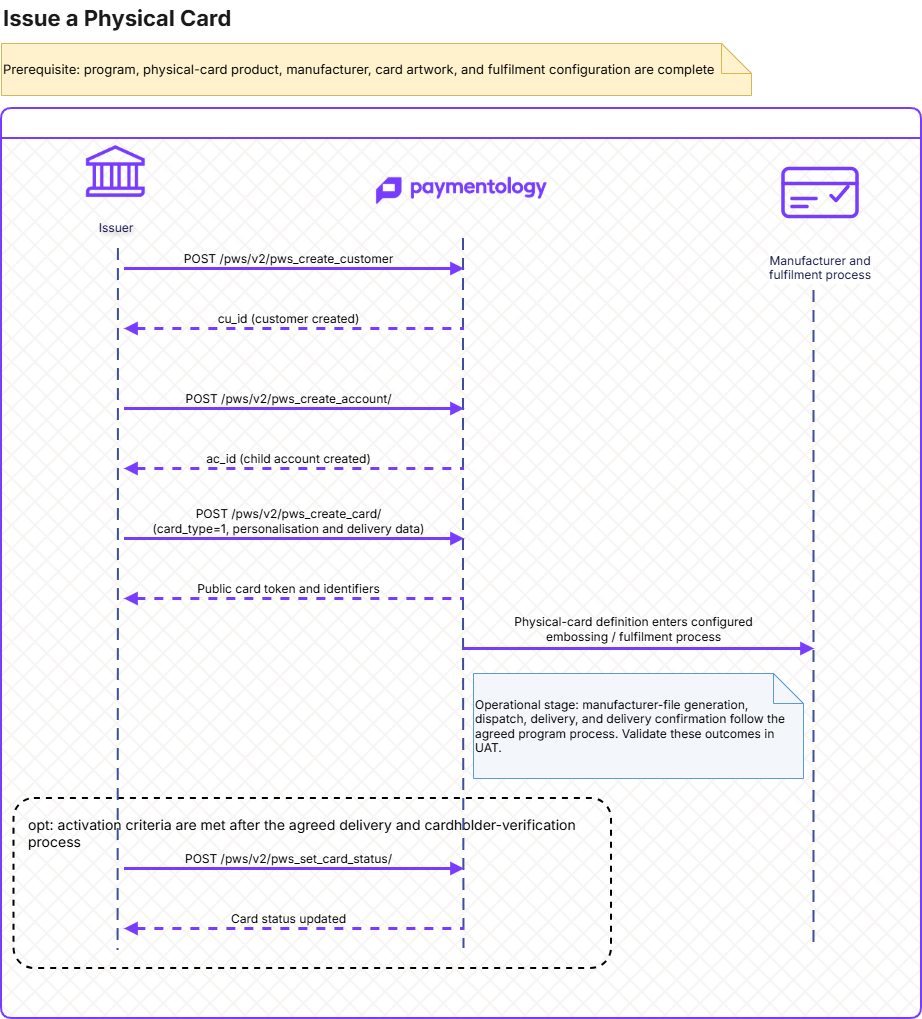
A successful Create Card response confirms that the card record was created. It does not confirm that the card has been personalised, dispatched, delivered, or activated.
Prerequisites
Before issuing any cards, the following program-level configuration is enabled in cooperation with Paymentology:
| Prerequisite | Description |
|---|---|
| Client and API access | A valid client_id and permission to call the required PayAPI endpoints.The configuration is done during the onboarding in cooperation the Paymentology Implementation team. |
| Root parent account | An existing account-hierarchy root. Account creation requires a parent account and cannot bootstrap the hierarchy. The root parent account is created during the onboarding in cooperation the Paymentology Implementation team. It is done in PayControl>Clients List>Add Client. |
| Physical card product | A configured card product, referenced by crd_prdct_id. The product controls the BIN range, currencies, card stack, manufacturer, authorisation model, and rules.The configuration is done during the onboarding in cooperation the Paymentology Implementation team. It is available in PayControl>Clients List>Add Product. |
| Manufacturer configuration | A configured default manufacturer, or an agreed card_manuf_id for the physical-card product.The configuration is done during the onboarding in cooperation the Paymentology Implementation team. It is done in PayControl>Clients List>Add Card Manufacturer. |
| Card image | The requested image_name must be configured for the client in PayControl.The configuration is done during the onboarding in cooperation the Paymentology Implementation team. It is done in PayControl>Clients List>Upload Virtual Card Image. |
| Personalisation and fulfilment design | Agreed embossing, carrier, insert, envelope, delivery, and manufacturer-file arrangements. |
| Initial state policy | An agreed initial status_nwk, commonly blocked until delivery or cardholder activation. |
Recommended issuance flow
Create the customer
Create the cardholder first to receive a durable customer ID (cu_id).
API Reference: Create Customer V2
Required inputs:
| Field | Value / purpose |
|---|---|
client_id | Your program client ID |
api_call_unique_identifier | Idempotency identifier for this issuance attempt |
cu_fname | Customer first name |
cu_mobile | Customer mobile number |
cu_sname | Customer last name |
Store the returned cu_id. It should be reused for future cards and accounts belonging to the same customer.
Create a child account
Create an account for the customer under the program’s existing parent account.
API Reference: Create account V2
Key inputs:
| Field | Value / purpose |
|---|---|
client_id | Your program client ID |
api_call_unique_identifier | Idempotency identifier for this issuance attempt |
ac_parent_id | Existing parent account |
ac_set_ccy | Settlement currency |
ac_bill_ccy | Billing currency |
cu_id | Customer to associate with the account |
account_name | Account holder name |
Store the returned account id (ac_id).
Create the physical card
API Reference: Create Card V2
Key inputs:
| Field | Value / purpose |
|---|---|
client_id | Your program client ID |
api_call_unique_identifier | Idempotency identifier for this issuance attempt |
card_type | 1 for a physical card |
crd_prdct_id | Existing configured physical-card product |
cu_id | Existing customer ID |
ac_id | Existing child account ID |
status_nwk | Pass 1000 to create a card in active state or 1005 to create a card in a blocked state.More information about the card statuses is available at Card status. |
token_group_id | An optional request field used to associate the card’s public token with a token group. Token groups provide a way to apply common controls or rules - such as spending limits, transaction restrictions, or fraud and risk policies - to multiple cards. This grouping is separate from the account-level grouping provided by group_id, so cards from different accounts can belong to the same token group. For example, token_group_id: "21345" associates the public card token with token group 21345; a request may also include "group_id": "55" for account-level grouping. |
image_name | Case sensitive configured physical-card image template. The configuration is done during the onboarding in cooperation the Paymentology Implementation team. It is done in PayControl>Clients List>Upload Virtual Card Image. |
image_delivery | Instructs the platform whether and how to include the generated card image in the response;
Note that image_delivery does not determine which details appear in the image - that is controlled by image_fields. |
image_fields | Controls which details are included inside the generated card image, in this order: PAN, CVV, expiry date, public token, and emboss name, so "10000" means the image contains the PAN but not the CVV, expiry, token, or emboss name. |
xml_fields | Controls which card details are returned as separate JSON fields, in this order: PAN, CVV, expiry date, public token, and emboss name; therefore, "00000" hides all five from the JSON response. |
client_card_ref | Recommended client-side business and reconciliation reference |
emboss_name | Name to appear on the physical card, where configured |
card_manuf_id | Manufacturer override, if the product default is not used |
product_ref | Physical-card design reference used by the card printer, where required |
The API returns the newly created card’s public token. Store this as the main identifier for later card-management operations.
Physical personalisation and delivery
Use the Create Card request’s physical-card fields only where they are agreed for the program and supported by the selected manufacturer.
| Area | Examples of relevant fields |
|---|---|
| Cardholder details i.e. the person whose name is associated with the card. | Use the If you provide an existing If you do not provide |
| Delivery recipient and address | Use the Use them when the delivery recipient or address differs from the cardholder, or when the manufacturer and courier process requires explicit delivery information. |
| Purchaser delivery | A purchaser is the person or organisation arranging the card, rather than necessarily the person who will use it. This is relevant when a company, parent, guardian, or other authorised third party requests delivery for a cardholder. pur_cust_type selects the address source for an individual delivery:
pur_cust_type is 1, provide a complete and internally consistent pur_* identity and address set. When it is 0, ensure the cardholder details are sufficient for the agreed delivery design. |
| Carrier and packaging | A carrier is the physical packaging that holds the card when it is sent to the recipient. It can include printed information, terms, welcome material, activation instructions, or other inserts. These fields, |
| Delivery grouping | Use Paymentology uses this value to group delivery information in the physical-card personalisation file under the |
| Additional personalisation | These optional fields, Some reserved values can automatically insert the card’s public token. Confirm the final printed placement and supported content with the configured card manufacturer. |
The API creates the physical-card definition. The card is then included in the configured embossing or manufacturer-file process. File generation and dispatch frequency must be confirmed during onboarding; they are not proof of card delivery.
What is created by Create Card
| Record | Created by Create Card? |
|---|---|
| Physical card | Yes |
| Public card token | Yes; returned as token |
| Link between card and supplied account | Yes |
| Child account | Yes, only when ac_parent_id is used instead of ac_id |
| Customer | The request supports cardholder data in place of an existing cu_id; use the dedicated customer endpoint for explicit customer management |
| Manufacturer-file entry | Operationally expected for a configured physical-card program; validate this in UAT |
| Physical card, carrier, or delivery | No; these are downstream fulfilment outcomes |
| Digital wallet token | No |
Optional shortcut: create the child account during card issuance
Instead of supplying an existing ac_id, Create Card can receive:
ac_parent_idac_name- optional account reference and currency inputs
In this mode, PayAPI creates a child account and links it to the card. The response returns the generated ac_id.
This is valid for simpler flows, but the recommended production pattern is to create the customer and account explicitly. It makes customer ownership, account reuse, reconciliation, and retry handling clearer.
Optional shortcut: create the customer during card issuance
Instead of supplying an existing cu_id, Create Card can receive cardholder details in the same request.
In this mode, omit cu_id and provide the required ch_* cardholder fields. PayAPI passes those details into the card-creation flow, which creates the customer record and associates it with the card.
Use this approach only when creating the customer is part of a single, one-time issuance flow. The recommended production pattern remains to create the customer explicitly first. This gives the client a durable customer identifier before account and card creation, and makes duplicate prevention, customer updates, reconciliation, and support investigations clearer.
When cu_id is omitted, provide a complete cardholder profile appropriate for the selected product and delivery design:
- ch_title
- ch_fname
- ch_sname
- ch_addr1
- ch_addr2
- ch_pcode
- ch_city
- ch_country
- ch_email
- ch_mobile
- ch_region
- ch_dob
The exact mandatory subset can be enforced by downstream product and customer rules. Validate the intended payload in UAT.
For the simplest single-call flow, also omit ac_id and provide:
- ac_parent_id
- ac_name
- Optional account reference and currency fields
In this mode, PayAPI creates the customer, creates a child account under the supplied parent account, and links the new card to that account.
Do not assume that the Create Card response will always contain the generated cu_id. Persist the returned card token and ac_id, then verify how your target environment exposes or reconciles the customer identifier before relying on this shortcut in production.
Activate a card issued in a blocked state
If the card was created with status_nwk: 1005, activate it after your activation criteria have been met.
API Reference: Set Card Status V2
| Field | Value / purpose |
|---|---|
client_id | Your program client ID |
api_call_unique_identifier | Idempotency identifier for this issuance attempt |
status_nwk | Set to 1000 to active |
token | Card’s public token |
Use the returned public card token and set the target status according to your program’s activation policy.
Important considerations
- A physical card is selected per issuance request using
card_type: 1; it is not a separate product type. - The product ID is mandatory. The API does not create a product automatically during card issuance.
- Treat PAN, CVV, PIN, card images, and fulfilment data as sensitive. Request, store, display, and log them only in accordance with PCI and your program’s security design.
- The API layer validates request shape, but product eligibility, BIN availability, manufacturer configuration, and operational rules can be enforced downstream. Validate the configured product and fulfilment path in the target environment before production rollout.
- Treat the create operation as idempotent. Persist the business reference and
api_call_unique_identifierbefore making the request. - A timeout does not prove failure. Reconcile before retrying so that an ambiguous request cannot create an unintended second card or fulfilment record.
- A replacement or renewal is a separate lifecycle journey. Do not issue another physical card as an implicit replacement without defining the status of the original card and the desired PAN/token behaviour.
- The public card token is not a PAN and is not a digital-wallet or network token.
Testing
| Test case | Expected result |
|---|---|
| Happy path: existing customer and account | A physical-card record is created and the response returns the expected identifiers and public card token. |
| Happy path: new customer and child account | Customer, account, and physical card are created or linked as designed. |
| Physical personalisation | The agreed embossing, card-art, cardholder, and delivery values appear correctly in the manufacturer test output. |
| Manufacturer routing | The card is assigned to the configured manufacturer and enters the expected test-file or operational process. |
| Delivery data | The carrier, recipient, address, packaging, and delivery-grouping data are correct for the agreed scenario. |
| Invalid product or missing hierarchy | The request fails clearly and no usable card or unintended fulfilment record is created. |
| Duplicate submission | Repeating the same request with the same idempotency identifier does not create an unintended second card. |
| Timeout and reconciliation | The client can determine whether the original request succeeded before retrying. |
| Initial blocked-state flow | The card remains blocked until the approved activation action is performed. |
| Sensitive-data handling | PAN, CVV, PIN, images, and address data are absent from unsafe logs, monitoring traces, analytics, and support tickets. |
Errors, retries, and request correction
Use header.error_id and header.error_desc as the primary outcome signal. Do not decide whether to retry from the HTTP status alone.
For an uncertain or retryable issuance attempt, resend the identical payload with the same api_call_unique_identifier. Never create a new identifier until you have reconciled whether the original attempt created a card.
A successful re-use of the same identifier replays the original successful response. This is important because the response contains the public card token created by the original attempt.
Retry automatically
| Error ID | Error description | Automatic retry? | Required retry behaviour |
|---|---|---|---|
| No response | No PayAPI response received | Yes | Retry the same payload and identifier after backoff. Do not change card, account, product, personalisation, or delivery inputs. |
1066 | Original request still processing. Please try again later. | Yes, after waiting | Do not send a parallel physical-card request. Wait, then resend the unchanged request with the same identifier. |
987 | We are temporarily unable to handle the request. Please try again later. | Yes | Use bounded retry with the same payload and identifier. Reconcile if retries are exhausted. |
988 | Error executing Request. Contact Paymentology for support | Yes | Use bounded retry with the same payload and identifier. Escalate repeated failures. |
989 | Error executing Request. Contact Paymentology for support | Yes | Perform a controlled retry with the same payload and identifier. Reconcile repeated failures. |
1034 | Failed to create card,please contact the paymentology support | Yes, controlled | This physical-card failure is allow-listed for V2 reprocessing. Retry the identical request with the same identifier, then reconcile and escalate if it persists. |
Do not retry automatically
| Error ID | Error description | Automatic retry? | Required action |
|---|---|---|---|
995 | model Validation Failed | No | Correct the invalid request fields, then submit a new business request. Typical examples are an invalid status_nwk or omitting both ac_id and ac_parent_id. |
990 | The client_id is invalid! Please provide a valid client id | No | Correct the client ID or target-environment configuration. |
991 | The parent account number is invalid | No | Use a valid existing parent account and correct the account hierarchy. |
992 | The account id is invalid ! | No | Correct the supplied ac_id, or provide valid child-account creation inputs. |
993 | api_call_unique_identifier already been used! | No | Reconcile the original issuance. Create a new identifier only for a genuinely new issuance request. |
996 | Permission denied ! The client does not have access to this web service. Contact Paymentology | No | Correct API entitlement. The V2 implementation allow-lists this stored ID for reprocessing, but it is not a transient technical failure. |
997 | Description varies; for example, Account Mapping list Not Found | No | Correct the missing card, account, customer, product, configuration, or relationship identified by error_desc. |
1012 | The manufacturer id is not available in repository | No | Correct the manufacturer configuration or supplied manufacturer ID. |
1013 | The manufacturer id is not associated with the client id | No | Select a manufacturer enabled for the client. |
1014 | The product id is not available in repository | No | Use an existing physical-card product configured for the client and target environment. |
1016 | product Bin Low/Bin is Not Matching with the available bins or Customer stack is empty ! | No | Correct product, BIN, or customer-stack configuration. The V2 processor permits reprocessing after a fix, but this must not be an automatic retry. |
1018 | Account Already assigned to card , Please create new account and create card | No | Review the intended card-to-account relationship. Create or select the correct account before issuing again. |
1020 | Please Provide Parent account or account id to Create the card | No | Supply a valid existing ac_id, or provide ac_parent_id and the required child-account inputs. |
1021 | Inserting delivery details failed during physical card create | No automatic retry | Verify the delivery design and del_* values. Reconcile first: a partial downstream operation may have occurred. Escalate repeated failures. |
1022 | Inserting purchaser details failed during physical card create | No automatic retry | Verify the purchaser design, pur_* values, and pur_cust_type. Reconcile before submitting another issuance request. |
1028 | Weak cvv computed. Change expiry and resend request again | No | Change the expiry value as instructed, then submit a new business request. |
1035 | Failed to create card image ,please contact the paymentology support | No automatic retry | Verify the product image configuration and sensitive-response settings; escalate persistent failures. |
1036 | Failed to encrypt card file | No automatic retry | Reconcile card creation and fulfilment state, then escalate to Paymentology Support. |
1038 | Failed to upload into Sftp folder | No automatic retry | Reconcile whether the card and manufacturer output were created. Treat this as a fulfilment-processing incident and escalate. |
Related APIs
-
Create customer: Create Customer V2
-
Create account: Create account V2
-
Create physical card: Create card V2
-
Set card status: Set Card Status V2
-
Link card, account and cardholder: Link account card V2
-
Convert virtual to physical: Card Conversion V2
Updated about 1 month ago