

Renew a Card
Outcome
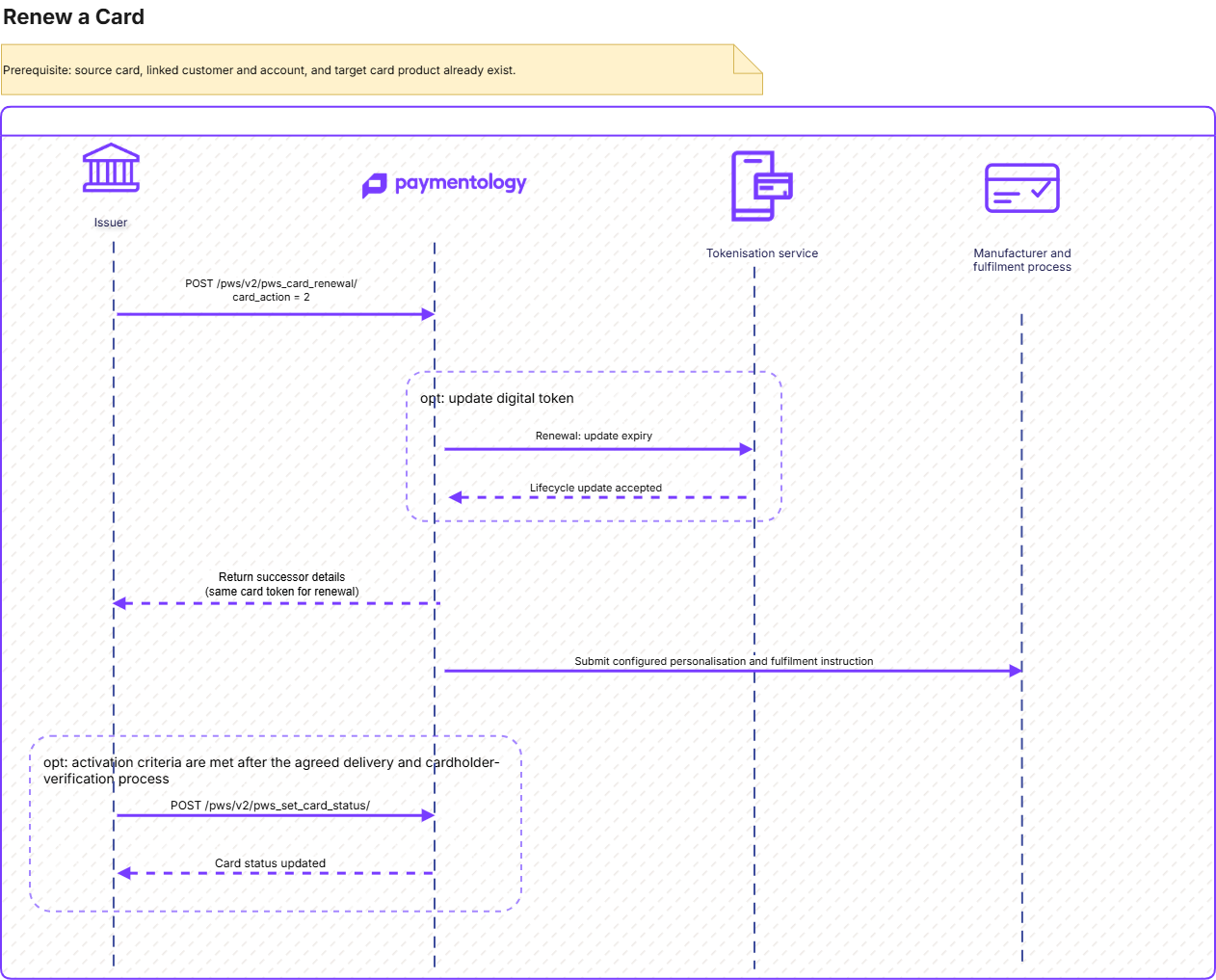
Use this guide to extend the expiry of an existing card through PayAPI while preserving its established customer, account, PAN, and Paymentology public card token.
A renewal retains:
- The existing PAN
- The existing public card token
It updates the card expiry date.
Who this is for
| Audience | Responsibility |
|---|---|
| Backend Engineer | Orchestrates the lifecycle API, preserves the existing identifiers, and implements idempotency and reconciliation. |
| Product Manager | Defines expiry policy, initial status, wallet policy, and cardholder experience. |
| Operations and Fulfilment Team | Confirms physical-card personalisation, delivery, activation, and support procedures. |
Overview
Prerequisites
Before reissuing any cards, the following program-level configuration is enabled in cooperation with Paymentology:
| Prerequisite | Description |
|---|---|
| Client and API access | Valid client_id and entitlement to use Card Renewal V2 and tokenization services, if needed.The configuration is done during the onboarding in cooperation the Paymentology Implementation team. |
| Eligible source card | Existing public card token belonging to the client. Do not void the source card with status_nwk: 1199 before this operation. |
| Existing customer | The customer record associated with the source card. Do not create a customer solely for this journey. |
| Existing account relationship | The source card’s account mapping. No new account is normally required. |
| Target card product | Existing, eligible crd_prdct_id, normally the card’s current product. |
| Card fulfilment configuration | Required where a physical card is produced: manufacturer, artwork, personalization, carrier, and delivery design. |
| Wallet-token policy | A documented decision on how existing digital wallet tokens should receive the expiry update. |
Recommended flow
Confirm the source-card context
Retrieve and validate the source card’s public token, customer, linked account, product, current status, and any linked wallet tokens.
Confirm the card is eligible for expiry extension under the program’s policy.
Define the expiry and delivery design
| Decision | Required outcome |
|---|---|
card_action | 2 |
| PAN | Retained |
Public card token | Retained |
| Expiry | Updated |
| Product | Normally retained |
| Initial status | Commonly 1005 where a physical card must remain unusable until delivery |
Call Card Renewal
API Reference: Card Renewal V2
Key inputs:
| Field | Value / purpose |
|---|---|
client_id | Your program client ID. |
api_call_unique_identifier | Durable idempotency identifier for this business attempt. |
token | Existing public card token. |
card_action | 2 |
reason | Business reason for the expiry update. |
crd_prdct_id | Existing eligible card product. |
status_nwk | The successor card’s network-facing status, commonly1005until delivery. It determines how the card’s public token is treated during authorization.More information about the card statuses is available at Card status. |
tok_flags | An optional 32-character binary string that controls card transaction behaviour Each character represents one flag position:
E-commerce-only card. Position 5 is set to |
exp_date | Optional target expiry. If omitted, the product configuration determines it. |
image_name, image_fields, image_delivery, xml_fields | Card-image and sensitive-response controls. |
update_digital_token | Requests an expiry lifecycle update for existing linked digital wallet tokens. It does not provision new wallet tokens. |
update_digital_token | Controls whether existing digital-wallet tokens linked to the card should be included in the card lifecycle operation. It does not create a new Apple Pay, Google Pay, VTS, or MDES token. It only applies to existing wallet tokens, and automatic processing is available only when the client uses Paymentology’s tokenization services. |
client_card_ref | Recommended client-side business and reconciliation reference. |
Continue using the existing public card token after the API completes successfully.
Physical personalisation and delivery
Use the Create Card request’s physical-card fields only where they are agreed for the program and supported by the selected manufacturer.
| Area | Examples of relevant fields |
|---|---|
| Cardholder details i.e. the person whose name is associated with the card. | Use the If you provide an existing If you do not provide |
| Delivery recipient and address | Use the Use them when the delivery recipient or address differs from the cardholder, or when the manufacturer and courier process requires explicit delivery information. |
| Purchaser delivery | A purchaser is the person or organisation arranging the card, rather than necessarily the person who will use it. This is relevant when a company, parent, guardian, or other authorised third party requests delivery for a cardholder. pur_cust_type selects the address source for an individual delivery:
pur_cust_type is 1, provide a complete and internally consistent pur_* identity and address set. When it is 0, ensure the cardholder details are sufficient for the agreed delivery design. |
| Carrier and packaging | A carrier is the physical packaging that holds the card when it is sent to the recipient. It can include printed information, terms, welcome material, activation instructions, or other inserts. These fields, |
| Delivery grouping | Use Paymentology uses this value to group delivery information in the physical-card personalisation file under the |
| Additional personalisation | These optional fields, Some reserved values can automatically insert the card’s public token. Confirm the final printed placement and supported content with the configured card manufacturer. |
The API creates the physical-card definition. The card is then included in the configured embossing or manufacturer-file process. File generation and dispatch frequency must be confirmed during onboarding; they are not proof of card delivery.
Wallet-token handling
A public card token is not a digital-wallet token. update_digital_token concerns existing network wallet tokens linked to the card.
| Use case | Recommended approach |
|---|---|
| Existing wallet tokens should receive the updated expiry | Set update_digital_token: true. |
| No wallet tokens exist | Do not treat this operation as wallet provisioning. Wallet provisioning is a separate journey. |
| Wallet policy is uncertain | Validate the token lifecycle result in UAT before production rollout. |
Current implementation distinguishes replacement as a PAN-replacement update and renewal as an expiry-date update. More at: LCM
Activate a successor issued in a blocked state
After physical delivery and the program’s activation checks, use Set Card Status V2.
API reference: Set Card Status V2
| Field | Value / Purpose |
|---|---|
client_id | Your program client ID. |
api_call_unique_identifier | Idempotency identifier for the status-change attempt. |
token | Existing public card token. |
status_nwk | Pass 1000 to activate.More information about the card statuses is available at Card status. |
action | 2 for the expiry-extension status-change context. |
What is created or changed
| Record | Renewal |
|---|---|
| Customer | Reused. Delivery or purchaser details may be updated where supplied. |
| Account and card-account relationship | Retained. |
| Card | Existing card remains the lifecycle identity. |
| PAN | Retained. |
| Public card token | Retained. |
| Expiry | Updated. |
| Card product | Normally retained. |
| Digital wallet token | May receive an expiry lifecycle update when enabled; no new wallet token is provisioned. |
Important considerations
- Use V2 and treat the request as idempotent.
- Do not run concurrent attempts for the same card.
- A timeout does not prove failure. Reconcile the original request before retrying.
- Do not set the card to
1199before calling the lifecycle API. - Continue to use the existing public card
tokenafter a successful response. - Treat PAN, CVV, card image, delivery information, and wallet-token data as sensitive.
- Validate downstream product eligibility, fulfillment, and wallet behavior in the target environment before production rollout.
Testing
| Test case | Expected result |
|---|---|
| Happy path | The existing PAN and public card token remain unchanged; expiry is updated. |
| Physical card issued blocked | The card remains unusable until activation. |
| Existing account relationship | The expected card-to-account relationship remains available. |
| Wallet lifecycle update enabled | Existing wallet tokens receive the agreed expiry update. |
| Wallet lifecycle update disabled | Wallet-token behavior follows the agreed policy and is verified in UAT. |
| Duplicate submission | The same idempotency identifier does not create an unintended second outcome. |
| Timeout and retry | The client reconciles the original attempt before retrying. |
| Fulfillment | Manufacturer-file output, delivery data, and activation readiness match the agreed design. |
Errors, retries, and request correction
Use header.error_id and header.error_desc as the primary outcome signal. Do not decide whether to retry from the HTTP status alone.
A renewal retains the existing public card token and updates the card expiry. For an uncertain or retryable renewal attempt, resend the identical payload with the same api_call_unique_identifier. Do not create a new identifier until you have reconciled whether the original renewal already completed.
Retry automatically
| Error ID | Error description | Automatic retry? | Required retry behaviour |
|---|---|---|---|
| No response | No PayAPI response received | Yes | Retry the same payload and identifier after backoff. Do not change the token, expiry, status, product, or personalisation inputs. |
1066 | Original request still processing. Please try again later. | Yes, after waiting | Do not send a parallel renewal request. Wait, then resend the unchanged request with the same identifier. |
987 | We are temporarily unable to handle the request. Please try again later. | Yes | Use bounded retry with the same payload and identifier. Reconcile after retry exhaustion. |
988 | Error executing Request. Contact Paymentology for support | Yes | Use bounded retry with the same payload and identifier. Escalate repeated failures. |
989 | Error executing Request. Contact Paymentology for support | Yes | Perform a controlled retry with the same payload and identifier. Reconcile repeated failures. |
1035 | Failed to create card image ,please contact the paymentology support | Controlled only | This ID is allow-listed for V2 reprocessing. Retry once with the same request, then check image and product configuration before escalating. |
Do not retry automatically
| Error ID | Error description | Automatic retry? | Required action |
|---|---|---|---|
995 | model Validation Failed | No | Correct invalid request fields. Typical examples are an unsupported status_nwk or invalid 3ds_lang. |
990 | The client_id is invalid! Please provide a valid client id | No | Correct the client ID or target-environment configuration. |
993 | api_call_unique_identifier already been used! | No | Reconcile the original renewal. Generate a new identifier only for a genuinely new renewal request. |
994 | The token is invalid ! | No | Correct the existing public card token and confirm that it belongs to the client. |
996 | Permission denied ! The client does not have access to this web service. Contact Paymentology | No | Correct API entitlement. The V2 implementation allow-lists this stored ID for reprocessing, but it is not a transient technical failure. |
997 | Description varies; for example, Token Details Not Found. or Account Mapping list Not Found | No | Correct the missing card, account, product, configuration, or relationship identified by error_desc. |
1012 | The manufacturer id is not available in repository | No | Correct the configured or supplied manufacturer ID. |
1013 | The manufacturer id is not associated with the client id | No | Select a manufacturer enabled for the client. |
1014 | The product id is not available in repository | No | Use an eligible card product configured for the client and target environment. |
1015 | card renwal failed. Check network status first. Set the card to lost,expired or stolen or damaged first | No | Correct the source card’s lifecycle eligibility and current status before reattempting. This ID is technically allow-listed for reprocessing, but it is a business-rule failure and must not be automatically retried. |
1021 | Inserting delivery details failed during physical card create | No automatic retry | Verify the delivery design and del_* values. Reconcile first because downstream fulfilment processing may have started. |
1022 | Inserting purchaser details failed during physical card create | No automatic retry | Verify purchaser data, pur_* values, and pur_cust_type. Reconcile before another renewal request. |
1028 | Weak cvv computed. Change expiry and resend request again | No | Change the expiry as instructed, then submit a new renewal request. |
Related APIs:
- Set card status: Set Card Status V2
- PAN Update in Wallet: Pan Update
- Tokenization Lifecycle Management: LCM
Updated about 1 month ago